Cloud storage solutions allow users to store, sync, and protect data on remote servers instead of local devices. They matter today because data volumes, remote work, and long-term backups are growing fast. Modern platforms focus on cost efficiency, security, and reliability, with future growth driven by AI-based management and smarter pricing models. 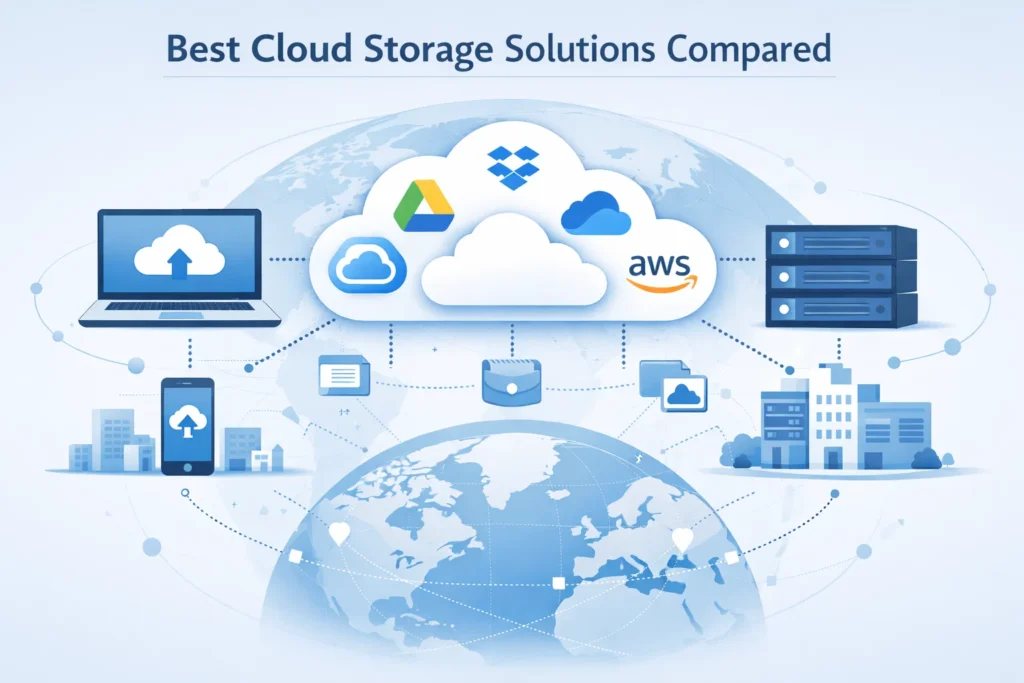
Cloud Storage Facsts:
| Aspect | Details |
|---|---|
| What it is | Online storage for files and backups on remote servers |
| Main uses | File sync, backup, collaboration, long-term storage |
| Top providers | Google Drive, OneDrive, Dropbox, iCloud, AWS |
| Pricing model | Free tiers, monthly plans, or pay-per-usage |
| Security | Encryption, access controls, shared responsibility |
| Best for students | Google Drive, OneDrive |
| Best for small business | OneDrive, Google Drive, Dropbox |
| Long-term storage | Archival cloud storage with redundancy |
| Current trend | Lower storage cost, higher value on access & features |
| Future direction | AI-driven organization, automation, stronger privacy controls |
Cloud storage stopped being optional a long time ago. Students rely on it for assignments. Small businesses depend on it for daily operations. Families use it to protect photos they can’t replace. At the same time, data volumes are exploding. Global data creation now measures in zettabytes, and most of it ends up in the cloud.
Here’s what matters. People don’t just want storage. They want predictable pricing, strong security, and confidence their files will still be there years from now. This guide breaks down the best cloud storage solutions using real costs, real limits, and real use cases.
No hype. Just facts, trade-offs, and clear recommendations.
Why Cloud Storage Matters More Than Ever
Data is no longer tied to one device. Phones break. Laptops get stolen. Offices go remote overnight. Cloud storage solves a basic problem: access and safety.
For individuals, cloud storage means your files follow you. For businesses, it means resilience. A single hardware failure no longer wipes out years of work. For students, it means collaboration without USB drives or email attachments.
Cost also matters more now. Storage prices look cheap at first glance, but they scale quietly. A few extra gigabytes today become terabytes tomorrow. That’s why understanding pricing models early saves money later.
Cloud storage is not just about space. It’s about control, longevity, and trust.
What Is Cloud Storage and How It Works
Cloud storage means your data lives on remote servers instead of your local device. You upload files over the internet. The provider stores copies across multiple data centers.
From your side, it feels simple. Drag a file. It syncs. Open it anywhere.
Behind the scenes, things get more complex. Files are broken into pieces, encrypted, and stored redundantly. If one server fails, another takes over. That redundancy is why cloud storage is reliable when done right.
There are three common models:
- Public cloud: Shared infrastructure. Most consumer services fall here.
- Private cloud: Dedicated storage for one organization.
- Hybrid cloud: A mix of local and cloud storage.
For most people and small businesses, public cloud storage is the right balance of cost and reliability.
The Four Main Cloud Services Explained
Cloud storage is only one part of the cloud ecosystem. Understanding the full picture helps avoid confusion.
The four main cloud services are:
- Storage – Saving and syncing files.
- Compute – Running applications and servers.
- Databases – Structured data management.
- Networking – Secure data movement.
This article focuses on storage, but providers like AWS and Google bundle these services together. That affects pricing and complexity, especially for businesses.
Common Cloud Storage Problems and Their Impact
| Problem | Cause | Impact |
|---|---|---|
| Rising costs | Automatic upgrades | Unexpected monthly bills |
| Vendor lock-in | Proprietary tools | Hard to switch providers |
| Security confusion | Shared responsibility | Misconfigured access |
| Slow syncing | Poor client apps | Lost productivity |
| Storage limits | Free tier caps | Forced upgrades |
Most issues come from misunderstanding limits, not bad technology.
How We Evaluated the Best Cloud Storage Solutions
Every platform in this guide was evaluated on five factors:
- Pricing transparency – Clear cost per GB or TB.
- Free tier value – Useful, not just promotional.
- Security – Encryption, access control, history.
- Reliability – Uptime and sync stability.
- Ease of use – Setup, sharing, and recovery.
This approach reflects real-world use, not marketing claims.
Google Drive
Google Drive is one of the most widely used cloud storage platforms in the world.
Pricing
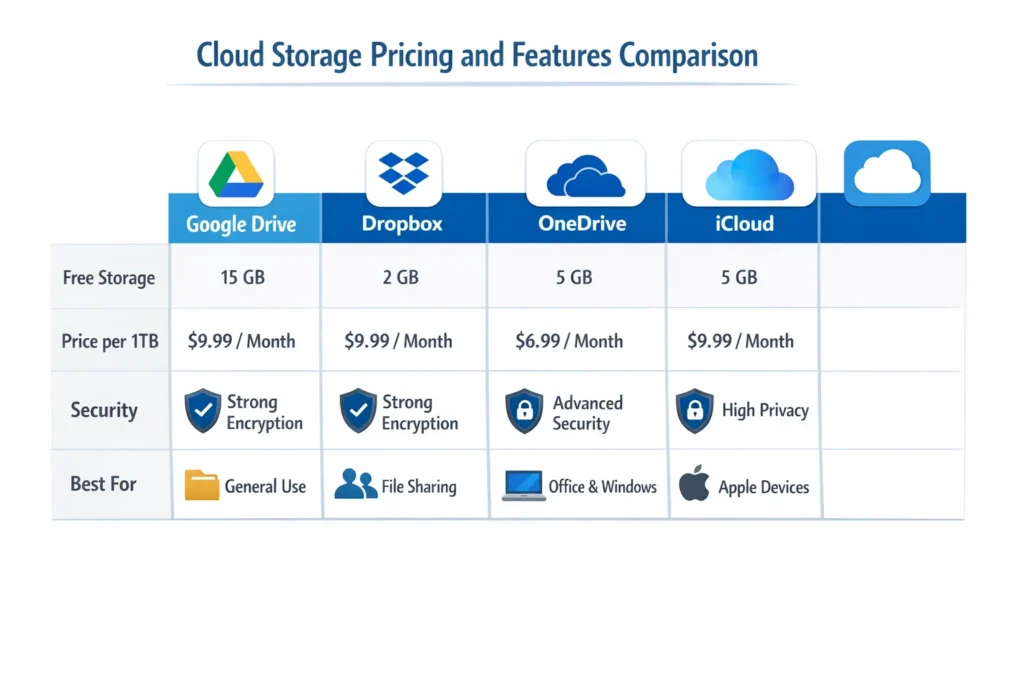
- 15GB free
- 100GB, 200GB, and 2TB paid tiers
- Bundled with Google One
Google’s pricing is competitive for personal users. The jump from free to paid is smooth.
Strengths
- Excellent collaboration
- Works seamlessly with Docs and Sheets
- Reliable syncing
Weaknesses
- Privacy concerns for sensitive data
- Limited control over encryption keys
Best for
Students, teams, and users already inside Google’s ecosystem.
Dropbox
Dropbox built its reputation on syncing. That reputation still holds.
Pricing
- Small free tier
- Paid plans focus on reliability, not volume
Dropbox costs more per GB than many competitors. What you get is consistency.
Strengths
- Fast, accurate syncing
- Excellent file version history
- Strong third-party integrations
Weaknesses
- Expensive at scale
- Limited free storage
Best for
Professionals who value reliability over raw storage size.
Microsoft OneDrive
OneDrive shines when paired with Microsoft 365.
Pricing
- 5GB free
- 1TB included with Microsoft 365 plans
Strengths
- Excellent value when bundled
- Deep Windows integration
- Business-ready access controls
Weaknesses
- Average standalone pricing
- Sync issues on older systems
Best for
Windows users and small businesses using Office tools.
Apple iCloud
iCloud focuses on simplicity, not flexibility.
Pricing
- 5GB free
- Paid tiers scale quickly
Strengths
- Seamless Apple device integration
- Reliable backups
Weaknesses
- Limited sharing options
- Not ideal for non-Apple users
Best for
Apple-only households and users who want hands-off backups.
Amazon S3 and AWS Storage
AWS is not consumer storage. It’s infrastructure.
Pricing
- Pay per GB
- Additional fees for access and transfers
Strengths
- Extreme durability
- Scales to massive data volumes
Weaknesses
- Complex pricing
- Not beginner-friendly
Best for
Developers, archives, and long-term storage projects.
AWS’ biggest competitors in storage are Google Cloud and Azure, but AWS remains the leader in raw scalability.

Is AWS or Google Cloud Cheaper?
For casual users, Google Drive is cheaper and simpler.
For businesses and archives, AWS can be cheaper only if configured correctly. Misconfiguration leads to surprise bills.
Cost depends on:
- Access frequency
- Retrieval needs
- Data transfer volume
There is no universal winner. Context matters.
Free Cloud Storage: What You Can Really Get
Many people search for “200GB free cloud storage.” That number rarely exists without conditions.
Most reliable free tiers:
- Google Drive: 15GB
- MEGA: Larger free tier with limits
- OneDrive: 5GB
Free storage works for light use. It does not scale long-term.
How Much Does 1TB of Cloud Storage Cost?
On average:
- Consumer plans: affordable yearly bundles
- Business plans: higher per-user cost
- Enterprise storage: usage-based pricing
Expect to pay more for:
- Advanced security
- Long-term retention
- Compliance features
Cheap storage often means fewer controls.
Can Hackers Access Cloud Storage?
Yes, but not the way people imagine.
Most breaches happen due to:
- Weak passwords
- Public sharing links
- Misconfigured permissions
Major providers encrypt data at rest and in transit. Security is a shared responsibility. Providers secure infrastructure. Users must secure access.
Best Cloud Storage for Small Businesses
Small businesses need three things:
- Reliable access
- Controlled sharing
- Predictable pricing
Best options:
- Microsoft OneDrive with 365
- Google Drive for collaboration
- Dropbox for client file delivery
Avoid overengineering. Simple systems fail less.
How to Store Data for 20 Years
Long-term storage changes the rules.
Best practices:
- Use archival cloud storage
- Keep multiple copies
- Test access annually
Cloud storage alone is not enough. Combine it with local backups for true longevity.
Future of Cloud Storage
Cloud storage is becoming smarter.
Trends to watch:
- AI-based file organization
- Automated lifecycle management
- Stronger privacy controls
Pricing pressure will increase. Storage will stay cheap. Access and features will cost more.
Practical Checklist Before Choosing a Cloud Storage Plan
- Estimate growth, not current usage
- Check retrieval costs
- Review security settings
- Test file recovery
- Read exit policies
Final Thoughts Before You Choose
The best cloud storage solution depends on how you use data, not brand names. Cheap storage that fails when you need it is expensive in the long run. Start small. Choose clarity over complexity. Revisit your plan once a year.
That’s how cloud storage stays an asset, not a headache.
FAQs About Cloud Storage Solutions
What is the most cost-effective cloud storage solution?
For most users, bundled plans offer the best value. Google Drive and Microsoft OneDrive are cost-effective because storage comes with tools people already use. For large volumes and long-term storage, AWS archival tiers can be cheaper if access is rare and well-managed.
Which is the best cloud storage to buy?
The best option depends on how you work. Students and teams benefit from Google Drive. Windows users often get more value from OneDrive. Professionals who care about file syncing reliability prefer Dropbox. There is no single “best” for everyone.
Which cloud has the cheapest storage?
On paper, AWS offers the lowest per-GB pricing for raw storage. In practice, consumer plans from Google and Microsoft feel cheaper because they include apps, sharing tools, and predictable monthly costs.
How much does 1TB of cloud storage cost?
For personal users, 1TB usually costs a modest monthly or yearly fee depending on the provider. Business plans cost more because they include admin controls, recovery tools, and security features. Pay-as-you-go platforms charge based on usage, access, and data transfer.
Which free cloud storage is most reliable?
Google Drive is considered the most reliable free option due to stability and long-term support. Its free tier is limited, but sync accuracy and uptime are strong. Free storage works best for light use, not backups.
How to get 200GB of cloud storage for free?
Legitimate 200GB free offers are rare. Most appear through temporary promotions, device bundles, or short trials. Be cautious of sites promising permanent free storage at that size. They usually involve restrictions or expire.
What are the top three cloud platforms?
The top platforms by global usage and infrastructure are Google Cloud, Microsoft Azure, and Amazon Web Services. Each serves different audiences, from consumers to large enterprises.
Is AWS or Google Cloud cheaper?
Neither is always cheaper. Google Cloud is simpler for predictable workloads. AWS can be cheaper for long-term or infrequently accessed data, but pricing becomes complex quickly. Cost depends on how often you access your files.
Can hackers access cloud storage?
Cloud platforms themselves are highly secure. Most breaches happen because of weak passwords, exposed sharing links, or misconfigured permissions. Using strong authentication and reviewing access settings greatly reduces risk.
Is there an alternative to iCloud storage?
Yes. Google Drive, OneDrive, and Dropbox all work well across devices and operating systems. They often provide better sharing options and easier access outside Apple’s ecosystem.
What is the best cloud solution for small businesses?
Small businesses benefit from platforms that combine storage with collaboration and security. OneDrive with Microsoft 365 and Google Drive for Workspace are popular because they balance cost, control, and ease of use.
How to store data for 20 years safely?
Use a mix of cloud archival storage and offline backups. Choose providers with strong durability records, keep multiple copies, and review access at least once a year. Long-term storage works best with redundancy, not a single service.

IT consultant and educator specializing in wireless networks and cloud systems. With a strong academic background and real-world projects, Priya brings practical expertise and trustworthy advice for students, professionals, and everyday tech users.