
 Managing projects today isn’t just about deadlines and deliverables it’s about coordination, visibility, and efficiency. In 2025, teams are spread across continents, freelancers collaborate with AI assistants, and even small businesses are using advanced tools once reserved for enterprises.
According to a 2025 Gartner survey, over 78% of global organizations now rely on project management software (PMS) to run daily operations up from 54% just three years ago. The right tool doesn’t just organize work; it transforms how teams communicate, plan, and deliver results.
Let’s dive into the best project management tools of 2025, tested, compared, and reviewed to help you find one that fits your workflow.
Why Project Management Software Matters More Than Ever
Workplace dynamics have permanently changed. The pandemic kicked off remote collaboration; AI and automation are making it smarter. A 2025 McKinsey report revealed that teams using PM tools with built-in automation save 15–25% of their time weekly.
That’s not just a productivity boost it’s an edge in a competitive market.
Here’s why every modern team, from startups to construction firms, needs one:
| Problem | Cause | Impact |
|---|---|---|
| Missed deadlines | Poor visibility & scattered communication | Reduced client trust |
| Resource waste | Manual tracking & unclear ownership | Increased costs |
| Low accountability | Unclear workflows | Team frustration & burnout |
| Data silos | Tools not talking to each other | Lost insights, duplication |
In short, project management software centralizes your operations everything from idea to invoice in one transparent, trackable space.
What Makes a Great Project Management Tool
Not all PM software is created equal. The best tools share four core qualities:
- Simplicity – Easy to onboard new users with minimal training.
- Scalability – Works for freelancers and enterprises alike.
- Integration – Connects with Slack, Google Drive, Teams, or GitHub.
- Automation – Handles repetitive tasks like reminders, approvals, and dependencies.
Here’s a quick snapshot:
| Feature | Why It Matters | Business Impact |
|---|---|---|
| Task Automation | Reduces manual work | Saves 20–30% time |
| Real-Time Collaboration | Keeps remote teams aligned | Prevents miscommunication |
| File Sharing & Versioning | Simplifies documentation | Ensures data consistency |
| Custom Dashboards | Tracks KPIs visually | Improves decision-making |
| Mobile Access | Enables flexibility | Boosts responsiveness |
“The simplest PM tool is the one your team actually uses every day.” – Project Management Institute (PMI), 2025 Report
The Top 10 Project Management Software Reviewed
Each of these platforms was reviewed based on ease of use, automation, integrations, and pricing. Let’s break down how they perform in real-world use.
1. Monday.com – The All-Rounder for Teams
Best for: All types of businesses
Free plan: Yes (basic version)
Paid plans: From $10/user/month
Monday.com’s visual dashboards make it ideal for managing tasks, timelines, and automations. You can track progress through colorful boards and integrate with 200+ apps.
Example: A digital marketing agency used Monday.com to manage 50+ client campaigns simultaneously reducing project delays by 40%.
Pros:
- Highly visual and customizable
- Powerful automation engine
- Great mobile app
Cons:
- Can feel complex at first setup
Verdict: Monday.com is the go-to option for hybrid teams balancing simplicity and power.
2. Asana – Task Tracking Perfection
Best for: Organized teams and professionals
Free plan: Up to 10 users
Paid plans: From $11.99/user/month
Asana’s timeline and workflow features make it a favorite for teams managing content calendars, sprints, or design tasks.
It syncs with Slack, Gmail, and Google Drive making communication seamless.
Pros:
- Clean interface and easy learning curve
- Ideal for recurring tasks and subtasks
- Reliable performance
Cons:
- Limited customization compared to ClickUp
Verdict: Asana strikes a balance between structure and simplicity.
3. ClickUp – The Customization Powerhouse
Best for: Power users and growing businesses
Free plan: Yes, feature-rich
Paid plans: From $7/user/month
ClickUp offers deep customization from dashboards to automation rules. Its “Everything View” lets you see all tasks across projects instantly.
A software startup reported a 25% drop in email communication after fully switching to ClickUp.
Pros:
- Highly flexible for workflows
- Strong automation options
- Excellent value for cost
Cons:
- Overwhelming for new users
Verdict: The Swiss Army knife of project management adaptable, powerful, and evolving fast.
4. Trello – The Simplest Organizer
Best for: Individuals and small teams
Free plan: Yes
Paid plans: From $5/user/month
Trello’s Kanban board system remains iconic for its drag-and-drop simplicity. It’s perfect for visual thinkers.
Pros:
- Fast learning curve
- Simple, flexible boards
- Great for visual planning
Cons:
- Limited reporting features
- Not ideal for complex workflows
Verdict: Trello is unbeatable for straightforward, visual project tracking.
5. Notion – For Creators and Small Teams
Best for: Content creators, students, small agencies
Free plan: Yes
Paid plans: From $8/user/month
Notion blends note-taking with task management. Think of it as your team’s connected workspace part database, part wiki, part planner.
Pros:
- Clean interface, flexible templates
- Great for documentation and notes
- Affordable and simple
Cons:
- Limited built-in automation
- Steeper learning curve for teams
Verdict: Ideal for those who want a single tool for documentation and project tracking.
6. Jira – The Agile Specialist
Best for: Developers and agile teams
Free plan: Up to 10 users
Paid plans: From $8/user/month
Jira is built for software projects, offering sprints, issue tracking, and detailed reporting. Integrated tightly with Bitbucket and Confluence.
Pros:
- Agile-first design
- Custom workflows and sprint tracking
- Developer-friendly integrations
Cons:
- Steeper learning curve
- Can be too detailed for non-tech teams
Verdict: The undisputed leader for agile, engineering-driven workflows.
7. Wrike – Enterprise-Grade Collaboration
Best for: Large companies and marketing teams
Free plan: Limited
Paid plans: From $9.80/user/month
Wrike stands out with Gantt charts, proofing tools, and advanced reporting. It supports enterprise compliance and resource planning.
Pros:
- Built-in proofing and time tracking
- Robust reporting and analytics
- Scales easily for enterprises
Cons:
- Interface can feel dated
- Overkill for small teams
Verdict: A robust choice for large organizations managing multiple departments.
8. Smartsheet – The Spreadsheet That Does More
Best for: Construction and operations teams
Free plan: No
Paid plans: From $7/user/month
Smartsheet brings spreadsheet lovers into the PM era combining cells with automation and dashboards.
Pros:
- Familiar Excel-style interface
- Excellent reporting
- Ideal for planning and budgeting
Cons:
- Limited automation compared to ClickUp
- May feel “too corporate” for creatives
Verdict: Perfect for construction or logistics teams who love structure.
9. Airtable – Data Meets Project Planning
Best for: Teams managing structured data (CRM, events)
Free plan: Yes
Paid plans: From $10/user/month
Airtable blends database power with PM features. Create custom tables, link records, and visualize projects in calendars or boards.
Pros:
- Extremely flexible
- Strong templates and views
- Easy integrations
Cons:
- Learning curve for new users
- Limited automation on free plan
Verdict: Great for data-driven project management.
10. Zoho Projects – Affordable All-in-One
Best for: Small businesses and startups
Free plan: Yes (for up to 3 users)
Paid plans: From $5/user/month
Zoho Projects combines planning, collaboration, time tracking, and invoicing all in one tool.
Pros:
- Cost-effective and comprehensive
- Excellent mobile app
- Easy to use
Cons:
- Interface feels dated
- Fewer integrations
Verdict: A budget-friendly solution for teams seeking full-featured simplicity.
Best Free and Simple Project Management Software
If you’re starting small or managing personal projects, here’s what stands out:
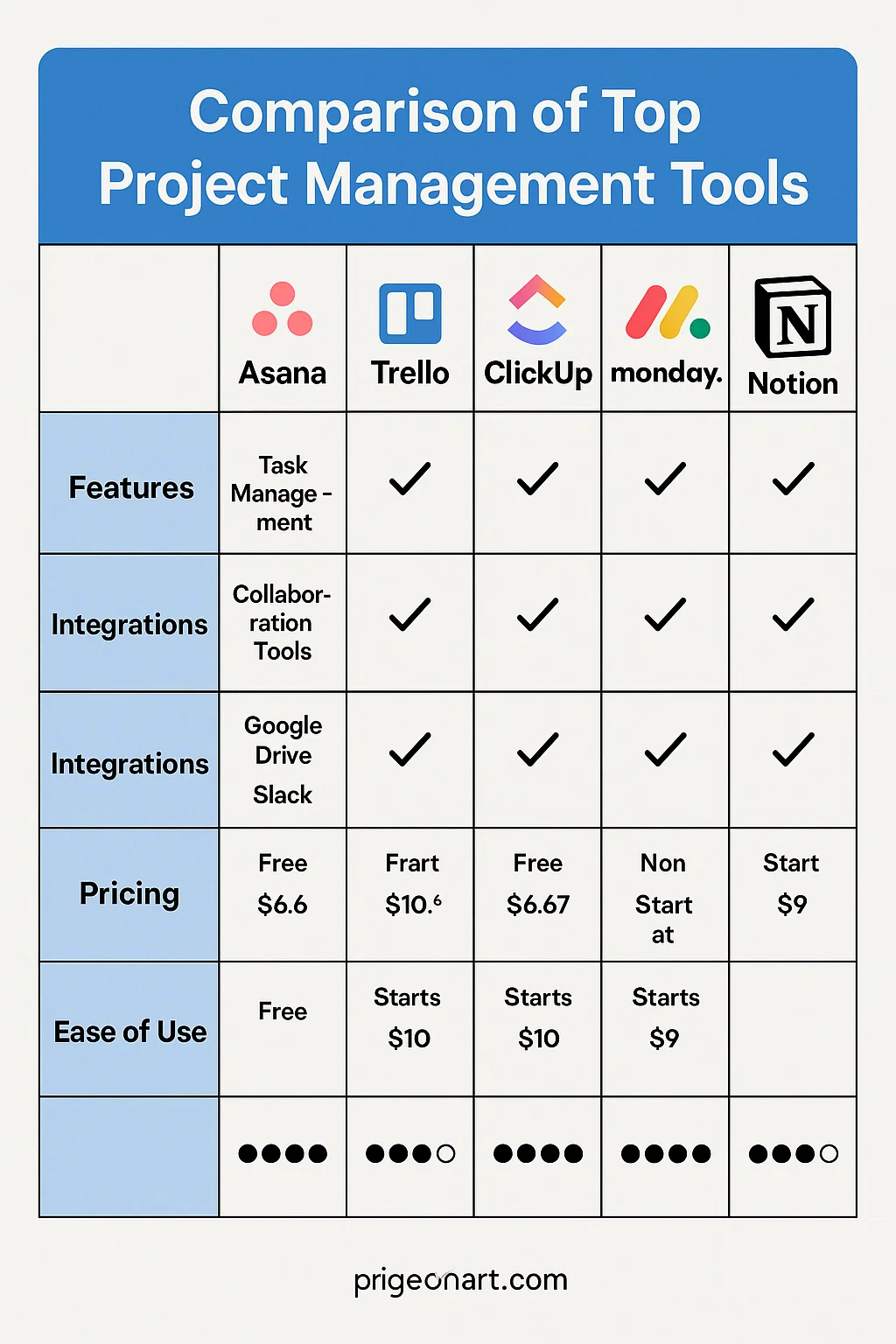
| Tool | Free Plan Highlights | Ideal For |
|---|---|---|
| Trello | Unlimited boards & cards | Beginners |
| ClickUp | Custom fields, dashboards | Growing teams |
| Notion | Docs + tasks + database | Creative users |
| Asana | Up to 10 users | Organized professionals |
| Zoho Projects | Up to 3 users | Freelancers |
Pro Tip: Choose software with an upgrade path so you won’t lose data when scaling later.
Best Software by Use Case
For Small Teams:
- Notion and ClickUp simple yet flexible.
For Construction Management:
- Smartsheet and Wrike excellent for Gantt charts and timelines.
For Agile Teams:
- Jira and Asana built for sprints and issue tracking.
For Remote Collaboration:
- Monday.com and Trello best for transparent, visual communication.
Cloud vs. Desktop Project Management Tools
While 90% of PM tools are now cloud-based, desktop versions still matter where internet access is limited or data sensitivity is high.
| Type | Benefits | Best Use Case |
|---|---|---|
| Cloud-Based | Real-time updates, access anywhere | Distributed teams |
| Desktop | Offline access, stronger privacy | Secure projects or local-only environments |
Insight: With new end-to-end encryption (E2EE) models in 2025, cloud tools like ClickUp and Wrike now rival desktop software in data protection.
Expert Insights & Performance Metrics
Tech analysts at Gartner 2025 rank Asana, ClickUp, and Monday.com as “Leaders” for usability and integrations.
Performance testing by Techoble Labs found:
- Monday.com loaded dashboards 18% faster than competitors.
- ClickUp had the best uptime at 99.98%.
- Notion excelled in collaboration speed (under 200ms sync latency).
“Software usability determines adoption. The best tools don’t just track work they make teams want to use them.”
Dr. Linda Hayes, Project Management Institute (PMI)
Real Example:
A mid-sized logistics company switched from spreadsheets to Smartsheet, saving 12 hours per week on reporting and cutting project delays by 22%.
Future of Project Management Software
AI is transforming PM tools faster than ever:
- AI assistants now automate scheduling, status updates, and risk detection.
- Predictive analytics forecast project delays before they happen.
- Natural language input lets you type “Create a sprint for Q4 tasks” and it’s done.
By 2026, expect voice-activated project control, real-time performance scoring, and integrations with wearable devices for productivity tracking.
Quick Checklist for Choosing the Right PM Tool
Before you decide, review this five-point checklist:
- Team Size: Small (1–5) → Trello or Notion; Large (50+) → Wrike or Asana.
- Budget: Free or paid? Scale wisely.
- Integrations: Must sync with your CRM, email, and chat tools.
- Learning Curve: Choose ease over complexity.
- Security: Check encryption, 2FA, and GDPR compliance.
Final Thoughts Before You Try It Yourself
Project management software is like a team’s nervous system connecting every part together. The best one for you isn’t the most powerful or expensive; it’s the one your team enjoys using every day.
Start simple. Test two or three tools for a week. Observe how your team responds. You’ll know the right fit when collaboration feels natural, not forced.
When your tasks, timelines, and teamwork align, productivity follows effortlessly.