
Project management software may look simple from the outside. A user opens a dashboard, creates a task, assigns it to a colleague, sets a deadline, and watches the project move forward. Behind that screen, however, several software systems work together to store data, apply permissions, trigger notifications, calculate schedules, connect external apps, and keep hundreds or thousands of users synchronized.
That hidden structure is project management software architecture.
Understanding it matters more than ever. Project teams now work across offices, homes, mobile devices, cloud platforms, AI tools, messaging apps, source-code repositories, and customer systems. The software supporting those teams has to exchange data reliably without turning every integration or new feature into a technical problem.
There is also a larger business reason to care about architecture. PMI’s 2025 global research covering more than 5,800 professionals found that only about half of projects met its modern definition of success: delivering value worth the effort and expense. Thirteen percent failed outright, while 37% delivered mixed results. Technology alone cannot fix project execution, but weak software design can make coordination, reporting, visibility, and decision-making harder than they need to be.
This guide explains how project management applications are structured, which architecture models teams commonly use, how security and integrations fit in, and how to choose an architecture without making the system more complicated than the problem requires.
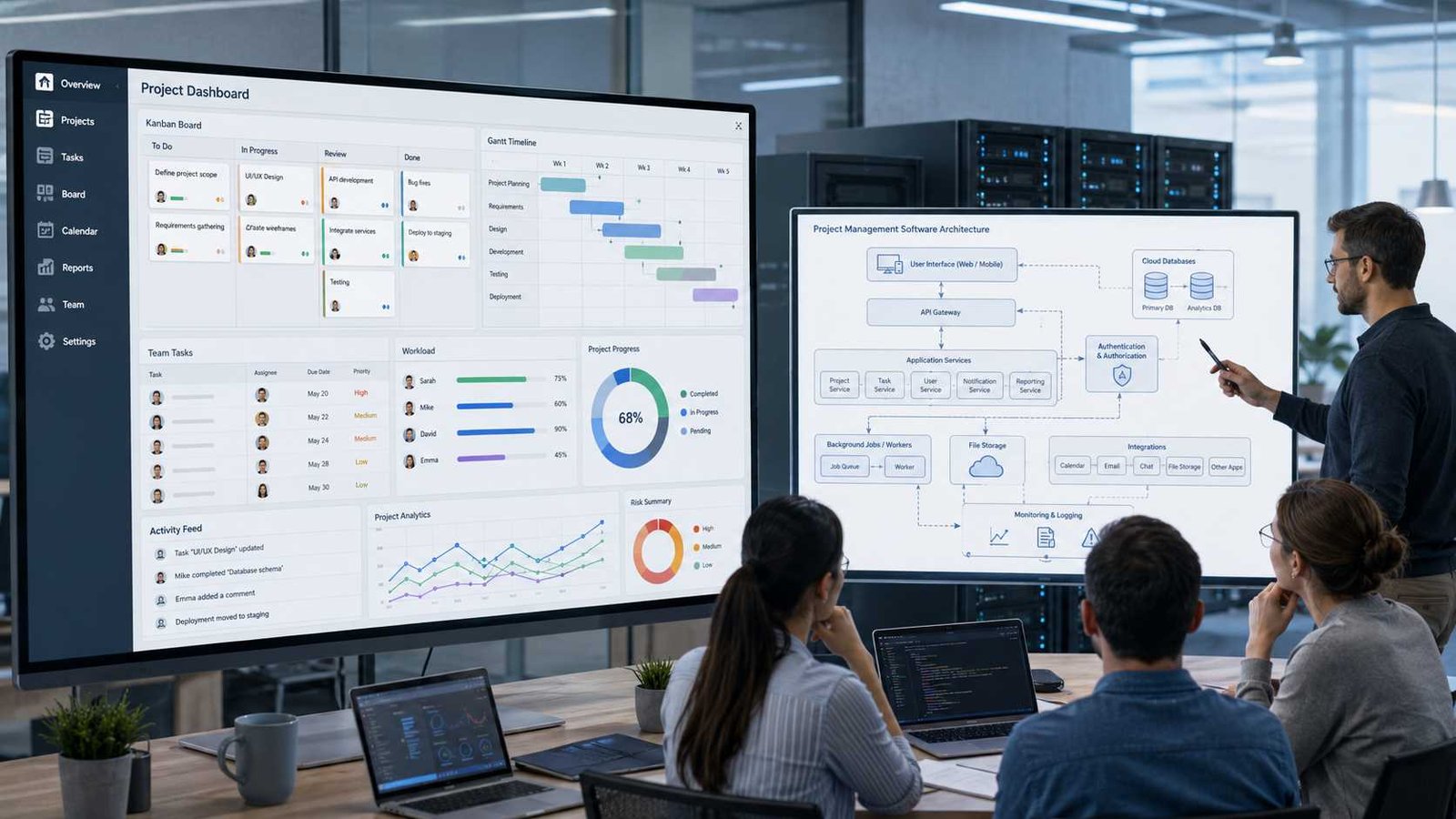
What Is Project Management Software Architecture?
Project management software architecture is the technical structure that defines how a project management application is divided into components and how those components communicate.
Think of it as the building plan behind the software. The dashboard is only the room users can see. Behind it sit the electrical wiring, plumbing, security systems, storage areas, and service entrances. In software, those hidden parts include databases, APIs, authentication systems, business rules, messaging services, reporting tools, file storage, and cloud infrastructure.
A typical request may follow this path:
User creates a task → application receives the request → permission is checked → business rules run → database saves the task → notification service alerts the assignee → dashboard refreshes
Architecture defines how every part of that sequence works.
It also determines what happens when something changes. Suppose 20 users update the same project at once. The system needs to keep the data consistent. If an external calendar becomes unavailable, the main project platform should ideally continue working. If a customer has 50,000 tasks instead of 500, the database and reporting layer must still respond at an acceptable speed.
Project management software architecture is therefore different from a project management methodology. Scrum, Waterfall, Kanban, and hybrid approaches describe how teams organize and deliver work. Architecture describes how the software supporting that work is designed and operated.
A well-designed platform connects these two worlds. It turns project rules into reliable technical workflows without forcing users to understand what happens behind the interface.
Why Architecture Matters More in 2026
Project management systems have moved far beyond digital task lists. Modern platforms combine project planning, workload management, dashboards, documents, chat, automation, AI, reporting, mobile access, APIs, and integrations with other business systems.
That creates a difficult design problem. Every useful connection can also create a dependency.
For example, a project platform may pull customer information from a CRM, create development work in a software tracker, send alerts through Microsoft Teams or Slack, store files in cloud storage, and send financial data to a business intelligence system. If those connections are tightly coupled, a small change in one service can break several workflows.
Project practices are changing too. PMI’s 2024 Pulse of the Profession report found an average project performance rate of 73.8% across respondents and reported a 57% increase in the use of hybrid approaches. It also found that predictive, hybrid, and agile approaches can perform similarly when organizations give teams flexibility to use the approach that fits their situation.
The software therefore needs similar flexibility.
PMI’s PMBOK Guide Eighth Edition, published in November 2025, also reflects this shift. It uses six core principles and seven performance domains while expanding coverage of AI, project management offices, and procurement. PMI says the edition draws on thousands of practitioners and more than 48,000 data points.
Here is what matters: project management software architecture should support changing workflows instead of locking the organization into one rigid way of working.
The Core Layers of Project Management Software Architecture
Most project management platforms can be understood through several logical layers. The exact implementation differs by product, but the underlying responsibilities remain similar.
1. Presentation Layer
The presentation layer is what users see.
It includes web pages, mobile apps, desktop interfaces, Kanban boards, calendars, Gantt charts, forms, dashboards, resource views, and project reports.
The presentation layer should not contain every business rule. Its main job is to display information, collect user input, and communicate with backend services.
For example, when a project manager moves a card from In Progress to Done, the interface captures the action. The backend decides whether that user has permission, whether dependent tasks should change, and whether notifications need to be sent.
2. Application and Business Logic Layer
This is where the project rules live.
The application layer may calculate schedules, enforce dependencies, assign resources, validate approvals, manage project states, calculate percentages, update milestones, and apply automation rules.
If a task cannot start until another task finishes, the rule belongs here rather than inside a specific screen.
3. API and Integration Layer
APIs allow the project platform to communicate with mobile clients, external applications, automation tools, and internal services.
A good API layer makes integrations predictable. It also keeps external systems away from internal databases.
4. Data Layer
This layer stores project records, tasks, users, comments, files, budgets, audit logs, and configuration data.
Relational databases often work well for structured relationships such as projects, tasks, users, and dependencies. Other storage types may handle files, logs, search indexes, or high-volume event data.
5. Identity and Security Layer
This controls who can sign in and what each person can do.
Typical functions include single sign-on, multi-factor authentication, role-based permissions, guest access, encryption, session management, and audit trails.
6. Automation and Notification Layer
This layer handles reminders, emails, workflow rules, scheduled processes, background jobs, and event-triggered actions.
7. Reporting and Analytics Layer
This turns operational data into dashboards, project health indicators, workload reports, financial summaries, and portfolio views.
Together, these layers turn a simple project interface into a working business system.
How a Project Management Request Moves Through the System
A single task creation gives us a useful example of the complete architecture.
Suppose Maria creates a task called Review Contract and assigns it to David for Friday.
First, the browser sends the request through HTTPS to the application’s API. The identity system verifies Maria’s session. The authorization layer checks whether she can create tasks in that project. The business layer validates the project, assignee, date, and any required fields.
The task service then writes the new record to the database.
At that point, the task may generate an event such as TaskCreated. Other parts of the system can react without forcing the original task service to perform every action itself. A notification service may alert David. A search service may index the new task. A reporting service may update workload figures. An integration service may add the deadline to an external calendar.
This separation becomes important at scale.
If the calendar provider is temporarily unavailable, creating the task should not necessarily fail. The integration event can stay in a queue and retry later.
Microsoft’s Azure Architecture Center describes event-driven systems in similar terms: producers create events, consumers react to them, and the components remain decoupled through an event channel or broker. That design can allow individual parts of a system to evolve and scale independently.
That is the difference between merely adding features and designing an architecture that can survive real-world failures.
Common Project Management Software Architecture Models
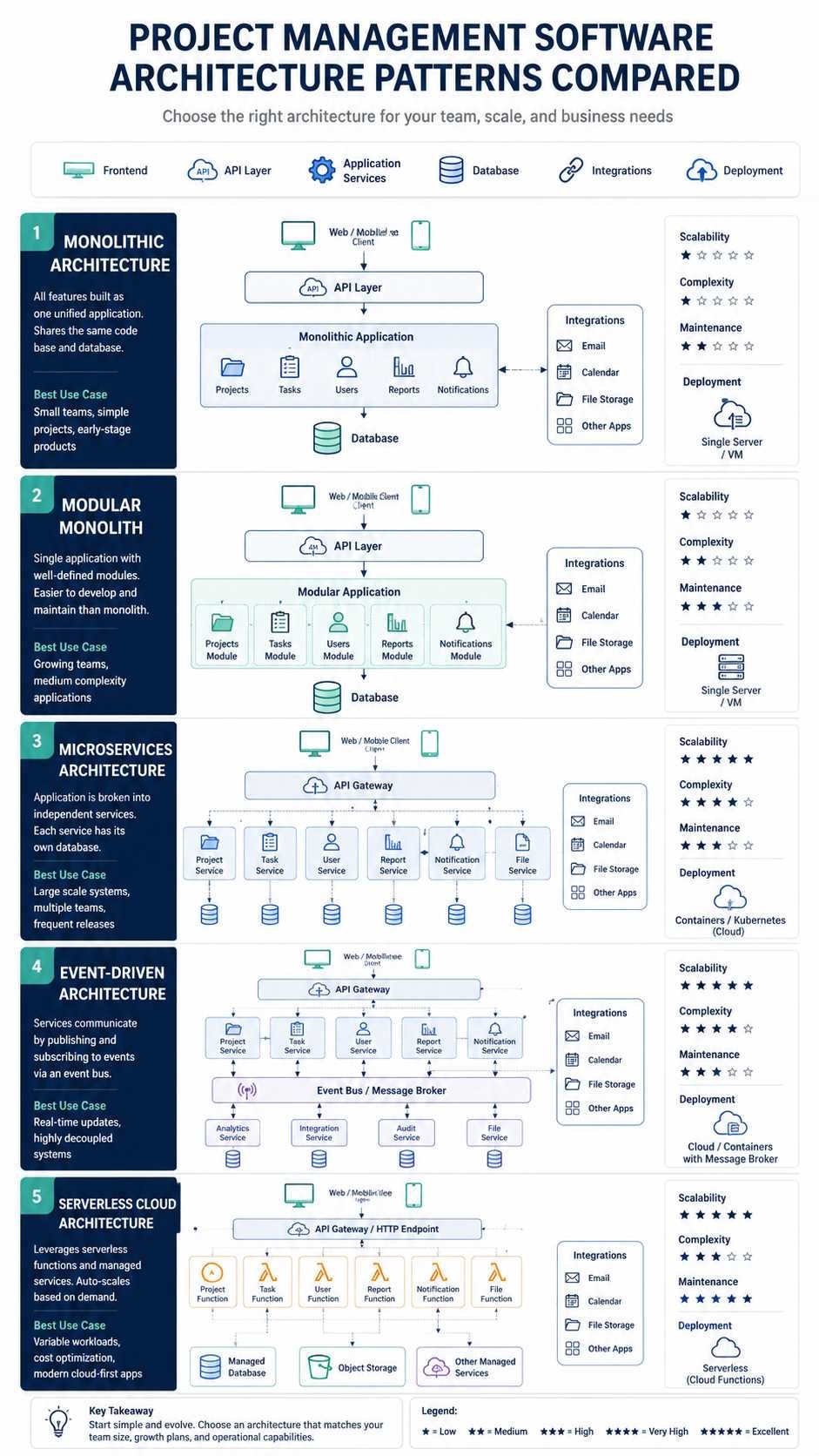
There is no single best architecture for every project management system. The right choice depends on scale, complexity, team skills, cost, and expected change.
Monolithic Architecture
A monolith packages most application functions into one deployable system.
A small project platform might contain authentication, tasks, reports, notifications, and integrations inside one application connected to one main database.
This approach has real advantages. Development is easier to understand. Testing can be simpler. Deployment requires fewer moving parts. A small team can build and maintain it without needing advanced distributed-system skills.
The problem appears when the product grows. A tightly coupled monolith can become difficult to change, and teams may have to deploy the entire application for a small update.
AWS notes that monoliths can remain valid in some situations, but poorly structured monoliths can create high coupling, maintenance problems, and limits on independent scaling.
Modular Monolith
A modular monolith keeps one main deployment but separates the code into clear modules.
For example:
Projects | Tasks | Users | Billing | Reports | Notifications
This design often makes sense for growing software because it keeps operational complexity under control while protecting internal boundaries.
Microservices Architecture
Microservices split the application into independently deployable services.
A larger platform could have separate task, identity, search, reporting, notification, file, billing, and integration services.
Microsoft’s architecture guidance defines microservices as small autonomous services organized around business capabilities. It also warns that they introduce complexity in service discovery, distributed data, monitoring, and operations.
Microservices therefore are not automatically better than a monolith.
Event-Driven Architecture
Event-driven systems respond to changes such as:
Task completed → event published → dependent task unlocked → report updated → notification sent
This pattern works well when many independent functions need to react to the same activity.
Serverless Architecture
Serverless functions can handle background jobs, scheduled reports, webhook processing, file conversion, or irregular workloads without requiring the development team to manage dedicated servers for every function.
Multi-Tenant SaaS Architecture
Most cloud project management products serve many organizations from a shared platform.
The architecture must isolate customer data while allowing common infrastructure to operate efficiently. Tenant identity, permissions, data partitioning, encryption, and resource limits become critical design concerns.
In practice, mature SaaS platforms often combine several patterns instead of following one architecture everywhere.
Common Problems, Causes, and Business Impact
Architecture problems usually become visible to users as slow screens, missing updates, duplicate records, broken integrations, or confusing permissions.
| Problem | Common Cause | Impact |
|---|---|---|
| Slow dashboard | Inefficient queries or overloaded services | Users wait and productivity drops |
| Missing updates | Synchronization or caching problems | Teams work with outdated information |
| Integration failure | API, token, or permission issue | Automated workflows stop |
| Duplicate records | Poor retry or synchronization logic | Reports become unreliable |
| Weak permissions | Poor access-control design | Sensitive project data may be exposed |
| Delayed notifications | Queue or worker overload | Deadlines may be missed |
| Scaling problems | Components are too tightly coupled | Performance falls as usage grows |
| Reporting mismatch | Data comes from inconsistent sources | Managers make decisions from conflicting numbers |
A common mistake is treating these symptoms as separate bugs when they actually come from the same architectural weakness.
For example, imagine a reporting dashboard that reads directly from the operational task database. As the company grows, executives begin running large reports while employees update thousands of tasks. Reporting queries now compete with everyday work.
A better design might move analytics into a separate reporting store that receives project events or scheduled data updates. Users get faster project screens, while reports can run heavier queries without interfering with normal task operations.
Architecture decisions often work this way. A small shortcut may be harmless at 20 users but costly at 20,000.
What Are the 7 Types of Project Management?
Searchers often ask for the seven types of project management, but there is no single official PMI list containing exactly seven universal types.
PMI commonly discusses broader delivery approaches such as predictive, adaptive, and hybrid. Its 2024 research also found that project performance does not depend on blindly choosing one approach over another. Fit matters.
Still, seven widely used methodologies or approaches often appear in project management discussions:
- Waterfall: Work progresses through planned sequential stages.
- Agile: Teams deliver work iteratively and respond to changing requirements.
- Scrum: Agile work is organized into short time-boxed sprints with defined roles and events.
- Kanban: Teams visualize work and control work in progress.
- Lean: Teams focus on value while reducing waste.
- Six Sigma: Teams use measurement and process improvement to reduce defects and variation.
- PRINCE2: Projects follow a structured governance and control method.
The architecture of project management software should not force every team into the same methodology.
A Waterfall-heavy engineering project may need baselines, dependencies, formal approvals, and detailed Gantt planning. A software team using Scrum may care more about backlogs, sprints, releases, and development integrations. A hybrid organization may need both.
This is why configurable workflows are architectural features, not just interface preferences.
What Are the Top 5 Project Management Software Platforms?
There is no universal top-five ranking that fits every company. A development team, construction business, university group, and marketing agency may need very different tools.
Still, five mainstream platforms worth comparing in 2026 are Microsoft Planner, Jira, Asana, monday.com, and ClickUp.
| Platform | Strong Fit | Notable Strength |
|---|---|---|
| Microsoft Planner | Microsoft 365 organizations | Microsoft ecosystem and Power Platform |
| Jira | Software and technical teams | Custom workflows, APIs, development work |
| Asana | Cross-functional organizations | Projects, goals, portfolios, automation |
| monday.com | Flexible business workflows | Boards, automation, dashboards |
| ClickUp | Teams wanting many functions together | Tasks, docs, dashboards, time and AI |
Microsoft Planner
Microsoft has been bringing Project for the web capabilities into Planner. Microsoft documentation shows that Project for the web was built on Power Platform components including Power Apps, Power Automate, Power BI, and Dataverse. That makes the Microsoft ecosystem a useful real-world example of project data, automation, reporting, and application layers working together.
Jira
Jira remains particularly strong for technical and development-oriented work. Atlassian lists customizable workflows, detailed permissions, rich APIs, reporting, dependencies, security controls, and more than 3,000 Marketplace integrations.
Asana
Asana focuses on projects, tasks, portfolios, goals, reporting, workflows, forms, rules, and AI-powered work management. Its current product information also highlights integrations with more than 270 apps.
monday.com
monday.com uses configurable boards, views, automations, integrations, dashboards, and AI workflows. Its 2026 documentation describes AI steps that can analyze, generate, and route work inside existing workflows.
ClickUp
ClickUp combines task management, documents, dashboards, time tracking, dependencies, automations, goals, collaboration, and AI features in one workspace.
The best choice depends less on the longest feature list and more on how well the platform’s data, permission, integration, and workflow model matches your organization.
What Is the Architecture of a Software Project?
Software project architecture describes the high-level technical design of the system being built.
It answers questions such as:
- What major components does the system contain?
- Where does data live?
- How do components communicate?
- How will users authenticate?
- How will the system be deployed?
- Which external systems must connect?
- How will failures be detected and recovered?
A useful architecture usually covers several views.
Application architecture defines the frontend, backend, services, and core business components.
Data architecture defines databases, storage, data ownership, synchronization, retention, and analytics.
Integration architecture describes APIs, message queues, webhooks, external platforms, and data exchange.
Security architecture defines identity, permissions, secrets, encryption, auditing, and network controls.
Deployment architecture shows where applications run, how they scale, and how traffic moves through cloud or on-premises infrastructure.
Observability architecture covers logs, metrics, alerts, traces, and health monitoring.
Project management software architecture is simply this broader concept applied to software that manages projects and work.
The architecture should also reflect the domain. A project platform has natural business concepts such as organization, workspace, project, task, milestone, user, dependency, comment, file, permission, portfolio, and report. Good architects model those concepts clearly instead of organizing the system only around technical components.
Step-by-Step: How to Design Project Management Software Architecture
Architecture becomes easier when teams work from business needs toward technology rather than starting with a fashionable framework.
Step 1: Define the Users
Identify project managers, administrators, team members, executives, clients, guests, contractors, and integration users.
Their permissions will shape the data and security model.
Step 2: Map the Core Workflows
Write down the essential processes.
For example:
Create project → add tasks → assign owners → set dependencies → track progress → approve deliverables → report results
Step 3: Define the Data Model
Map the relationships between:
Organization → Workspace → Project → Task → Subtask → User → Comment → File → Event
Do this before designing dozens of screens.
Step 4: Choose Architecture Boundaries
Separate major responsibilities such as identity, projects, tasks, notifications, files, analytics, and integrations.
A small team may keep them inside a modular monolith. A larger platform may separate some into services.
Step 5: Design the API
Decide how web, mobile, integration, and internal clients access the system.
Keep database tables private behind application rules.
Step 6: Build Security Into the Model
Define tenant boundaries, project roles, guest permissions, administrator access, authentication, and audit requirements.
Step 7: Add Asynchronous Processing
Use background workers or queues for slow work such as emails, imports, exports, large reports, webhook processing, and file operations.
Step 8: Plan Reporting Separately
Operational screens and heavy analytics often have different performance needs.
Step 9: Add Monitoring and Recovery
Track errors, latency, queue depth, failed integrations, database health, and service availability.
Step 10: Test Real Workflows
Do not test architecture only with perfect requests. Test expired login sessions, duplicate webhooks, failed integrations, large projects, slow databases, and temporary service outages.
That is where an architecture proves whether it can handle actual work.
Security Architecture for Project Management Platforms
Project management software can contain contracts, budgets, product plans, customer names, employee discussions, source-code links, internal documents, and strategic information.
Security cannot be added after the architecture is finished.
Start with identity.
Users should authenticate through a controlled identity system. Larger organizations often prefer single sign-on because it allows access to follow company identity policies. Multi-factor authentication adds another protection layer.
Next comes authorization.
Authentication answers Who are you?
Authorization answers What are you allowed to do?
A project manager may edit schedules. A client may see only selected deliverables. A contractor may access one project but not the company’s full portfolio. A finance employee may see budgets without changing technical tasks.
Role-based access control can manage many of these rules, but sensitive systems may also require resource-level checks. Every API request should verify access rather than trusting that a hidden button in the interface prevents unauthorized actions.
Data should be encrypted while traveling across networks and, where appropriate, while stored. Audit logs should record important administrative and security events. Backups need their own access controls and recovery testing.
Security also applies to integrations. An external automation token should receive only the permissions required for that workflow.
APIs and Integrations: The Connective Layer
Modern project software becomes far more useful when it connects with the rest of the business.
Common integrations include calendars, email, messaging, cloud storage, accounting systems, customer relationship management platforms, source-control systems, help desks, analytics tools, and automation services.
Two technologies appear often: APIs and webhooks.
An API works like asking a receptionist for information. One system sends a request such as, Give me task 532, and the project system returns a response.
A webhook works more like leaving your phone number and asking to be contacted when something happens. Instead of repeatedly checking whether task 532 is complete, the project system sends an event when its status changes.
Good integrations need more than a working connection.
They need retry logic, duplicate protection, rate-limit handling, version management, secure credentials, logging, and clear ownership of data.
Suppose a CRM creates a new implementation project whenever a sales opportunity becomes Won. The CRM sends a webhook. The project platform creates the project but times out before replying. The CRM retries.
Without idempotency or duplicate detection, the customer may suddenly have two identical projects.
This is a small example of why integration architecture matters. Systems fail in ordinary ways: networks slow down, tokens expire, providers impose rate limits, and messages arrive twice. Reliable architecture assumes those failures will happen.
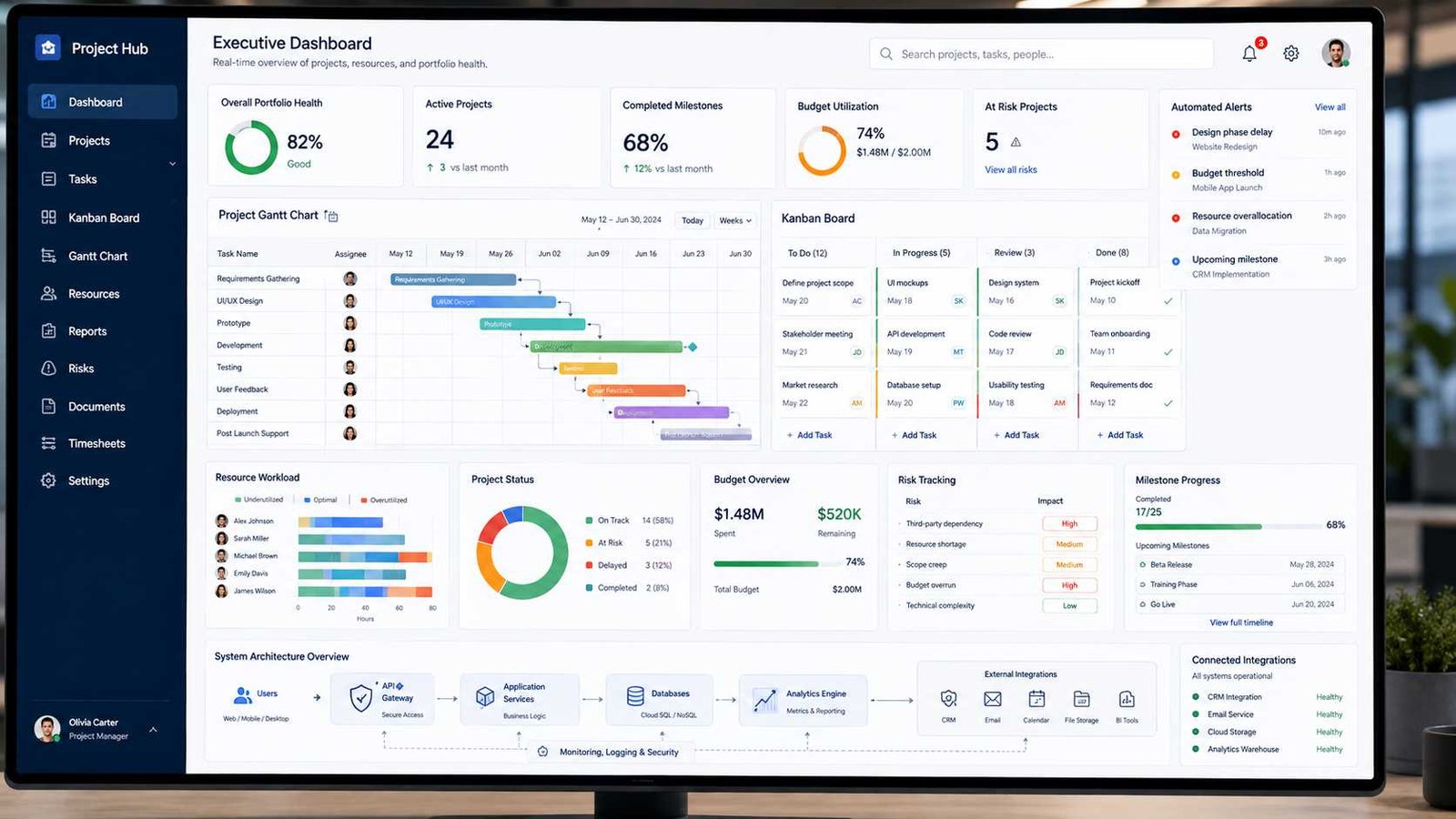
Project Dashboards and Data Architecture
Dashboards look simple because they compress a large amount of project information into a few charts.
Behind them, the system may need to calculate overdue tasks, milestone progress, employee workload, blocked work, portfolio status, budget variance, project risk, and completion trends.
The fastest way to build a small dashboard may be to query the operational database directly. That approach becomes less attractive as data volume grows.
Large analytical queries can compete with ordinary user activity. Complex joins across projects, tasks, users, time records, and financial tables can become expensive.
Larger platforms often separate transactional work from analytics.
The operational database handles rapid reads and writes required by everyday project activity. Events or data pipelines then feed reporting stores designed for aggregation and historical analysis.
This also helps portfolio reporting. Executives rarely need every task row. They need summarized information such as projects at risk, capacity by department, delayed milestones, and budget trends.
Current project tools reflect this demand for connected reporting. Asana provides portfolios and reporting dashboards, Jira offers real-time project views and reports, and ClickUp connects dashboards directly with operational work data.
Monolith vs Microservices for Project Management Software
The choice between a monolith and microservices should follow the problem, not fashion.
| Factor | Monolith | Microservices |
|---|---|---|
| Initial development | Simpler | More complex |
| Deployment | One main unit | Many independent services |
| Scaling | Often whole application | Individual services |
| Operations | Easier | Requires mature operations |
| Debugging | Usually simpler | Distributed tracing often needed |
| Data consistency | Easier | More difficult across services |
| Team independence | Limited as system grows | Strong when boundaries are good |
| Best fit | Small to medium systems | Large, complex, fast-changing platforms |
A startup building its first project tool may gain nothing from 25 microservices. The team could spend more time managing containers, messaging, tracing, deployment pipelines, and network failures than building useful project features.
A modular monolith may deliver the same business value with less risk.
The calculation changes when hundreds of developers work on a platform and individual capabilities have very different scaling needs.
Microsoft’s architecture guidance emphasizes that microservices allow independent development and deployment but require mature DevOps and operational practices. AWS likewise recommends understanding business boundaries and system dependencies before breaking a monolith apart.
The best architecture is often the simplest one that can support the expected growth.
Cloud vs On-Premises Project Management Architecture
Cloud project management platforms dominate modern collaboration because users can connect from different locations without maintaining local application servers.
A SaaS vendor typically manages infrastructure, application deployment, upgrades, scaling, and much of the availability work. The customer manages users, permissions, workflows, and data policies.
On-premises systems give an organization more direct control over infrastructure and can remain useful where internal policy, disconnected environments, legacy integrations, or regulatory requirements make cloud deployment difficult.
The trade-off is operational responsibility.
A company hosting its own platform must plan servers, databases, patching, backups, failover, monitoring, capacity, certificates, security hardening, and disaster recovery.
Hybrid environments sit between the two.
For example, a cloud project platform may connect to an internal financial system through a controlled integration gateway. The project software remains cloud-based while sensitive legacy systems stay inside the company network.
A small digital agency with 20 employees will usually gain more from a managed SaaS service than from running project servers.
A large regulated organization may make a different decision based on data location, retention, internal security policy, integration requirements, and operational capability.
Architecture decisions are contextual. The same technology can be sensible for one organization and unnecessary for another.
Is PMP Worth It for Architects?
PMP can be valuable for architects who are responsible for more than technical design.
A software, cloud, solution, enterprise, or infrastructure architect often works across engineering teams, management, vendors, security groups, business stakeholders, timelines, risks, and budgets. At that point, architecture work overlaps heavily with project leadership.
PMP can help architects strengthen structured skills in planning, stakeholder management, governance, risk, delivery approaches, and business outcomes.
It becomes particularly useful when an architect leads major migrations, ERP implementations, data-center projects, cloud transformations, platform redesigns, or cross-functional technology programs.
It may provide less direct value for an architect whose role is almost completely technical. In that case, a cloud architecture, security, networking, or software engineering certification may produce a faster return.
The qualification itself has also evolved. PMI launched its updated PMP exam on July 9, 2026. The new version puts greater emphasis on outcomes, value, business impact, stakeholder engagement, AI, and sustainability within project scenarios.
For an architect moving toward technical leadership, program architecture, consulting, or management, that broader business perspective can be useful.
For someone who wants to remain a specialist engineer, PMP should be considered an optional complement rather than a required architecture credential.
How AI Is Changing Project Management Software Architecture
AI is becoming a new architectural layer inside project platforms.
Current tools already use AI to summarize work, generate updates, automate workflows, analyze project information, find risks, and help users search their workspace in natural language. Asana, Jira, monday.com, and ClickUp all promote AI-assisted workflows or project features in their current products.
But adding an AI assistant is not the same as adding a normal button.
The architecture must answer new questions.
Which project data can the model read? Can it see private projects? Can information from one customer appear in another customer’s answer? Which actions can the AI perform? Does a human need to approve important changes? How are prompts, responses, and actions logged? What happens if the AI suggests an incorrect deadline or risk assessment?
PMI addressed this broader governance problem in June 2026 when it published The Standard for Artificial Intelligence in Portfolio, Program and Project Management. The standard includes eight guiding principles, five performance domains, human-in-the-loop practices, and guidance covering governance, risk, ethics, legal issues, data quality, and AI-enabled project work.
PMI President and CEO Pierre Le Manh summarized the issue clearly:
“AI transformation succeeds or fails in the projects and programs that deliver it.”
For software architects, the lesson is simple. AI features need permission boundaries, auditability, data controls, monitoring, and human oversight just like other important system components.
How to Choose the Right Project Management Software Architecture
Start with the problem you actually have.
A 10-person internal application does not require the same architecture as a global SaaS platform serving thousands of organizations.
Before selecting an approach, evaluate these factors:
- Expected user count and growth
- Number and size of projects
- Real-time collaboration requirements
- Reporting and analytics volume
- External integrations
- Security and compliance needs
- Mobile and offline requirements
- Development team size
- Deployment frequency
- Availability targets
- Backup and disaster recovery requirements
- AI and automation plans
Then choose the smallest architecture capable of meeting those requirements safely.
For many new systems, that may mean a modular web application with a relational database, API layer, background queue, object storage, identity provider, reporting service, and monitoring tools.
Microservices can come later when clear business boundaries and scaling problems justify them.
This approach avoids premature complexity while leaving room to grow.
Practical Project Management Software Architecture Checklist
Use this checklist before approving a new design or reviewing an existing platform.
- Users and roles are clearly defined.
- Core project workflows are documented.
- Major application modules have clear responsibilities.
- Project and task data relationships are documented.
- APIs protect internal database details.
- Authentication and authorization are separate concerns.
- Permissions are checked on the server.
- Tenant data is isolated correctly.
- Sensitive information is encrypted appropriately.
- Background jobs handle slow or retryable work.
- Integration failures do not unnecessarily break core workflows.
- Duplicate webhook and message handling is tested.
- Reporting workloads cannot overload daily project operations.
- Backups are created and restoration is tested.
- Logs, metrics, traces, and alerts cover critical services.
- Large projects have been performance-tested.
- Architecture documentation matches the running system.
- AI features respect existing access permissions.
- Human review exists for high-impact automated decisions.
- The architecture can evolve without requiring a complete rewrite for every new feature.
Frequently Asked Questions
What is project management software architecture?
It is the technical structure behind a project management platform. It defines how the user interface, business rules, APIs, databases, authentication, reporting, automation, integrations, and infrastructure work together.
What are the 7 types of project management?
There is no official universal list of exactly seven types. Seven commonly discussed approaches or methodologies are Waterfall, Agile, Scrum, Kanban, Lean, Six Sigma, and PRINCE2. PMI more broadly discusses predictive, adaptive, and hybrid delivery approaches.
What are the top 5 project management software platforms?
Five widely used options worth comparing in 2026 are Microsoft Planner, Jira, Asana, monday.com, and ClickUp. The best choice depends on your workflows, integrations, security requirements, reporting needs, and team type.
What is the architecture of a software project?
Software architecture describes the major technical components of a system, their responsibilities, how they exchange data, where data is stored, how security works, and how the application is deployed and operated.
Is PMP worth it for architects?
It can be worth it for architects who lead large projects, coordinate multiple teams, manage stakeholders, handle risks, or move toward management and consulting. Architects focused mainly on technical design may receive more immediate value from specialized architecture certifications.
Which architecture is best for project management software?
There is no single best design. Small and medium systems often work well as modular monoliths. Large platforms may benefit from microservices, event-driven components, or a hybrid architecture.
Do project management applications need microservices?
No. Microservices solve specific scaling, deployment, and organizational problems. Using them before those problems exist can increase cost and complexity.
Why is an API important in project management software?
APIs allow web apps, mobile apps, integrations, automation tools, and external business systems to interact with project data through controlled interfaces.
Resources for Further Reading
Readers who want to explore the subject beyond this guide should start with the Project Management Institute’s PMBOK Guide, PMI’s project success research, Microsoft Azure Architecture Center, AWS Prescriptive Guidance, Microsoft Planner documentation, and official architecture material from major cloud platforms.
PMI’s current guidance is especially useful for understanding how project delivery itself is changing. Cloud architecture documentation from Microsoft and AWS helps translate those management needs into practical application patterns, including microservices, event-driven systems, APIs, data ownership, and observability.
Final Thoughts Before You Design It Yourself
Good project management software architecture does not try to use every modern technology.
It makes ordinary project work reliable.
Users should be able to create tasks, update schedules, share information, receive alerts, run reports, integrate other systems, and control access without thinking about databases, queues, APIs, or distributed services.
That simplicity on the screen usually comes from careful decisions behind it.
Start with users and workflows. Model the project data clearly. Separate responsibilities where separation provides real value. Protect permissions at every important boundary. Move slow work into background processing. Treat integrations as unreliable external dependencies. Keep reporting from overwhelming operational data. Add monitoring before production problems force you to add it. Use microservices only when the scale or organization truly needs them.
Most importantly, remember that architecture serves the project rather than the other way around.
A smaller system with clean boundaries, clear data ownership, good security, and reliable backups can be better architecture than a complicated collection of fashionable services.
The goal is not to build the most technically impressive project management platform.
The goal is to build one that helps people plan work, understand what is happening, make better decisions, and deliver projects with fewer avoidable obstacles.

IT consultant and educator specializing in wireless networks and cloud systems. With a strong academic background and real-world projects, Priya brings practical expertise and trustworthy advice for students, professionals, and everyday tech users.