Software as a Service has moved far beyond webmail and basic office tools. Businesses now run sales, accounting, customer support, cybersecurity, HR, analytics, ecommerce, and even AI workflows through SaaS applications. The market reflects that shift. Fortune Business Insights estimates the global SaaS market at $375.57 billion in 2026, while Grand View Research uses a broader methodology and estimates it at $530 billion. The difference shows why SaaS market numbers can vary depending on which applications and deployment models researchers include. Both forecasts, however, point in the same direction: cloud-delivered software continues to take a larger role in everyday computing.
The types of SaaS software are easiest to understand by the jobs they perform. Customer relationship management software handles sales and customer data. Project management platforms organize tasks. Accounting SaaS manages financial records. Other categories cover human resources, marketing, security, ecommerce, analytics, and communication. AWS specifically lists CRM, ERP, accounting, human resources, security, collaboration, document editing, communication, and contact-center software among common SaaS applications.
Here’s what matters: SaaS describes how software is delivered and managed, not one particular type of software. A CRM system can be SaaS if the vendor hosts it in the cloud, or traditional software if a company installs and maintains it on its own servers.
Expert insight: AWS explains that with SaaS, customers mainly focus on using the software rather than maintaining its infrastructure.
What Is SaaS in Simple Terms?
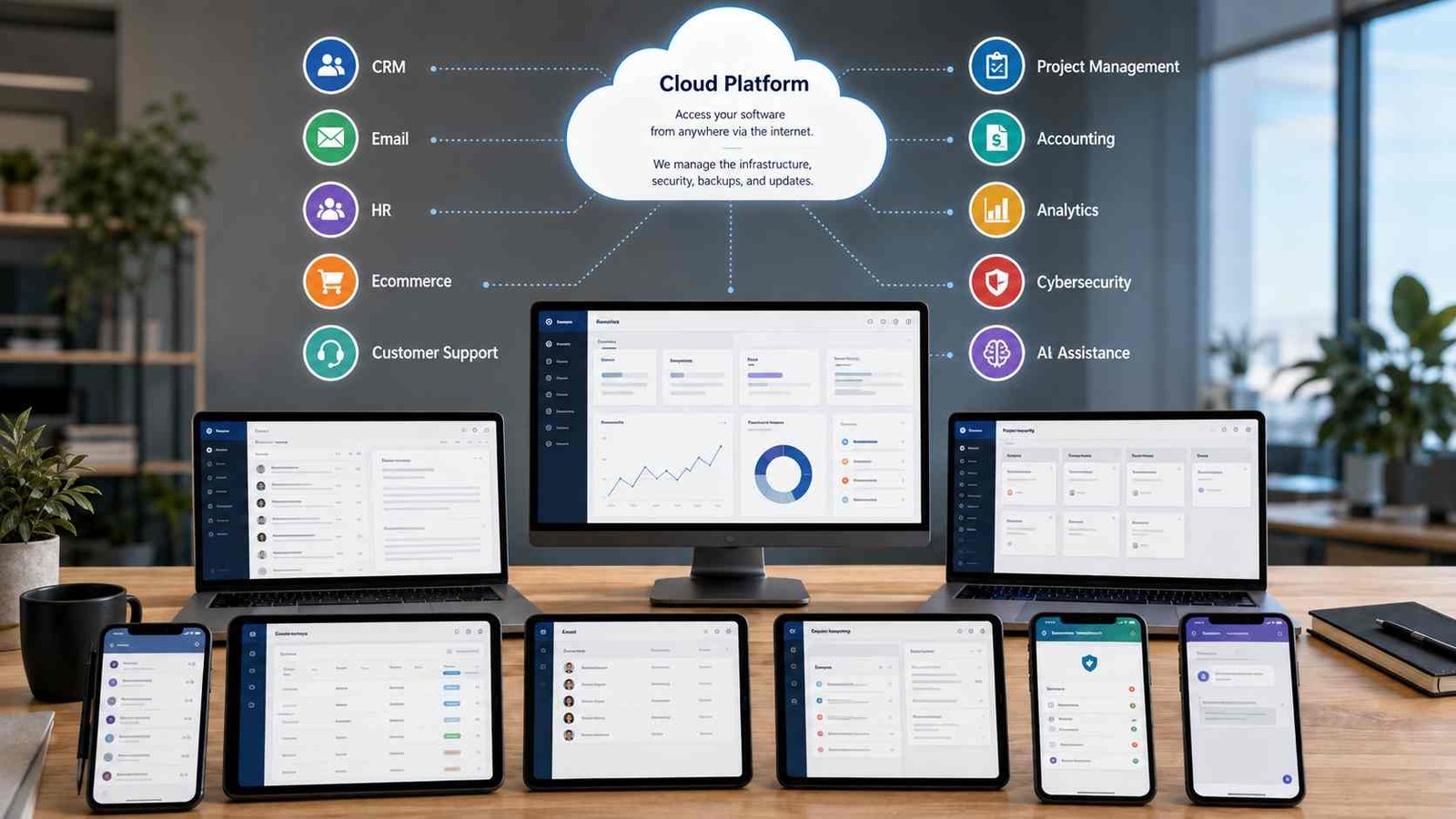
SaaS stands for Software as a Service. Instead of buying software, installing it on a server, managing updates, and maintaining the hardware underneath it, you access a complete application managed by another company. That application usually runs in a web browser, desktop client, mobile app, or a combination of all three. AWS defines SaaS as cloud-based software delivered to end users over the internet. Microsoft describes it as ready-to-use software where the provider handles the underlying technical environment, updates, and much of the maintenance.
Think of the process as:
SaaS provider hosts application → user creates an account → user signs in → provider maintains software and infrastructure → user works with the application
You already use this model if you access Gmail through a browser, work in Google Docs, manage projects online, or use a cloud CRM. Google Cloud lists Gmail, Calendar, Docs, and Drive as familiar SaaS productivity applications.
The pricing model often involves monthly or annual subscriptions, but subscription pricing is not mandatory. AWS notes that SaaS can also use pay-as-you-use pricing. That distinction matters because people sometimes assume that any subscription service must automatically be SaaS. It does not work that way. SaaS requires a software application delivered and managed as a service, while many other online products also happen to use subscriptions.
Expert insight: Microsoft describes SaaS as delivering “fully developed applications over the internet” while the provider manages the technical details.
Why SaaS Categories Can Be Confusing
Modern cloud products frequently overlap. One application may include CRM, email marketing, analytics, automation, AI, and customer support features inside the same account. Companies such as Microsoft, Google, Oracle, Salesforce, and SAP also sell products across several cloud categories, so the company itself should not automatically be labeled SaaS, PaaS, or IaaS. You need to classify the individual service.
| Problem | Cause | Impact |
|---|---|---|
| SaaS gets confused with PaaS | Both are delivered through cloud infrastructure | Users misclassify online services |
| Subscriptions get confused with SaaS | Many digital services charge monthly fees | Services such as Netflix become difficult to classify |
| Products overlap categories | One platform may offer CRM, analytics, AI, and support | Simple category lists become incomplete |
| Vendors sell several cloud models | Microsoft, Google and others provide SaaS, PaaS, and IaaS | Brand-level classifications become misleading |
| AI is becoming part of existing SaaS | AI assistants now appear inside many applications | AI SaaS overlaps traditional categories |
The key is to ask what the customer receives. If you receive a complete ready-to-use application, it usually fits SaaS. If developers receive a managed environment for building applications, that is PaaS. If an IT team receives computing infrastructure such as virtual machines, networks, or storage, that is IaaS. Microsoft and Google both describe these models mainly in terms of how much of the technology stack the provider manages.
12 Main Types of SaaS Software
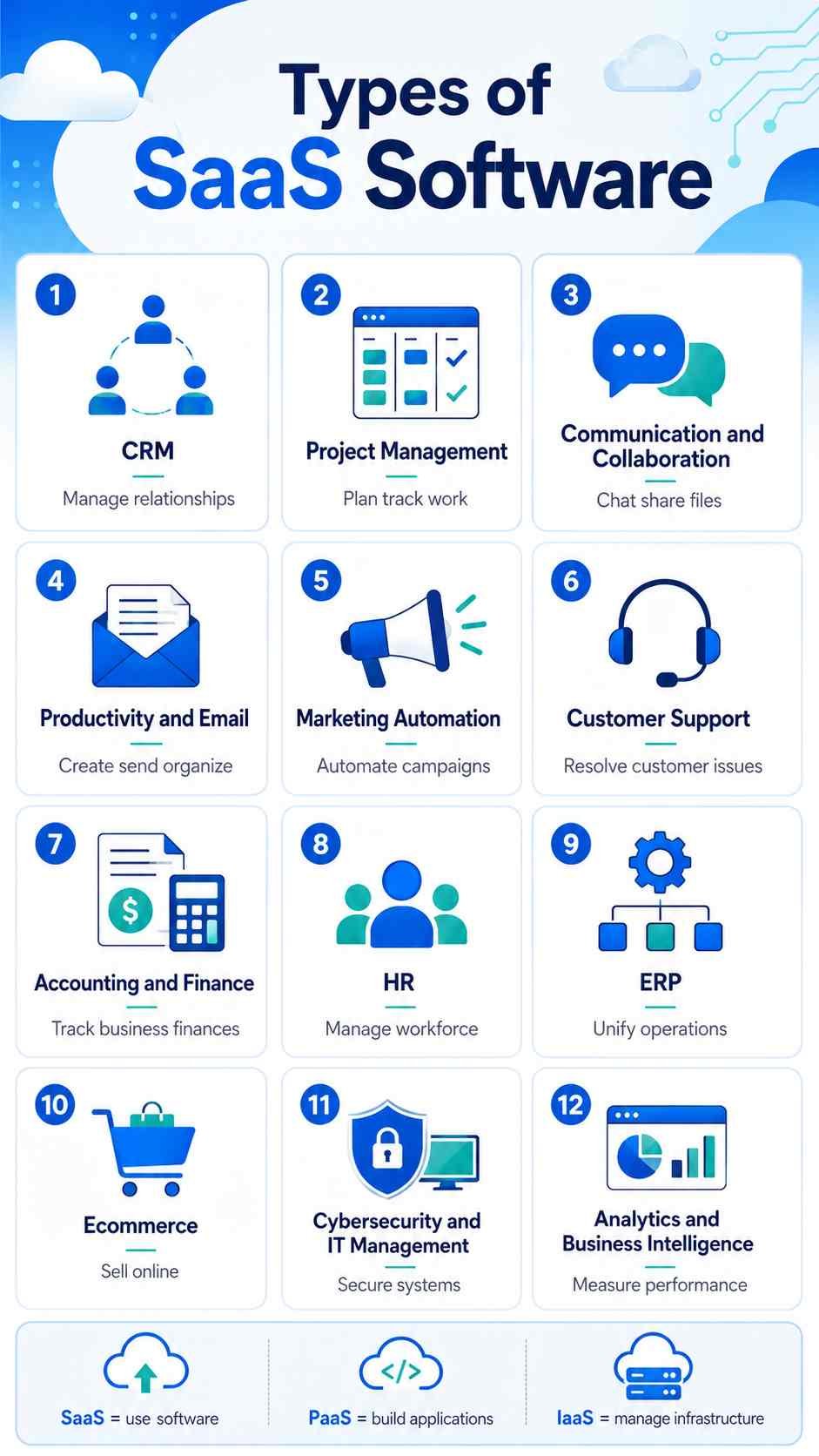
There is no official rule stating that exactly 12 SaaS categories exist. Different researchers combine or separate them in different ways. SAP, AWS, Software Advice, Zoho, and other software sources all use slightly different groupings. The following 12 categories provide a practical way to understand the most common SaaS applications businesses and everyday users encounter.
1. Customer Relationship Management SaaS
CRM SaaS manages leads, customer information, sales opportunities, communication history, and sales pipelines. Salesforce and HubSpot are familiar examples. A small sales company can give every salesperson access to the same customer database without maintaining its own CRM server.
CRM is one of the clearest examples of SaaS because employees may work from offices, homes, customer locations, or mobile devices while accessing the same centrally managed data. Grand View Research estimates that CRM represented about 22% of the SaaS market by application in 2025 under its methodology.
2. Project and Work Management SaaS
Project management SaaS helps teams assign tasks, set deadlines, create workflows, track progress, and manage resources. Examples include Asana, monday.com, Trello, Jira, and similar online work platforms.
Imagine a five-person marketing agency handling 20 client projects. Instead of tracking work through email threads and spreadsheets, the agency can create one workspace where employees see deadlines, responsible team members, files, and project status. MongoDB’s SaaS overview identifies Asana, monday.com, Smartsheet, Trello, and Wrike as examples within project management.
3. Communication and Collaboration SaaS
These applications help people communicate through team messaging, video meetings, shared files, calendars, and collaborative workspaces. Common examples include Slack, Microsoft Teams, Zoom, and cloud collaboration suites.
This category became particularly important as companies adopted remote and hybrid work. SaaS removes much of the location dependency because the application and data live online rather than on one office computer. Zoho’s SaaS overview groups Microsoft Teams, Slack, Zoom, and similar tools under collaboration and communication SaaS.
4. Productivity and Email SaaS
Productivity SaaS includes email, online document editors, spreadsheets, presentations, calendars, cloud storage, and office collaboration. Google Workspace and Microsoft 365 are major examples.
Is Gmail a PaaS or SaaS?
Gmail is SaaS, not PaaS.
This classification is unusually easy to verify because Google’s own cloud documentation explicitly describes Gmail as Software as a Service. Google fully manages the service, while users simply sign in and use it. The company places most Google Cloud development services in the PaaS or IaaS side of the comparison because those products allow technical users to develop, deploy, or operate workloads.
Google also lists Gmail, Calendar, Docs, and Drive as SaaS productivity applications.
5. Marketing Automation SaaS
Marketing SaaS can manage email campaigns, lead nurturing, forms, landing pages, customer journeys, campaign analytics, and automated follow-ups. HubSpot and similar marketing platforms fit this category.
For example, someone who downloads an ebook from a company’s website might automatically enter an email sequence. The software records the lead, sends relevant messages, tracks engagement, and alerts the sales team if the lead becomes qualified. All of those functions can happen without the business operating its own marketing automation servers.
6. Customer Support and Help Desk SaaS
Customer support SaaS organizes support tickets, live chat, knowledge bases, customer histories, service-level targets, and increasingly AI-powered support agents. Zendesk and Freshdesk are common examples.
Consider an ecommerce shop receiving customer questions from email, web forms, and chat. A help-desk platform can route those conversations into one queue, assign tickets to staff, store past conversations, and measure response times. SAP includes customer-support platforms among common SaaS application categories.
7. Accounting and Finance SaaS
Accounting SaaS handles invoicing, expenses, financial reports, bank reconciliation, bookkeeping, and sometimes payroll or tax workflows. QuickBooks Online, Xero, and similar applications fall into this category.
Cloud accounting is particularly useful for small businesses because the owner, accountant, and authorized employees can work from a shared financial system. They do not need to maintain a dedicated local accounting server. AWS and SAP both identify accounting and finance software as common SaaS use cases.
8. Human Resources SaaS
HR SaaS manages employee records, recruitment, onboarding, attendance, benefits, payroll, performance reviews, and workforce planning. Workday, BambooHR, and similar platforms provide these functions.
Larger systems are often called Human Capital Management, or HCM, platforms. Software Advice lists both HR and HCM among the major SaaS application categories, while MongoDB identifies platforms such as Workday, SAP SuccessFactors, and UKG Pro as examples.
9. Enterprise Resource Planning SaaS
ERP SaaS combines several core business functions inside one system. It may connect finance, purchasing, inventory, manufacturing, supply chains, human resources, and reporting.
Oracle, SAP, and NetSuite-style platforms serve this market. The main difference between ERP and CRM is scope. CRM focuses primarily on customers and sales relationships. ERP coordinates broader internal business operations.
A manufacturing company, for example, might use ERP to connect an incoming customer order with inventory, purchasing, production, invoicing, and financial reporting.
10. Ecommerce SaaS
Ecommerce SaaS provides hosted technology for running online stores. These systems may manage product catalogs, checkout, orders, payments, inventory, discounts, integrations, and storefront design.
Shopify and BigCommerce are widely recognized examples. The business does not need to build the entire commerce engine from scratch. A small retailer can select a template, upload products, configure payments, and begin selling without maintaining its own ecommerce application infrastructure. Zoho’s current overview includes ecommerce-oriented vertical platforms within the broader SaaS landscape.
11. Cybersecurity and IT Management SaaS
Cybersecurity SaaS includes identity management, authentication, endpoint security, cloud security, monitoring, backup, access management, and other IT services delivered through hosted platforms.
This category has become more important because company data now sits across many cloud applications. Identity platforms can help businesses control who can access those applications, while security dashboards give IT teams a central view of threats and account activity. Zoho categorizes Okta, Microsoft Entra ID, CrowdStrike, and related products under security and identity management SaaS.
12. Analytics and Business Intelligence SaaS
Analytics SaaS converts business data into reports, visualizations, dashboards, forecasts, and other decision-support information. Tableau Cloud, Microsoft Power BI services, Zoho Analytics, and similar platforms can fit this category.
The real value often comes from integrations. Instead of manually copying sales, marketing, finance, and operations data into spreadsheets, businesses can connect multiple systems to an analytics platform and monitor important metrics through dashboards. Zoho identifies Tableau and Power BI alongside its own analytics software in this SaaS category.
Horizontal SaaS vs. Vertical SaaS
Another way to divide the types of SaaS software is by market focus.
Horizontal SaaS solves a common problem across many industries. Email, CRM, project management, video conferencing, accounting, and document collaboration are good examples. A construction company, university, retailer, law firm, and marketing agency may all use the same project management platform.
Vertical SaaS targets one industry and goes deeper into its specialized workflows. A healthcare platform might support patient records and healthcare compliance. Construction SaaS may include job-site reporting, contractor management, drawings, and project costing. Life-sciences software can contain industry-specific regulatory tools. G2 distinguishes horizontal SaaS as software used across industries and vertical SaaS as software built for one particular industry or organization type.
| Feature | Horizontal SaaS | Vertical SaaS |
|---|---|---|
| Target market | Many industries | Specific industry |
| Main goal | Solve a common business problem | Solve industry-specific problems |
| Potential audience | Broad | More focused |
| Industry customization | Usually limited | Usually deeper |
| Examples | CRM, email, collaboration | Healthcare, construction, life sciences |
Neither approach is automatically better. A small company may use horizontal software for email and accounting while relying on one vertical platform for its specialized work.
Is ChatGPT a SaaS?
The ChatGPT end-user application fits the standard definition of SaaS, although OpenAI does not need to label every ChatGPT product simply as “SaaS.”
This conclusion comes from comparing how ChatGPT is delivered with established SaaS definitions. Users access a complete hosted application. OpenAI operates the infrastructure and updates the software. Business customers can purchase centrally managed workspaces with user administration and subscription-based seats. OpenAI describes ChatGPT Business as a self-serve workspace for organizations with centralized billing, admin controls, role management, and access to ChatGPT through web, desktop, and mobile apps.
That satisfies the normal SaaS characteristics described by AWS, Microsoft, and Google: a provider-managed application delivered to end users over the internet.
However, ChatGPT and the OpenAI API should not be treated as exactly the same product model. OpenAI states that ChatGPT Business and the API platform have separate billing systems and that a ChatGPT Business subscription does not include API usage. The API is primarily a developer service that lets organizations integrate OpenAI models into their own software.
So the short answer is: ChatGPT is reasonably classified as SaaS when referring to the hosted ChatGPT application. The OpenAI API is a separate developer platform/service.
Is Netflix a PaaS or SaaS?
Netflix creates an interesting classification problem because it looks like SaaS from a technical delivery perspective but belongs to a different commercial category.
One answer is certain: Netflix is not PaaS for ordinary subscribers. Platform as a Service gives developers a managed environment in which they can build, test, deploy, or run applications. Netflix subscribers do none of that. They use a finished service. Microsoft and Google both describe PaaS as a developer-focused platform rather than a finished consumer application.
Netflix shares several characteristics with SaaS. The provider operates the software, customers access the service through internet-connected devices, and the service uses subscriptions. This is why some cloud-computing explainers loosely use Netflix as a SaaS example.
But “subscription streaming service” is the more precise primary description. Netflix itself defines Netflix as a subscription-based streaming service for watching TV shows and movies on internet-connected devices. Its main commercial product is media entertainment rather than productivity or business software.
Therefore, the safest answer is:
Netflix is not PaaS. It uses a SaaS-like delivery model, but its primary classification is a subscription streaming service rather than traditional SaaS software.
That distinction is more accurate than forcing every internet subscription into a cloud-computing label.
What Are the Top 5 SaaS Companies?
There is no universal top-five SaaS ranking. Results change depending on whether you rank companies by market capitalization, SaaS revenue, total cloud revenue, number of customers, or market share within one software category.
For a practical industry overview, Microsoft, Salesforce, Oracle, SAP, and Google are five major companies worth knowing. Microsoft provides cloud productivity and business applications such as Microsoft 365 and Dynamics 365. Salesforce remains one of the best-known cloud CRM providers. Oracle and SAP operate large portfolios of cloud enterprise applications, especially ERP and business management software. Google provides Google Workspace and other hosted productivity applications.
Statista’s current SaaS coverage tracks Microsoft, Salesforce, Oracle, SAP, and Google among the major companies shaping the SaaS and cloud-software market. Its SaaS market definition also explicitly includes products such as Microsoft 365, Google Workspace, Salesforce Customer 360, Slack, and Zoom.
This list should therefore be read as five major SaaS market leaders, not a fixed first-to-fifth ranking. A ranking based strictly on public-company market capitalization could produce a different result from one based on SaaS-only annual revenue.
SaaS vs. PaaS vs. IaaS
The easiest way to remember the three major cloud service models is to ask how much the provider gives you.
| Cloud Model | What You Get | What You Mainly Manage | Typical User |
|---|---|---|---|
| SaaS | Finished application | Users, settings and business data | Employees and consumers |
| PaaS | Application development environment | Your application and data | Developers |
| IaaS | Compute, storage and networking infrastructure | OS, applications and data | IT teams and engineers |
With SaaS, you use the software. With PaaS, you build software. With IaaS, you manage more of the computing environment on which software runs.
Microsoft describes SaaS as the simplest of the three because the provider manages the complete application and underlying environment. PaaS leaves the application and data under the customer’s control while the provider manages infrastructure and runtime components. IaaS provides the greatest customer control, including management of operating systems and applications.
Google gives a similar explanation: IaaS provides infrastructure, PaaS provides platform tools, and SaaS provides complete applications.
How to Choose the Right Type of SaaS Software
Start with the business problem instead of the brand name. A company struggling to track leads needs CRM software, while a company losing control of invoices needs an accounting solution. Buying an all-in-one platform simply because it has more features can increase costs without solving the original problem.
Next, identify the functions you cannot operate without. Separate essential capabilities from features that would merely be useful. Then check integrations. CRM software may need to connect with email, accounting, marketing, customer support, or analytics applications. Poor integration can create duplicate records and manual work.
Security deserves its own review. Check authentication options, multifactor authentication, administrator controls, access permissions, data encryption, backup policies, compliance requirements, and the provider’s process for exporting data. Review the service-level agreement as well. AWS notes that SaaS SLAs commonly address areas such as uptime, security, support, updates, customer responsibilities, and data access.
Then calculate the real cost. A $20-per-user subscription can become expensive when hundreds of employees need licenses or when essential capabilities require higher plans. Include add-ons, storage, integrations, implementation, support, and training.
The safest process is:
Define problem → identify requirements → shortlist SaaS category → compare products → review security → test integrations → run pilot → measure results → expand
A short pilot often reveals problems that a feature comparison page cannot.
SaaS Security: Who Is Responsible?
One common misunderstanding is that moving software to SaaS transfers every security responsibility to the provider. The provider manages a large part of the technical stack, but the customer still controls important areas such as accounts, permissions, data sharing, and configuration.
The SaaS provider normally manages hosting infrastructure, application maintenance, platform updates, availability, and many technical security controls. Customers typically remain responsible for deciding who can use the system, removing old accounts, enforcing strong authentication, assigning suitable permissions, managing sensitive data, and configuring the service correctly.
For example, a provider can support multifactor authentication, but the customer may still need to enable or enforce it. The vendor can secure its infrastructure while an administrator can accidentally grant excessive permissions to an employee.
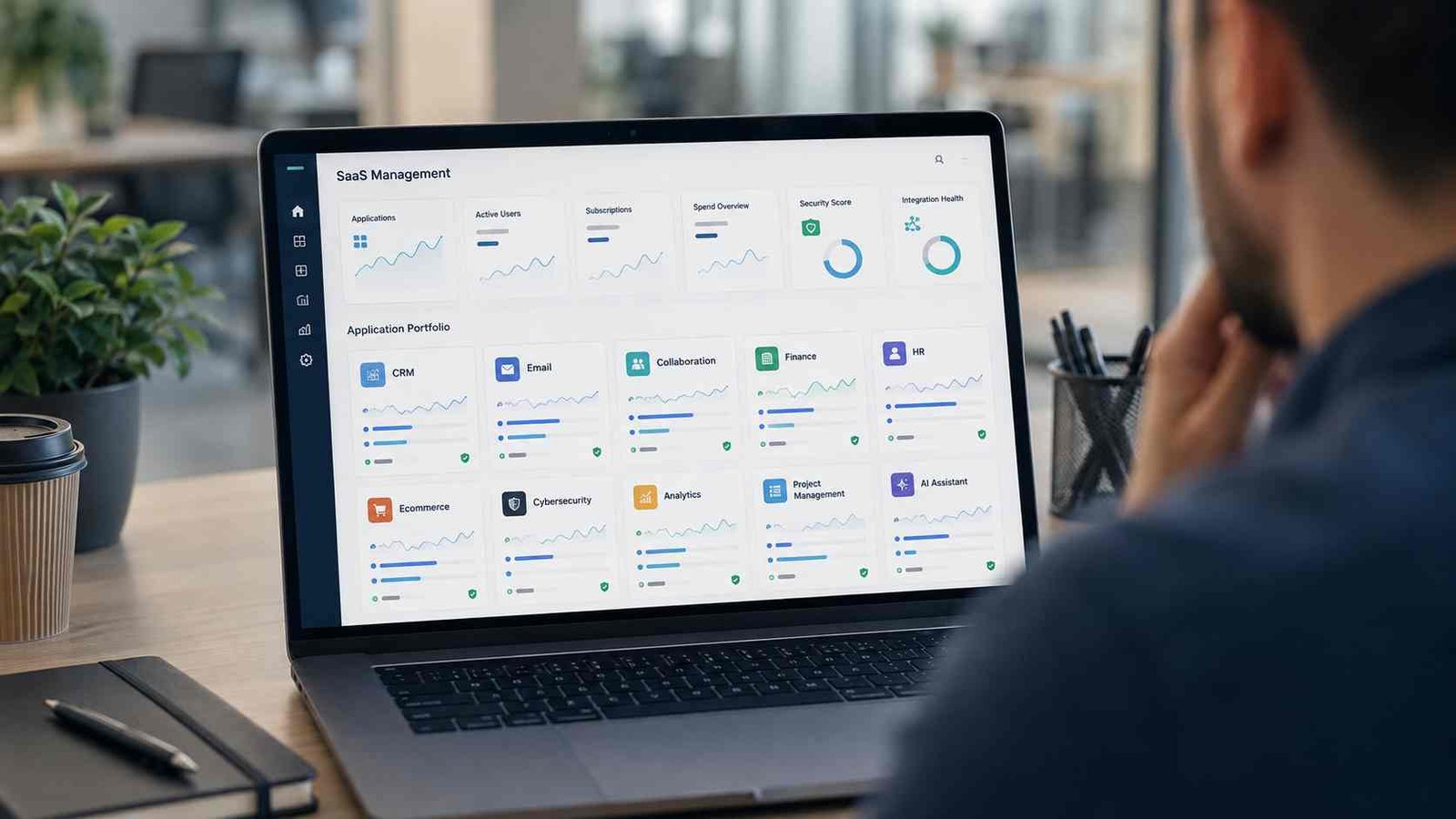
This is one reason centralized identity management and SaaS-management dashboards have become useful. They help IT teams see which applications employees use, which accounts remain active, and which services have risky configurations.
AI SaaS Is Changing Traditional Software Categories
AI is becoming less of a standalone software category and more of a layer inside existing SaaS products. CRM platforms can summarize customer interactions. Marketing software can generate campaign content. Help desks can draft responses. Analytics platforms can answer questions in natural language. Productivity suites can summarize documents and meetings.
ChatGPT also demonstrates how AI can function as a complete hosted application. Users can access advanced models without buying GPUs, deploying model infrastructure, or maintaining inference servers. Business versions add centralized administration and organizational controls on top of the hosted AI service.
AWS’s description of SaaS architecture also recognizes products built around artificial intelligence, machine learning, data access, and API-delivered functions. This suggests that the boundary between traditional application SaaS and AI services will continue to become less rigid.
For buyers, the important question is no longer simply whether a platform “has AI.” Check whether its AI functions solve a real workflow problem, what data the feature can access, how administrators control it, and whether it increases subscription or usage costs.
Common SaaS Problems Businesses Should Avoid
SaaS is easy to deploy, and that convenience creates its own problem: companies can accumulate applications faster than they can manage them. IBM specifically warns about SaaS sprawl, where applications spread through an organization without enough IT oversight. The result can include unnecessary spending, inefficient workflows, isolated data, and security risks. IBM also points to vendor lock-in caused by proprietary systems and complex integrations.
A business may discover that marketing, sales, customer support, and finance teams have purchased separate applications that perform overlapping tasks. Former employees may still have accounts. Teams may continue paying for software nobody actively uses. Important information can become trapped inside one vendor’s data format.
A quarterly SaaS review can reduce these problems. Check active users, unused subscriptions, duplicate functionality, administrator accounts, integrations, security settings, renewal dates, and data-export options. Small companies can perform this review manually. Larger organizations may benefit from SaaS management or software asset management platforms.
Frequently Asked Questions About Types of SaaS Software
What are the main types of SaaS software?
Major types include CRM, ERP, project management, communication, productivity, marketing automation, customer support, accounting, HR, ecommerce, cybersecurity, and analytics SaaS. The exact number depends on how categories are grouped. AWS, SAP, Zoho, and Software Advice all use slightly different classifications.
Is Netflix a PaaS or SaaS?
Netflix is not PaaS for subscribers. It shares some technical characteristics with SaaS because users access a provider-managed online application, but Netflix itself describes its core product as a subscription-based streaming service. “Streaming service” is therefore the more precise primary classification.
Is ChatGPT a SaaS?
The hosted ChatGPT application fits standard SaaS characteristics because OpenAI manages the application and users access it as an online service. ChatGPT Business also provides subscription-based, centrally administered workspaces. The OpenAI API is separate from ChatGPT subscriptions and should be treated as a developer service rather than simply another ChatGPT SaaS plan.
What are the top 5 SaaS companies?
Microsoft, Salesforce, Oracle, SAP, and Google are five major SaaS and cloud-application companies. There is no permanent top-five order because rankings depend on measurements such as market capitalization, SaaS revenue, customer numbers, or category market share.
Is Gmail a PaaS or SaaS?
Gmail is SaaS. Google’s own documentation classifies Gmail as a fully managed SaaS service that requires no development effort from the user.
What is horizontal SaaS?
Horizontal SaaS serves users across multiple industries. CRM, email, accounting, and project-management applications are common examples.
What is vertical SaaS?
Vertical SaaS targets one specific industry and supports its specialized workflows, terminology, and compliance needs. Healthcare, construction, legal, hospitality, and life-sciences platforms can all be vertical SaaS.
Do you need to install SaaS software?
Usually, you do not need to install and maintain the core software or server infrastructure yourself. Many SaaS platforms run directly in browsers, although vendors may also provide desktop and mobile apps.
Is all SaaS subscription based?
No. Subscription pricing is common, but SaaS companies can also use usage-based, tiered, per-user, freemium, or hybrid pricing. AWS specifically recognizes both subscription and pay-as-you-use SaaS models.
Practical SaaS Evaluation Checklist
Before paying for a new SaaS product, check:
- The software solves a clearly defined problem.
- Essential features are available on the plan you will buy.
- Pricing remains reasonable as the number of users grows.
- The platform integrates with your existing software.
- Multifactor authentication is available.
- Administrators can control roles and permissions.
- Sensitive data receives suitable protection.
- Backup and recovery policies meet your needs.
- You understand where your data is stored when relevant.
- Your organization can export its data.
- The provider publishes availability or service-level commitments.
- Support options match the importance of the application.
- Mobile or remote access works where employees need it.
- You know what happens when you cancel the service.
- You have checked for overlapping software already in use.
Useful Resources for Learning More
For deeper technical reading, AWS provides detailed SaaS architecture and delivery guidance. Microsoft Azure and Google Cloud explain the differences between SaaS, PaaS, and IaaS. SAP provides examples of SaaS by business function, while IBM discusses SaaS benefits, sprawl, and vendor lock-in. Current market estimates are available from research firms such as Grand View Research and Fortune Business Insights.
These sources are particularly useful because SaaS terminology continues to evolve. Modern platforms increasingly combine software, APIs, AI models, automation, and cloud infrastructure, so rigid labels do not always describe every service perfectly.
Final Thoughts Before Choosing Your SaaS Stack
Understanding the types of SaaS software becomes much easier once you separate the delivery model from the software’s purpose. SaaS tells you that the provider hosts and manages the application. CRM, accounting, HR, project management, cybersecurity, ecommerce, analytics, and other labels tell you what that application actually does.
For an everyday user, SaaS may simply mean opening Gmail or another online productivity tool without thinking about servers. For a small business, it can mean running sales, finance, customer support, and projects through several cloud applications. For an enterprise, SaaS can become part of a much larger architecture involving PaaS, IaaS, APIs, identity systems, and custom applications.
That distinction also clears up common questions. Gmail is SaaS. ChatGPT’s hosted application fits the SaaS model, while its API is a separate developer service. Netflix is not PaaS and is more precisely described as a subscription streaming service, even though its delivery shares SaaS characteristics.
The best SaaS stack is not the one with the most applications. It is the one that solves the required problems with the fewest unnecessary tools, connects data cleanly, protects user access, and gives the business a practical way to leave or change vendors later.

IT consultant and educator specializing in wireless networks and cloud systems. With a strong academic background and real-world projects, Priya brings practical expertise and trustworthy advice for students, professionals, and everyday tech users.