
Personal knowledge management tools have become much more useful in 2026 because the problem is no longer simply taking notes. The harder problem is finding the right note, decision, research paper, meeting detail, or idea when you actually need it. We save information in browsers, PDFs, messaging apps, meeting transcripts, AI chats, cloud drives, notebooks, and project tools. Without a system, useful knowledge becomes another form of digital clutter.
The numbers show why this matters. Atlassian’s 2025 State of Teams research surveyed 12,000 knowledge workers and 200 executives and found that leaders and teams spend about 25% of their time searching for answers. Gartner reached a similar conclusion from the enterprise side, noting in 2025 that employees continue to struggle to find work information even as AI assistants become more common.
This is where personal knowledge management tools, or PKM tools, help. They give you a place to capture information, connect related ideas, retrieve old knowledge, and turn what you saved into something useful.
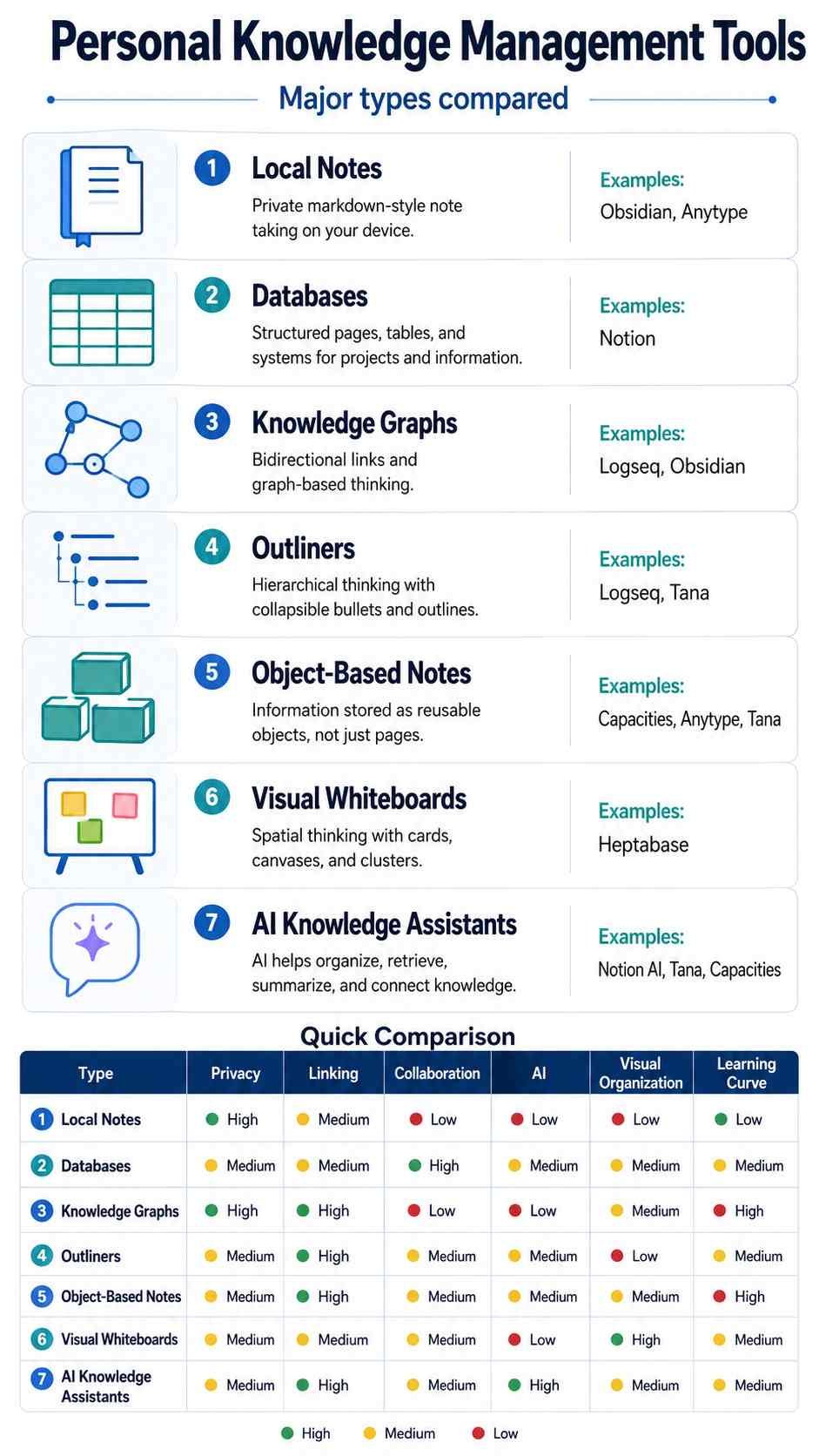
The best PKM tool, however, depends on how you think. Obsidian gives you strong ownership over local Markdown files. Notion combines notes with databases and collaboration. Tana adds structured information and AI. Capacities organizes knowledge as objects. Logseq is built around outlines and linked references. Anytype focuses heavily on local-first privacy. Heptabase makes research visual. Mem emphasizes AI-powered recall.
Here’s what matters: do not choose a PKM tool because it has the longest feature list. Choose one that makes useful information easy to capture and easy to find again.
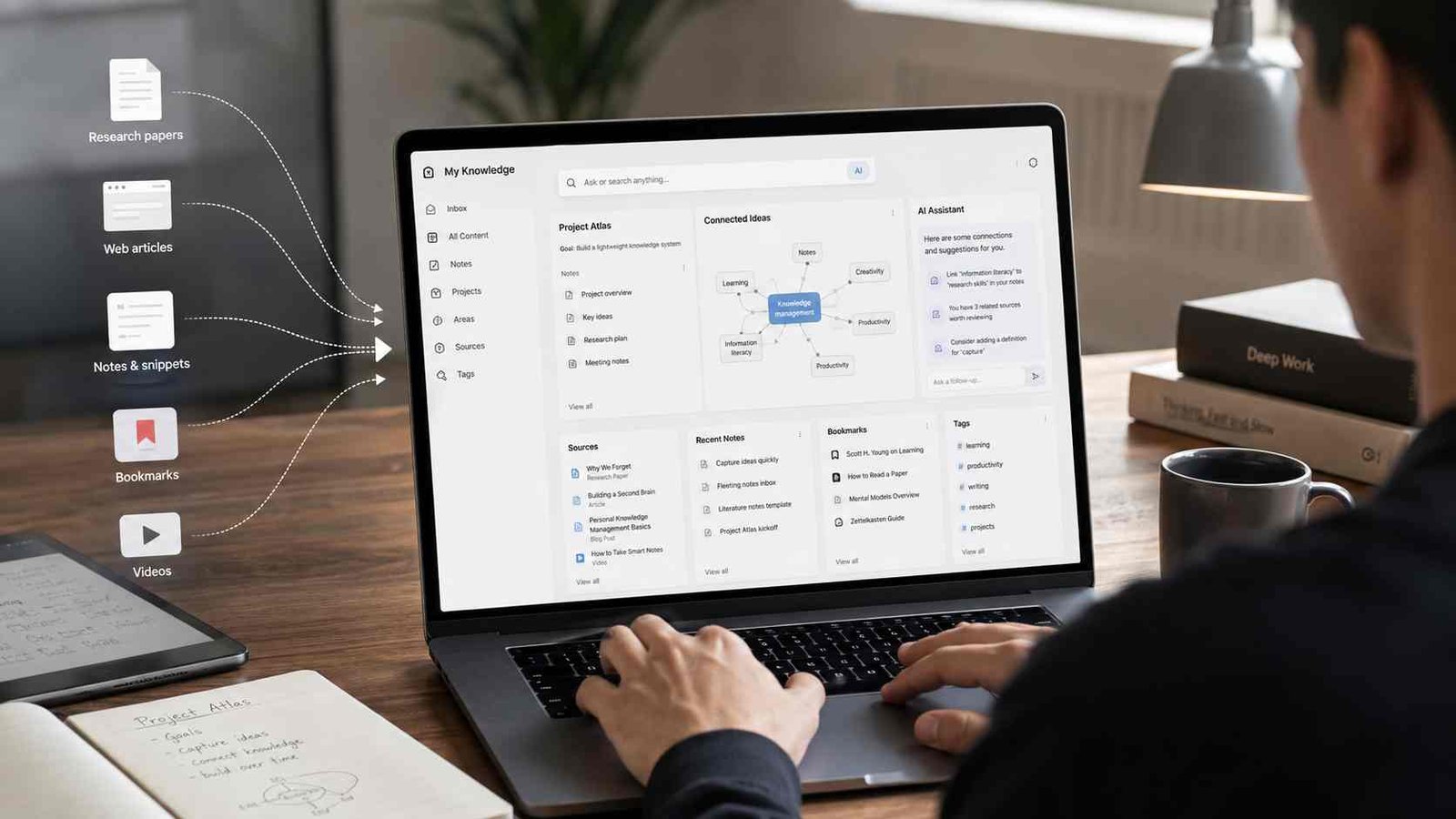
What Is a Personal Knowledge Management Tool?
A personal knowledge management tool is software that helps an individual collect, organize, connect, retrieve, and reuse information.
A normal notes app can store a shopping list or a few ideas. A PKM system goes further. It may connect notes with backlinks, attach metadata, create databases, show relationships in a graph, organize research sources, search by meaning, or let AI answer questions based on information you previously saved.
A practical PKM workflow looks like this:
Capture → Organize → Connect → Retrieve → Apply → Review
Suppose a university student is researching cybersecurity. The student saves lecture notes, PDFs, definitions, web articles, lab observations, and exam questions. A basic folder may store all of them, but a good PKM system can connect a note about phishing with social engineering, authentication, email security, and a related research paper. Months later, the student can follow those connections instead of trying to remember the original filename.
The same idea applies to a small-business owner. Meeting notes can connect to customers, projects, suppliers, decisions, deadlines, and previous conversations.
That ability to create a useful return path is what separates serious personal knowledge management from digital hoarding. Current 2026 PKM comparisons increasingly evaluate tools around capture, organization, connections, and especially retrieval rather than simple note creation.
Why Personal Knowledge Systems Fail
Most failed PKM systems do not fail because the software lacks features. They fail because the system demands too much maintenance.
| Problem | Common Cause | Impact |
|---|---|---|
| Notes are difficult to find | Too many folders or weak search | Knowledge gets recreated instead of reused |
| Hundreds of unused tags | Over-organizing during capture | Users stop maintaining the system |
| Constant app switching | Chasing new features | Knowledge becomes fragmented |
| Useful information goes stale | No review process | Old information creates bad decisions |
| AI gives weak answers | Poor or outdated source material | Fast retrieval of incorrect information |
| Knowledge is trapped | Proprietary formats or weak export | Migration becomes difficult |
| Everything gets saved | No capture criteria | Search results become noisy |
The lesson is simple. A PKM system should reduce mental work, not create another administrative job.
Best Personal Knowledge Management Tools Compared
The following recommendations reflect how the tools work as of August 2026 rather than treating one product as universally superior.
| PKM Tool | Best For | Knowledge Model | AI | Offline/Data Approach | Learning Curve |
|---|---|---|---|---|---|
| Obsidian | Local knowledge ownership | Notes and links | Plugins/integrations | Local Markdown | Medium |
| Notion | All-in-one workspace | Pages and databases | Extensive built-in AI | Cloud-centered | Low–Medium |
| Tana | Structured AI workflows | Types and Supertags | Extensive | Hosted workspace | High |
| Capacities | Object-based knowledge | Connected objects | Built-in AI features | Offline-first with sync | Medium |
| Logseq | Outlining and daily notes | Blocks and references | Developing ecosystem | Local-first | Medium–High |
| Anytype | Privacy and data control | Objects and databases | Emerging | Local-first, E2E encrypted | Medium |
| Heptabase | Research and visual learning | Cards and whiteboards | Research AI | Offline access with sync | Medium |
| Mem | AI-first retrieval | Notes and collections | Core feature | Hosted workspace | Low |
| Reflect | Simple networked notes | Notes and backlinks | Built-in | E2E encrypted sync | Low |
| Roam Research | Block-based networked thinking | Blocks and graphs | Limited compared with AI-first tools | Cloud graphs | High |
1. Obsidian: Best for Local-First Personal Knowledge
Obsidian remains one of the strongest choices for people who want long-term control over their notes.
Instead of storing your main knowledge base only inside a vendor-controlled cloud database, Obsidian stores notes as Markdown-formatted plain-text files inside a local vault. Those files can also be opened with other text editors. Obsidian supports internal links, backlinks, graph views, Canvas, plugins, and several ways to synchronize files between devices.
That makes Obsidian attractive for researchers, writers, developers, students, and anyone who worries about software lock-in.
Imagine a student studying artificial intelligence. One note explains neural networks. Another discusses transformers. A third summarizes an IEEE paper. By linking the concepts rather than placing them in isolated folders, the student gradually creates a navigable network of knowledge.
Obsidian’s biggest strength can also become its weakness. The app gives users enormous flexibility. Thousands of plugins, templates, properties, themes, queries, and workflows are available. Some users spend more time designing a perfect vault than actually learning or producing work.
Use Obsidian if ownership, extensibility, Markdown, and connected notes matter more to you than having an immediately finished workspace.
Best for: Researchers, students, writers, developers, privacy-conscious users.
Watch out for: Plugin obsession and excessive customization.
2. Notion: Best All-in-One PKM Workspace
Notion works differently. Instead of focusing mainly on linked personal notes, it combines documents, databases, projects, wikis, collaboration, search, automation, and AI inside one workspace.
That makes it particularly useful when personal knowledge connects directly to work.
A small-business owner, for example, could create databases for customers, suppliers, projects, meetings, content ideas, procedures, and research. A meeting page can relate to a customer record. That customer can relate to an active project. The project can connect to documents, tasks, deadlines, and decisions.
Notion’s AI capabilities have also expanded considerably. Its current AI system can search workspace content and connected applications, perform deeper research, work with databases, create and edit pages, summarize meetings, and use information from services such as Google Drive, Slack, Microsoft Teams, Jira, and other supported connectors. Some of the more advanced capabilities require Business or Enterprise plans.
The trade-off is complexity. Notion makes it easy to create sophisticated systems, but a workspace full of databases, templates, relations, and dashboards can become difficult to maintain.
Choose Notion when you want your PKM system to overlap with project management, business documentation, teamwork, or databases.
Best for: Small businesses, freelancers, teams, project-based knowledge.
Watch out for: Overbuilding databases and dashboards.
3. Tana: Best for Structured AI-Assisted Knowledge
Tana is one of the more ambitious personal knowledge management tools in 2026.
Its defining concept is the Supertag. A Supertag turns an entry into a typed object with predefined fields. You might create types for Person, Meeting, Project, Book, Task, Customer, Research Paper, or Idea. Every item with the same type can then become part of a searchable and filterable collection.
This gives Tana some of the flexibility of an outliner and some of the structure of a database.
AI is deeply integrated into the current product. Tana says its AI can perform keyword and semantic searches, inspect relationships between documents, read meeting transcripts and PDFs, and create or update documents, tasks, typed entries, fields, calendar events, and other structured content.
Consider a consultant with 50 client meetings. Instead of treating every meeting as an isolated document, the consultant can tag people, clients, decisions, projects, tasks, and follow-ups as defined types. AI can then help retrieve and work with that structured knowledge.
The downside is the learning curve. Tana makes much more sense once you understand nodes, types, fields, Supertags, search, and structured workflows.
Best for: Consultants, managers, founders, advanced PKM users.
Watch out for: Initial complexity.
4. Capacities: Best Object-Based PKM Tool
Capacities takes a different approach to organization. Instead of asking primarily where a note belongs, it asks what the note represents.
Everything is treated as an object with a type. A book becomes a Book object. A meeting becomes a Meeting. A person becomes a Person. A research paper can have its own object type with properties such as author, publication year, status, and topic.
These objects can link to one another. Capacities also supports bidirectional links, backlinks, graph views, properties, templates, and several visual representations of structured information.
This model works well when your knowledge naturally contains recurring entities.
For example, a writer researching renewable energy could create object types for Company, Technology, Research Paper, Expert, Country, and Topic. A single research paper might connect simultaneously to Solar Energy, Battery Storage, Germany, and a particular scientist without needing duplicate copies in several folders.
Capacities is also an offline-first application. Its documentation says notes are downloaded locally after login, edits can be made offline, and changes synchronize when the user reconnects.
Best for: Writers, researchers, students, object-oriented thinkers.
Watch out for: Users who simply want conventional folders may need time to adapt.
5. Logseq: Best Open-Source Outliner
Logseq is built around outlines, blocks, linked references, daily writing, queries, and local control.
Its current public positioning describes it as a privacy-first, open-source knowledge base. The existing system supports local data, Markdown files, linked references, queries, mobile applications, plugins, and optional synchronization.
The workflow is particularly natural for people who think in bullet points.
Instead of starting every thought inside a carefully named document, you can write in today’s journal and create links while you work. Those connections allow information to resurface elsewhere.
Logseq deserves one important 2026 qualification. The project is developing a newer database version that introduces DB graphs and a new collaboration approach. Its own GitHub documentation currently labels the database version beta and the newer RTC collaboration and mobile work alpha, with an explicit warning that data loss may be possible during testing.
For that reason, readers should distinguish Logseq’s established file-based workflow from experimental newer components.
Best for: Students, developers, journal users, open-source enthusiasts.
Watch out for: Product transition and experimental database features.
6. Anytype: Best for Privacy and Data Control
If privacy is the first requirement, Anytype deserves serious consideration.
Anytype describes itself as local-first and end-to-end encrypted. Content is stored on-device first, and its documentation says data is encrypted before leaving the device for synchronization. Users control their recovery keys, and local-only or self-hosting options are also available.
Anytype combines documents, objects, databases, relationships, templates, and collaboration.
That creates an interesting middle ground. You can build a structured personal knowledge system similar to object-based platforms while keeping a much stronger focus on local ownership and encrypted synchronization.
Its underlying Any-Sync protocol is built around local-first communication, creator-controlled keys, CRDT-based synchronization, and end-to-end encryption.
Anytype is also exploring local and user-controlled AI approaches. A February 2026 community update described experimental work around local agents and giving users a choice between no AI, local AI, cloud AI, or hybrid configurations. That work should be treated as a direction rather than a mature feature promise.
Best for: Privacy-focused individuals and users who want structured knowledge without depending entirely on a cloud service.
Watch out for: Some AI functionality remains experimental.
7. Heptabase: Best for Visual Learning and Research
Heptabase is especially strong when understanding a subject matters more than simply storing notes.
Its central workspace combines cards and whiteboards. Users can visually place notes, create mind maps, build tables or Kanban views, annotate PDFs, work with journals, and connect information with bidirectional links. It is marketed specifically toward students, researchers, and lifelong learners.
This makes Heptabase useful for complex topics where spatial relationships help.
Imagine researching climate policy. Instead of opening 30 separate documents, you could create one visual board with branches for legislation, energy technology, economics, countries, academic research, and arguments. Individual cards remain reusable while the whiteboard shows the larger structure.
Research integrations also stand out. Heptabase supports Zotero synchronization, including bibliographic data and supported PDFs and annotations from selected Zotero collections.
Its AI direction is also increasingly important. Current Heptabase material highlights source-based AI research, while its MCP functionality supports semantic searches across notes and can expose whiteboard structures, journals, and PDF contents to compatible AI workflows.
Best for: Researchers, postgraduate students, visual thinkers.
Watch out for: More expensive than many basic note apps and unnecessary for simple note capture.
8. Mem: Best for AI-Centered Retrieval
Mem approaches PKM from the opposite direction of highly manual systems.
The idea is to reduce how much time you spend deciding where everything belongs.
Its current product describes a workspace where notes, meetings, ideas, research, and saved pages build persistent context. Mem can search across that information by meaning and use it as context for its AI features.
Mem Chat can search notes, recall details, summarize information, create or update notes, and organize material into collections. Collections also support automatic organization and can be used to guide AI queries toward particular areas of the workspace.
This model can work well for someone who constantly saves information but dislikes manually maintaining folders, backlinks, tags, and metadata.
The trade-off is control. People who enjoy building precise knowledge structures may prefer Obsidian, Tana, Capacities, or Logseq.
Best for: Busy professionals who want AI-powered recall with less manual organization.
Watch out for: Less appeal to users who want full control over their information architecture.
9. Reflect: Best for Simple Networked Notes
Reflect offers a cleaner alternative for people who want backlinks and connected thinking without spending weeks configuring a system.
Its main features include networked notes, backlinks, calendar integration, browser capture, search, AI tools, and end-to-end encryption.
The encryption model is notable. Reflect’s documentation says note contents are encrypted on the client before being sent to its servers. It also explains an important AI privacy limitation: when users activate certain AI functions, relevant text or search results may need to be sent to model providers for processing.
That distinction matters beyond Reflect. A knowledge app can protect stored notes while an optional AI feature has different data-processing requirements.
Reflect works particularly well for daily notes, meeting notes, writing, personal research, and users who like backlink-based thinking but do not want Obsidian’s plugin ecosystem.
Best for: Professionals and writers seeking a focused connected-notes system.
Watch out for: Fewer deep customization options than Obsidian.
10. Roam Research: Best for Block-Based Networked Thought
Roam Research helped popularize the modern interest in networked thinking.
The product describes itself as a note-taking tool for networked thought that combines document-like writing with graph-database concepts.
Roam’s important idea is that individual blocks can act as reusable units of knowledge. A paragraph or bullet can have its own reference. Instead of copying the same information into several documents, users can reference the original block elsewhere.
Daily Notes also make capture easy. You can record thoughts chronologically and connect them to people, topics, projects, or concepts later.
This approach remains useful for research and nonlinear thinking, although the PKM market around Roam has become much more competitive. Obsidian, Logseq, Tana, Capacities, and others now offer different versions of linked or structured knowledge management.
Best for: Researchers and experienced users who like block-level references.
Watch out for: Higher learning curve and fewer reasons for beginners to choose it over newer alternatives.
What Is the Best PKM Tool?
There is no single best PKM tool for everyone.
For most users, these are the strongest starting points:
- Best for long-term ownership: Obsidian
- Best all-in-one workspace: Notion
- Best structured AI system: Tana
- Best object-based organization: Capacities
- Best open-source outliner: Logseq
- Best privacy-focused choice: Anytype
- Best visual research tool: Heptabase
- Best AI-first recall: Mem
This is also consistent with the wider 2026 PKM search landscape. Current comparison guides repeatedly split recommendations by workflow rather than naming one universal winner. Some rank Obsidian highest for local-first durability, others prioritize AI maintenance, while others emphasize visual research or database structure.
The best test is not how impressive the app looks during the first week.
Ask yourself:
Can I find something useful that I saved six months ago?
If the answer is consistently yes, your PKM system is working.
How to Choose a Personal Knowledge Management Tool
Start with your workflow rather than the software.
First, decide what you actually need to capture. A researcher might care about PDFs, citations, highlights, and connections. A manager might need meetings, people, decisions, and tasks. A student may care about lectures, concepts, revision notes, and sources.
Next, think about how you naturally organize information. Some people understand folders immediately. Others prefer outlines, databases, objects, visual boards, or connected notes.
Then examine ownership. If keeping local readable files for many years matters to you, Obsidian has a clear advantage. If encrypted local-first architecture matters most, Anytype becomes more interesting. If teamwork and structured databases matter more, Notion may make greater sense.
Finally, test retrieval.
Create 20 to 30 real notes rather than sample content. Wait several days. Search for them using the vague words you would naturally remember. Follow links. Try the mobile app. Export several notes. Disconnect from the internet if offline work matters.
A PKM app should pass the boring tests, not just the impressive demo.
What Are the Tools of Knowledge Management?
Knowledge management tools include more than PKM software.
Organizations may use document management systems, internal wikis, search systems, knowledge bases, collaboration platforms, learning repositories, databases, knowledge graphs, AI assistants, and enterprise search software.
Personal knowledge management focuses on an individual’s knowledge. Organizational knowledge management focuses on capturing and distributing useful information across groups.
The two areas are now moving closer together because AI needs reliable context.
Gartner stated in its 2025 Knowledge Management Maturity Model that evolving AI systems depend on information that is up-to-date, accurate, accessible, and actionable. Its separate enterprise-search research also argues that generative AI is changing search from simple retrieval toward information synthesis.
That insight applies to personal systems too. Giving an AI assistant 10,000 messy notes does not automatically create good knowledge.
What Are the 5 Ps of Knowledge Management?
One commonly used 5 Ps of knowledge management framework is:
Purpose, People, Process, Platform, and Performance.
Elastic’s knowledge-management guide uses these five elements to describe a practical organizational framework.
Purpose asks why the knowledge system exists.
People identifies who creates, maintains, and uses the knowledge.
Process covers how information gets captured, reviewed, updated, and shared.
Platform refers to the technology supporting the system.
Performance measures whether the system is delivering useful results.
For personal knowledge management, the same framework can be simplified. Your purpose might be learning cybersecurity. The person is you. Your process could be capturing articles and turning important ideas into connected notes. Obsidian might be the platform. Performance could be measured by whether you can retrieve information quickly and use it in an assignment or project.
One caution matters: the phrase 5 Ps is used by several different management frameworks with different definitions. Purpose, People, Process, Platform, and Performance is useful for knowledge management, but it should not be presented as the only universally standardized 5P model.
How to Build a PKM System Step by Step
A practical PKM system does not need 40 folders or 100 tags.
Step 1: Create One Main Capture Point
Choose a reliable inbox, daily note, or capture page.
Step 2: Save Selectively
Do not archive everything you see. Save information because you expect to learn from it, reference it, or use it.
Step 3: Process Important Notes
Give useful information context. Add a title, short explanation, source, project, topic, or connection.
Step 4: Connect Related Knowledge
Link a new idea to something you already know.
Step 5: Retrieve Knowledge During Real Work
Use the system when writing, studying, making decisions, planning projects, or preparing meetings.
Step 6: Review What Matters
Update active material and archive or delete information that no longer deserves attention.
The full cycle is:
Capture → Process → Connect → Retrieve → Apply → Review
Retrieval and application are where knowledge starts creating value.
PARA, Zettelkasten, and Other PKM Methods
Software alone does not create a personal knowledge system. You also need a method simple enough to maintain.
PARA organizes information into Projects, Areas, Resources, and Archives. It works well for action-oriented knowledge because active projects remain separate from long-term reference material.
Zettelkasten emphasizes small notes containing individual ideas and connections between them. It is valuable for writing and research because new arguments can emerge from relationships between older notes.
Daily Notes take the opposite approach to careful filing. You write information under today’s date first and organize it through links or structure later. Logseq, Roam, Obsidian, Tana, and Capacities can all support variations of this workflow.
The important point is not to follow a method perfectly. A method should make thinking easier.
How AI Is Changing Personal Knowledge Management
AI is shifting PKM from passive storage toward active retrieval and synthesis.
Instead of remembering an exact note title, users increasingly expect to ask questions such as, “What did I decide about this project in March?” or “Which of my research papers disagree about battery degradation?”
Tana already supports semantic searches and relationship-aware queries across its workspace. Mem searches across saved context and can create or update notes. Notion AI can search databases, workspace content, connected applications, and the web. Heptabase is combining visual research with source-based AI.
This movement is bigger than note-taking software. IEEE’s active P2807.6 project on educational knowledge graphs explicitly covers integration with large language models and Graph-RAG techniques for retrieval and intelligent learning systems.
That gives us a reasonable picture of where PKM is heading: your notes will increasingly become structured context that AI systems can search, connect, summarize, and act upon.
But AI does not remove the need for good sources.
A wrong fact stored in your knowledge base can become a fast wrong answer.
PKM Privacy: Local-First vs Cloud
Privacy deserves more attention now that personal knowledge tools can contain years of meetings, research, contacts, private reflections, and work documents.
A local-first tool keeps the primary working copy on your own device. Obsidian’s plain Markdown vaults are the simplest example. Anytype goes further with a local-first architecture and end-to-end encrypted synchronization. Capacities takes an offline-first approach where notes are downloaded locally but synchronized through its service.
Cloud-based systems make collaboration and multi-device access easier, but users should understand where information lives and how exports work.
AI introduces another layer. End-to-end encrypted storage does not necessarily mean every AI operation happens locally. Reflect, for example, clearly explains that activating certain AI features can send selected text or relevant search results to model providers.
Before committing years of knowledge to a platform, check storage, encryption, backups, export formats, account recovery, AI processing, and what happens if you stop paying.
Common PKM Mistakes to Avoid
The first mistake is saving too much. Capturing 20,000 articles does not mean you have learned 20,000 things.
The second is over-organizing. Complex tag trees and folder systems feel productive until maintaining them becomes a second job.
The third is changing apps constantly. Moving from Notion to Obsidian, then to Tana, then to Capacities every few months destroys continuity.
The fourth is never reviewing old information.
The fifth is trusting AI-generated summaries without returning to the source.
The sixth is ignoring export and backup options.
A good PKM system should become slightly more valuable every month. If it becomes more complicated every month instead, simplify it.
Frequently Asked Questions
What is a PKM tool?
A PKM tool is software used to capture, organize, connect, retrieve, and reuse personal knowledge. Examples include Obsidian, Notion, Tana, Capacities, Logseq, Anytype, Heptabase, Mem, Reflect, and Roam Research.
What are the tools of knowledge management?
Knowledge management tools include knowledge bases, wikis, document repositories, note-taking systems, databases, search platforms, knowledge graphs, AI assistants, collaboration platforms, and personal knowledge management applications.
What are the 5 Ps of knowledge management?
One commonly used version is Purpose, People, Process, Platform, and Performance. The model helps connect the reason for managing knowledge with the people involved, the processes they use, the technology supporting those processes, and the results being measured.
What is the best PKM tool?
There is no universal winner. Obsidian is a strong choice for local control, Notion for databases and teamwork, Tana for structured AI, Capacities for object-based notes, Anytype for privacy, Heptabase for visual research, and Mem for AI-first retrieval.
Is Notion a personal knowledge management tool?
Yes. Notion can function as a PKM tool through pages, databases, relations, search, and AI. It is also broader than PKM because it supports team wikis, projects, business workflows, and collaboration.
Is Obsidian better than Notion for PKM?
Obsidian is usually stronger when local files, Markdown, backlinks, plugins, and long-term ownership are priorities. Notion is usually stronger when databases, collaboration, project management, and structured cloud workspaces matter more.
Can ChatGPT replace a PKM tool?
Not completely. An AI assistant can analyze and generate information, but a PKM system gives your personal knowledge persistent structure, sources, history, relationships, and retrieval paths. The two technologies are increasingly complementary.
Can I build a PKM system for free?
Yes. Several tools provide free options, and local Markdown systems can be built with little or no ongoing software cost. The important investment is creating a workflow you will maintain.
Personal Knowledge Management Checklist
Before choosing a tool, check the basics:
- Can I capture information quickly?
- Can I retrieve an old note without remembering its exact title?
- Can I link related ideas?
- Can I organize recurring information consistently?
- Does it work on the devices I use?
- Does it work offline if I need that?
- Do I understand where my data is stored?
- Can I export my knowledge in a useful format?
- Do I have a backup strategy?
- Does AI use my own sources when answering questions?
- Can I verify AI answers against original material?
- Is the system simple enough to maintain for years?
Useful Resources for Learning PKM
Start with official documentation rather than copying another person’s complicated productivity system.
Useful resources include Obsidian Help for Markdown vaults, backlinks, and graph views; Notion Help for databases and AI search; Tana Learn for Supertags and AI workflows; Capacities documentation for object-based knowledge; Logseq’s official site and GitHub documentation; Anytype’s privacy and local-first documentation; Heptabase’s research guides; and official help centers from Mem and Reflect.
For the wider field, Gartner’s current knowledge-management research is useful for understanding how search, governance, and AI are converging. IEEE’s work on knowledge graphs is worth following if you want to understand the technical direction behind structured retrieval and Graph-RAG.
Final Thoughts Before Choosing Your PKM Tool
Personal knowledge management tools are becoming more intelligent, but the basic goal has not changed.
You need to be able to capture what matters, understand it, connect it, find it again, and use it.
For many people, Obsidian is the safest starting point when long-term ownership matters. Notion makes more sense when personal knowledge overlaps with business systems and collaboration. Tana is compelling for structured information and AI-assisted workflows. Capacities offers a more approachable object-based model. Anytype stands out for local-first privacy. Heptabase is excellent for visual research. Mem shows where low-maintenance AI retrieval is heading.
Do not spend months searching for a perfect second brain.
Choose one system. Put real information into it. Use it for real work. Then judge it by one question:
When you need something you learned months ago, can the system bring it back?
If it can, you have found a useful personal knowledge management tool.

Digital innovation analyst with a focus on AI, IoT, and connectivity. Maria’s articles combine data-driven research, industry statistics, and tested solutions, helping global readers stay informed, confident, and future-ready in technology.