
Yet buying more technology has not solved every marketing problem. Salesforce’s 2026 State of Marketing research found that 75% of marketers have adopted AI, but 84% still sometimes run generic campaigns. Another 69% struggle to respond to customers promptly. The study covered nearly 4,500 marketers, making the gap difficult to ignore.
Gartner found a similar issue from another angle. Its 2026 CMO Spend Survey reported that companies allocate an average of 15.3% of marketing budgets to AI, while only 30% of CMOs say their organizations have mature or fully developed AI readiness.
Here’s what matters: modern SaaS marketing automation is not about sending more messages with less human effort. The real goal is to connect customer data, workflows, AI, sales teams, and analytics so each action has a reason behind it.
This guide explains how SaaS companies marketing automation works, which platforms stand out in 2026, what features matter, where ChatGPT fits, and how a business can choose a platform without paying for complexity it does not need.
What Is SaaS Marketing Automation?
SaaS marketing automation is cloud-based software that automates repetitive marketing processes and makes the tools available through the internet. Instead of installing a large marketing system on company servers, a business signs into the service through a browser or app and usually pays a monthly or annual subscription.
Marketing automation handles work such as email sequences, lead nurturing, customer segmentation, social media scheduling, lead scoring, sales notifications, abandoned-cart reminders, and campaign reporting. HubSpot defines marketing automation as software that automates repetitive marketing tasks and uses actions such as form submissions, page visits, and email activity to trigger workflows.
Think of it as an automatic traffic controller for customer interactions. A visitor downloads an ebook. The system records that action. It adds the person to the correct audience segment, sends a useful follow-up message, adjusts the person’s lead score, and may alert a salesperson if that visitor later checks the pricing page.
None of those steps needs an employee to manually move information from one tool to another.
The SaaS model also makes upgrades easier. The vendor manages the underlying infrastructure, software updates, storage, and most technical maintenance. A small company can therefore use marketing technology that once required a much larger IT team.
SaaS Marketing Software vs Traditional Software
| Area | Traditional Marketing Software | SaaS Marketing Automation |
|---|---|---|
| Installation | Installed locally or on company servers | Hosted in the cloud |
| Access | Often tied to specific systems | Browser and app access |
| Updates | Company may install updates | Vendor manages updates |
| Pricing | License or infrastructure cost | Usually subscription based |
| Scaling | May require new hardware | Usually scales by plan or usage |
| Integrations | Often require custom work | APIs and prebuilt connectors |
| Remote teams | More difficult | Designed for online access |
| Maintenance | Internal IT responsibility | Mostly vendor managed |
How SaaS Marketing Automation Works
Most marketing automation follows a simple logic:
Customer action → Data capture → Segmentation → Trigger → Automated action → Measurement → Optimization
Imagine a software company offering a free project-management template. A visitor downloads the template and enters an email address. The automation platform adds that person to the CRM and labels the lead according to the downloaded resource.
The system may wait one day and send a tutorial. If the customer clicks the tutorial, it can send a case study. If the person then visits the pricing page three times, the lead score rises and the sales team receives an alert.
A different visitor may download the file and never engage again. Instead of repeatedly sending sales messages, the system can slow the sequence or move the person into a general newsletter.
That difference is important. Good automation responds to behavior. Bad automation simply sends the same sequence to everybody.
HubSpot describes modern workflows around triggers and conditions. An action such as a form submission starts the sequence, and the software then performs predefined actions such as sending messages, updating records, or notifying teams.
The Four Main Parts of an Automation Workflow
Trigger: Something happens. A customer submits a form, clicks a link, buys a product, abandons a cart, attends a webinar, or visits a key page.
Condition: The software checks what is known about the customer. It may look at location, company size, purchase history, engagement, plan type, or previous behavior.
Action: The platform sends an email, creates a sales task, updates the CRM, starts an SMS sequence, changes a lead score, or sends data to another application.
Measurement: Analytics show whether the workflow generated clicks, qualified leads, appointments, purchases, renewals, or revenue.
Common Marketing Problems Automation Can Solve
Companies often buy automation because employees spend too much time doing repetitive tasks. That is only part of the problem. Poor data, slow handoffs, weak personalization, and disconnected systems usually create the larger losses.
| Problem | Common Cause | Business Impact |
|---|---|---|
| Customers receive generic emails | Weak segmentation | Lower engagement |
| Sales contacts leads too late | Manual handoff process | Lost opportunities |
| Customer information is scattered | Disconnected SaaS tools | Incomplete customer view |
| Teams repeat the same tasks | No automated workflows | Higher workload |
| Leads are treated equally | No scoring system | Sales wastes time |
| Campaign results are unclear | Weak attribution | Poor budget decisions |
| Customers receive too many messages | Over-automation | Unsubscribes and frustration |
| AI produces weak personalization | Poor customer data | Generic output at scale |
Salesforce’s 2026 data highlights this exact problem. Companies can adopt advanced AI while still delivering generic experiences if their customer data remains disconnected.
Bobby Jania, Salesforce Agentforce Marketing CMO, summarized the danger clearly:
“We are using the most powerful technology in history to send more one-way spam, faster.”
The lesson is simple. Automation magnifies the process you give it. If the process is useful, automation makes it faster. If the process is poorly designed, automation spreads the problem faster.
Top 10 Marketing Automation Platforms in 2026
There is no single best marketing automation platform for every company. A five-person ecommerce store and a multinational B2B software provider have very different needs.
G2’s July 2026 evaluation of more than 20 products highlighted ten leading marketing automation platforms: HubSpot Marketing Hub, ActiveCampaign, Insider One, Braze, Klaviyo, HighLevel, Attentive, Omnisend, Customer.io, and Mailchimp.
1. HubSpot Marketing Hub
Best for: Businesses that want marketing automation closely connected with CRM, content, lead generation, and sales.
HubSpot combines customer records, email marketing, lead scoring, forms, campaigns, workflows, and analytics. Its visual workflow builder makes it easier for non-developers to create rules based on customer behavior.
A useful example is a B2B company that wants to alert sales when a high-value prospect visits a pricing page. HubSpot can connect page activity with CRM data, update the lead score, and create a sales notification automatically.
HubSpot currently emphasizes AI-powered workflows, chatbots, automated scoring, personalization, and customer journey orchestration.
The main downside is cost and complexity as a company’s requirements increase. Smaller teams should compare the features they actually need before moving into higher tiers.
2. ActiveCampaign
Best for: Email-heavy businesses that need detailed segmentation and automation.
ActiveCampaign is known for flexible email workflows, audience segmentation, personalized messaging, and automated customer journeys.
It can work well for online courses, professional services, membership businesses, and SaaS companies that want more automation depth than a basic newsletter tool provides.
G2’s 2026 review identifies ActiveCampaign as a strong option for advanced email marketing and AI automation.
3. Insider One
Best for: Companies building personalized experiences across several customer channels.
Insider One focuses on cross-channel engagement. Instead of treating email, mobile apps, web experiences, and messaging as separate campaigns, companies can use customer data to coordinate them.
This makes it more suitable for organizations with large customer bases and complex digital journeys than for a small company that only needs a monthly newsletter.
4. Braze
Best for: Real-time engagement across mobile apps, push notifications, email, and other channels.
Braze fits companies that need to respond quickly to customer behavior. A streaming service, for example, could trigger personalized recommendations after a viewer finishes a series. A travel app could send relevant notifications when customer behavior or trip status changes.
G2 lists Braze among its leading 2026 choices for real-time, multi-channel customer messaging.
5. Klaviyo
Best for: Ecommerce brands.
Klaviyo connects customer behavior and purchase information with email and SMS marketing. Ecommerce businesses can build abandoned-cart flows, post-purchase sequences, product recommendations, win-back campaigns, and customer segments based on shopping behavior.
A clothing store could automatically separate first-time buyers from loyal customers and send different campaigns to each group.
G2’s 2026 assessment highlights Klaviyo specifically for ecommerce email and SMS automation.
6. HighLevel
Best for: Marketing agencies and service businesses that want several tools inside one platform.
HighLevel combines CRM functions, email, SMS, funnels, appointment tools, automation, and agency-focused features.
The advantage is consolidation. An agency can avoid maintaining separate software for lead capture, appointment reminders, client pipelines, and some campaign workflows.
The trade-off is that a large feature set can require more setup and training.
7. Attentive
Best for: SMS-focused ecommerce and consumer brands.
Attentive places strong emphasis on mobile messaging, subscriber growth, personalization, and AI-assisted engagement.
It makes more sense for brands with an active mobile audience than for B2B companies that mainly depend on long sales cycles and account-based marketing.
8. Omnisend
Best for: Smaller ecommerce stores that want email and SMS automation without moving straight into an enterprise platform.
Omnisend supports workflows such as cart recovery, welcome sequences, order follow-ups, and customer reactivation.
For a growing Shopify or WooCommerce merchant, that narrower ecommerce focus can make setup easier than adopting a broad enterprise marketing suite.
9. Customer.io
Best for: Product-led businesses that want behavior-triggered lifecycle messaging.
Customer.io can use product and customer events to trigger email, SMS, push notifications, in-app messages, and webhooks.
A SaaS product could automatically guide a new customer through onboarding based on the features that person has or has not used.
That event-driven approach makes Customer.io especially useful when marketing activity needs to respond closely to product usage.
10. Mailchimp
Best for: Small teams that want an accessible starting point for email marketing and basic-to-moderate automation.
Mailchimp has expanded beyond newsletters into customer journeys, segmentation, analytics, ecommerce integrations, and AI-assisted features.
Its familiarity and lower entry barrier can make it useful for a business that does not yet need the depth of an enterprise automation platform.
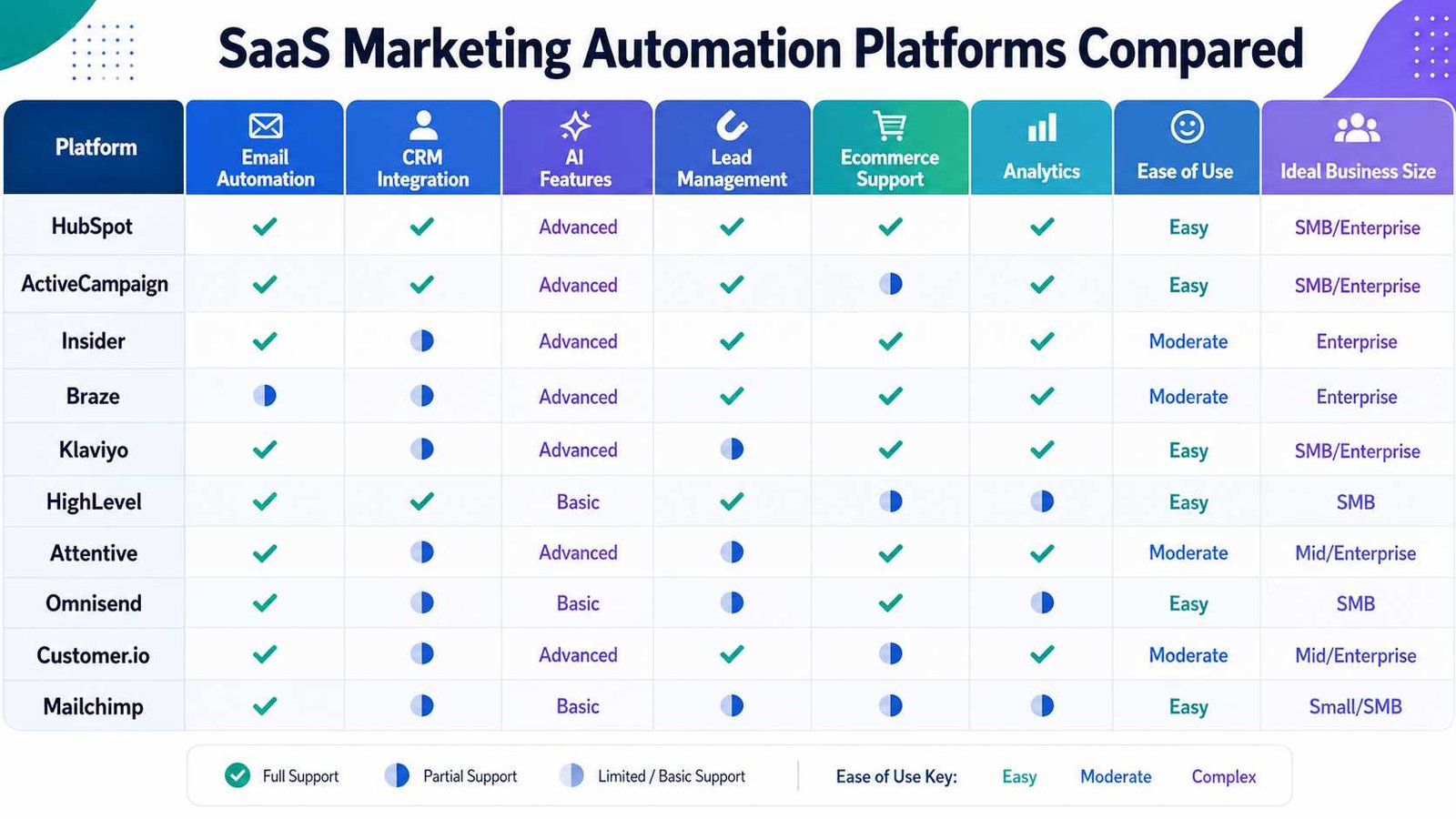
Quick Comparison of SaaS Marketing Automation Platforms
| Platform | Best Fit | Strongest Area | Typical Complexity |
|---|---|---|---|
| HubSpot | SMB to enterprise | CRM-connected marketing | Medium |
| ActiveCampaign | SMB and mid-market | Email automation | Medium |
| Insider One | Larger brands | Cross-channel personalization | High |
| Braze | Digital-first brands | Real-time messaging | High |
| Klaviyo | Ecommerce | Email and SMS | Medium |
| HighLevel | Agencies | All-in-one workflows | Medium |
| Attentive | Consumer brands | SMS marketing | Medium |
| Omnisend | Ecommerce SMBs | Affordable email/SMS | Low to medium |
| Customer.io | SaaS/product businesses | Behavioral messaging | Medium to high |
| Mailchimp | Small businesses | Email campaigns | Low |
Pricing changes often, so businesses should compare current vendor pricing against contact volume, SMS usage, seats, AI usage, integrations, and required features rather than judging software by its starting price alone.
What Are the Top 5 SaaS Companies?
There is no official universal top-five SaaS ranking. The answer changes depending on whether you measure revenue, market value, number of customers, SaaS revenue alone, or influence.
Five widely recognized SaaS-led companies include Microsoft, Salesforce, Adobe, ServiceNow, and Shopify. However, not all of these companies are pure SaaS businesses. Microsoft, for example, operates cloud infrastructure, operating systems, hardware, AI services, productivity software, and many other products.
For marketers, a more useful question is which SaaS companies play the biggest role in the marketing technology stack. Salesforce is important for CRM and customer data. Adobe operates Experience Cloud and Marketo Engage. HubSpot combines CRM and marketing tools. Shopify sits at the center of ecommerce operations for many merchants. Intuit combines financial and business software with products such as Mailchimp.
The correct choice therefore depends less on which company is biggest and more on what problem the business needs to solve.
What Is SaaS for Marketing?
SaaS for marketing means using cloud-hosted applications to manage marketing activities without operating the underlying software infrastructure yourself.
Several types of SaaS products can appear in the same marketing stack.
Email marketing SaaS manages newsletters, automated email sequences, and audience lists.
CRM SaaS stores prospect and customer records and tracks interactions.
Marketing automation SaaS connects triggers, customer data, campaigns, and workflows.
Analytics SaaS measures traffic, conversions, attribution, and campaign performance.
Social media SaaS schedules posts, manages social conversations, and analyzes engagement.
Ecommerce marketing SaaS uses shopping behavior to trigger cart reminders, recommendations, loyalty campaigns, and purchase follow-ups.
AI marketing SaaS helps create content, analyze data, segment audiences, summarize research, predict behavior, or operate more complex workflows.
The lines between these categories continue to blur. A modern platform may contain CRM, email, analytics, AI, advertising, messaging, and automation inside one subscription.
How AI Is Changing SaaS Marketing Automation
AI is moving marketing automation from fixed rules toward systems that can interpret more data and assist with decisions.
Traditional automation works like this: if a customer performs action A, execute action B.
AI-assisted automation can add another layer. It may predict which leads are most likely to convert, suggest the best audience, generate message variations, identify customer segments, summarize campaign results, or recommend which action should happen next.
Adobe offers a useful example of where enterprise platforms are heading. Marketo Engage now describes itself as an AI-powered marketing automation solution with an agentic experience. Adobe says its newer capabilities can assist with campaign operations, audience creation, data normalization, lead investigation, content development, and multi-step journey work.
Adobe has also introduced a Marketo Engage MCP server designed to connect Marketo with AI applications and large language models.
This does not mean marketers can switch on an AI agent and stop managing campaigns.
Gartner VP Analyst Ewan McIntyre warns that organizations risk investing in AI tools faster than they build the required “data foundations, processes, governance and talent.”
That point matters more than any individual AI feature. AI works best when customer data is accurate, business rules are clear, employees understand the workflow, and someone remains responsible for the final outcome.
Is ChatGPT a SaaS?
Yes. ChatGPT can reasonably be classified as SaaS.
Users access the application through the internet while OpenAI operates the underlying models, infrastructure, updates, and service. Customers do not need to install and operate the core AI system on their own servers.
ChatGPT Business makes the SaaS model especially clear. OpenAI currently provides it as a per-user subscription with a managed workspace, centralized administration, company tools, collaboration features, SAML SSO, MFA, and other business controls.
There is an important distinction, however.
ChatGPT is an application. The OpenAI API is a developer service.
A marketing team can use ChatGPT directly to research an audience, summarize campaign results, draft content variations, analyze files, or brainstorm campaign ideas. A software company can instead use the API to add AI capabilities inside its own product or marketing system.
ChatGPT is also not a complete replacement for a dedicated marketing automation platform. It does not automatically replace the CRM records, contact consent controls, campaign attribution, email infrastructure, customer journey engine, lead scoring, and channel management found in products designed specifically for marketing automation.
The stronger approach is often integration: use AI for reasoning, generation, and analysis while an automation platform manages customer records, triggers, permissions, and campaign execution.
Three Real-World Marketing Automation Examples
Ecommerce Store
A shopper adds running shoes to a cart but leaves the website.
The ecommerce system sends the event to the marketing platform. The customer receives a cart reminder several hours later. If the customer returns and buys the shoes, the reminder sequence stops. Three days later, the system sends useful care information. Several weeks later, it may recommend related products based on the purchase.
The customer sees a connected journey instead of unrelated promotional emails.
B2B SaaS Company
A manager downloads a report about project security.
The marketing platform creates or updates the CRM record and begins an educational nurture sequence. The lead reads two emails and visits the enterprise pricing page. The system raises the lead score and alerts a salesperson.
The sales representative now knows what content the prospect consumed before making contact.
Small Service Business
A customer requests a consultation through a website.
Automation immediately confirms the request, creates the CRM contact, sends appointment details, issues a reminder before the meeting, and sends a follow-up message afterward.
If the customer becomes a paying client, the prospect workflow stops and the customer workflow begins.
These examples show why automation is useful. The technology handles predictable administrative steps while people focus on decisions, conversations, and creative work.
How to Choose the Right Marketing Automation Platform
Start with the problem, not the software.
A common mistake is watching impressive product demonstrations and then trying to invent reasons to use every feature. Reverse that process.
Step 1: Define the Business Goal
Decide what you want to improve.
Examples include generating more qualified leads, recovering abandoned carts, reducing manual follow-ups, improving onboarding, increasing renewals, or connecting marketing with sales.
Step 2: Identify Required Channels
A company that only needs email should not automatically pay for a complex omnichannel platform.
List the channels you actually use: email, SMS, push notifications, website personalization, advertising, social media, mobile apps, or sales outreach.
Step 3: Check CRM and Data Integration
Automation becomes weak when customer data lives in disconnected systems.
Confirm that the platform can connect with your CRM, ecommerce system, website, analytics tools, forms, payment platform, support software, and other important applications.
Step 4: Test the Workflow Builder
Create a real workflow during the trial.
For example:
Form submission → customer segment → email → two-day wait → behavior check → sales alert
A tool that looks simple in a demonstration may feel very different when your team builds an actual campaign.
Step 5: Evaluate AI Features Carefully
Ask what the AI actually does.
Does it only generate subject lines? Can it predict lead quality? Can it create segments? Does it analyze campaigns? Can an AI agent make changes automatically? What approvals remain under human control?
Step 6: Calculate the Full Cost
Check more than the advertised starting price.
Costs may increase with contact numbers, email volume, SMS messages, users, premium integrations, AI usage, data storage, support, or advanced reporting.
Step 7: Review Security and Data Ownership
Confirm how data is stored, who can access it, how it can be exported, and what happens if you leave the platform.
Step 8: Start Small and Measure
Automate one valuable workflow first.
Measure the result. Fix the weak points. Then expand.
The practical flow is:
Need → Data → Integration → Workflow → Security → Cost → Pilot → Measurement → Scale
Security and Privacy Matter More as Automation Grows
Marketing automation platforms can hold names, email addresses, purchase histories, browsing behavior, company records, support interactions, and other customer information.
That makes access control important.
Businesses should check multi-factor authentication, administrator roles, user permissions, encryption, audit logs, integration security, consent management, unsubscribe processes, data retention, and data-export options.
AI adds another question: what happens to information sent into the AI system?
For example, OpenAI states that it does not train its models on data from ChatGPT Business, Enterprise, Edu, or its API platform by default. Its current business documentation also lists encryption and administrative security controls.
Other vendors use different policies. Businesses should read the current terms for every platform they connect.
A secure automation system should also follow the principle of least privilege. Employees should receive only the access needed for their jobs. A content writer does not necessarily need billing controls. An external contractor should not automatically receive access to the complete customer database.
Common Marketing Automation Mistakes
The first mistake is automating a bad process. If nobody understands when a lead should go to sales, software will not solve that confusion.
The second is sending too many messages. Automation makes communication easy, which can encourage teams to create unnecessary workflows. Every message should have a purpose.
The third is using poor data. Duplicate records, missing fields, outdated customer information, and inconsistent tags weaken personalization.
The fourth is building workflows that are too complex. A simple five-step sequence that employees understand may outperform a 40-step automation nobody wants to edit.
The fifth is ignoring human contact. High-value sales, sensitive complaints, unusual customer situations, and strategic accounts may still require a person.
The sixth is measuring activity instead of business results. Email opens can provide useful information, but companies ultimately care about outcomes such as qualified leads, purchases, customer value, renewals, and revenue.
The seventh is adding AI before fixing data and processes.
Gartner’s 2026 findings make that last problem especially clear: 70% of CMOs view becoming an AI leader as a critical goal, while 70% also say their marketing processes are not mature enough to implement and scale AI effectively.
Advanced SaaS Marketing Automation Strategies
Once basic workflows operate reliably, businesses can add more advanced techniques.
Behavioral lead scoring gives more weight to meaningful actions. Visiting a pricing page may matter more than opening a newsletter.
Dynamic segmentation automatically moves customers between groups as their behavior changes.
Account-based marketing coordinates campaigns around high-value companies rather than treating every individual lead separately.
Lifecycle automation changes communication as a person moves from prospect to customer, active customer, renewal candidate, or former customer.
Multi-touch attribution attempts to show how different campaigns contributed to a conversion instead of giving all credit to the final click.
Predictive models can estimate which customers may buy, cancel, upgrade, or respond to particular messages.
AI agents represent the next step. Instead of merely generating text, an agent may analyze a goal, work with connected data, and carry out parts of a workflow within defined limits.
Adobe’s direction with Marketo illustrates this shift. Its agentic capabilities are designed to help with campaign operations, audience work, data cleanup, journey creation, and other marketing tasks while keeping strategy and approvals under human control.
SaaS Marketing Automation Trends to Watch
The biggest change is the movement from automation of tasks toward automation of decisions.
Older systems were good at following fixed instructions. Modern platforms increasingly use AI to recommend the audience, content, channel, timing, or next action.
A second trend is two-way communication. Customers increasingly expect brands to respond rather than simply broadcast messages. Salesforce found that 83% of marketers say customers expect two-way conversations, while many organizations still struggle to provide them consistently.
A third trend is tighter connection between AI and customer data. Marketing teams need systems that understand CRM history, purchases, product usage, and customer-service activity instead of generating content without context.
A fourth trend is consolidation. Companies are questioning whether they need a large collection of disconnected marketing tools when larger SaaS platforms increasingly combine CRM, analytics, messaging, customer data, and AI.
The final trend is stronger governance. As AI gains the ability to take actions rather than only make suggestions, companies will need clearer permissions, approval rules, monitoring, and accountability.
The future of SaaS marketing automation will therefore not be fully automatic marketing. It will be better-controlled automation with more capable AI and better customer context.
Frequently Asked Questions
What are the top 5 SaaS companies?
There is no universal top-five ranking because results depend on revenue, market value, customers, or SaaS revenue. Major SaaS-led companies commonly include Microsoft, Salesforce, Adobe, ServiceNow, and Shopify. For marketing teams specifically, companies such as HubSpot, Salesforce, Adobe, Shopify, and Intuit are especially relevant because their products sit directly inside marketing, CRM, ecommerce, and customer-data workflows.
What is SaaS for marketing?
SaaS for marketing is cloud-based software used through the internet to manage activities such as CRM, email marketing, customer segmentation, analytics, lead nurturing, social media, ecommerce campaigns, and marketing automation. The software provider manages the underlying infrastructure while the business normally pays a subscription.
What are the top 10 marketing automation platforms?
G2’s 2026 evaluation highlights HubSpot Marketing Hub, ActiveCampaign, Insider One, Braze, Klaviyo, HighLevel, Attentive, Omnisend, Customer.io, and Mailchimp among its top marketing automation choices. The best platform depends on business size, customer channels, integrations, budget, technical skills, and required automation depth.
Is ChatGPT a SaaS?
Yes. ChatGPT fits the SaaS model because users access hosted software online while OpenAI operates the underlying application and infrastructure. ChatGPT Business provides a subscription-based managed workspace with administrative and security features. The OpenAI API is different because developers use it to build AI capabilities into other applications.
Is marketing automation worth it for a small business?
It can be, especially when employees repeatedly send the same follow-ups, appointment reminders, onboarding messages, cart reminders, or customer updates. A small business should start with one or two valuable workflows rather than buying a complex enterprise platform.
What is the difference between CRM and marketing automation?
A CRM primarily manages customer and prospect information, sales activity, and relationships. Marketing automation uses customer information and behavioral triggers to run campaigns and workflows. Modern platforms often combine both functions, so the boundary is becoming less clear.
Can AI replace marketing automation software?
Not completely. AI can generate content, analyze data, identify patterns, recommend actions, and increasingly execute controlled tasks. A dedicated automation platform still provides customer records, workflow rules, consent management, campaign delivery, integrations, reporting, and channel infrastructure.
How much does marketing automation cost?
Costs range from inexpensive plans for small email lists to large enterprise contracts. Pricing can depend on contacts, monthly sends, SMS volume, seats, AI usage, support, integrations, and advanced analytics. Always calculate the total expected cost at your actual customer volume rather than comparing advertised entry prices alone.
Practical SaaS Marketing Automation Checklist
Before choosing or expanding a platform:
- Define the business problem you want automation to solve.
- Identify repetitive marketing tasks.
- List the channels you actually use.
- Check CRM compatibility.
- Confirm ecommerce or website integrations.
- Clean customer data before building workflows.
- Test segmentation options.
- Review lead-scoring features.
- Test one real automation workflow.
- Check AI capabilities and their limits.
- Review human approval controls.
- Confirm user permissions and MFA options.
- Review data ownership and export options.
- Check consent and unsubscribe controls.
- Calculate total subscription and usage costs.
- Define conversion and revenue metrics.
- Start with a small pilot.
- Review workflows regularly.
- Remove automations that no longer serve a purpose.
- Keep humans involved in high-value and sensitive decisions.
Further Reading and Useful Resources
For deeper research, start with Salesforce’s State of Marketing 2026 for customer-engagement and AI adoption data. Gartner’s 2026 CMO Spend Survey provides useful context on AI budgets and organizational readiness. HubSpot’s marketing automation guides explain trigger-based workflows and lead nurturing in practical terms. G2’s 2026 comparison provides a current view of major automation platforms. Adobe’s Marketo Engage documentation is useful for understanding agentic AI and enterprise marketing automation. OpenAI’s Business documentation explains how ChatGPT is delivered to organizations and how business data controls work.
Final Thoughts Before You Automate Your Marketing
The best SaaS companies marketing automation strategy does not begin with finding the platform that has the longest feature list.
It begins with understanding the customer journey.
Know where leads come from. Decide which actions matter. Clean the data. Connect the systems. Define when automation should act and when a person should take over. Then choose software capable of supporting that process.
AI makes these platforms more powerful in 2026. It can help teams analyze customers, generate content, identify opportunities, optimize campaigns, and increasingly perform controlled actions. But Gartner’s research shows why companies should not confuse AI spending with AI readiness. Strong data, clear workflows, governance, and skilled people still determine whether the technology creates value.
For a small business, that may mean a straightforward email and CRM automation platform. An ecommerce company may benefit more from Klaviyo or Omnisend. A product-led SaaS company may value Customer.io. A growing company may prefer HubSpot or ActiveCampaign. Large enterprises may need platforms such as Braze, Insider One, or Adobe Marketo Engage.
The right platform is the one your team can understand, integrate, measure, and improve.
Automation should remove repetitive work without removing judgment. When the technology makes customer communication more relevant, faster, and easier to manage, it is doing its job.

Digital innovation analyst with a focus on AI, IoT, and connectivity. Maria’s articles combine data-driven research, industry statistics, and tested solutions, helping global readers stay informed, confident, and future-ready in technology.