
Wireless networks now carry video meetings, cloud software, payment systems, security cameras, smart appliances, online classes, and AI applications. A slow or unstable connection no longer causes a minor inconvenience. It can stop business transactions, interrupt lessons, freeze medical calls, or disconnect important devices.
The pressure on wireless infrastructure continues to rise. Ericsson reported that total monthly global mobile network traffic reached 210 exabytes in the first quarter of 2026 . That represented 22 percent growth from the same quarter in 2025. Video generated about 75 percent of mobile data traffic at the end of 2025.
Network teams face another problem: modern wireless environments have become too complex to manage through occasional speed tests and manual router changes. Cisco surveyed more than 6,000 wireless professionals for its 2026 State of Wireless report. It found that 98 percent saw growing operational complexity, while 81 percent preferred artificial intelligence for IT operations, or AIOps, to simplify wireless management. Only 26 percent reported a high level of implementation.
Here’s what matters: AI does not create radio capacity from nothing. It improves wireless network performance by studying network data, identifying patterns, predicting problems, and helping the network use its available resources more effectively.
“Wi-Fi has transcended its origins as a convenience feature to become a strategic growth engine.”
— Cisco State of Wireless Report 2026

What Is Wireless Network Performance?
Wireless network performance describes how effectively a network moves data between users, devices, applications, and online services. People often treat performance as another word for speed, but speed is only one part of it.
A network may deliver 500 Mbps during a test and still perform badly during a video call. High packet loss could distort the audio. Unstable latency could cause delays. Poor roaming could disconnect the call when the user walks into another room.
A complete performance assessment should examine several measurements:
| Performance metric | What it measures | Why it matters |
|---|---|---|
| Throughput | Useful data transferred each second | Affects downloads, streaming, and file transfers |
| Latency | Time required for data to reach its destination | Affects calls, gaming, and interactive apps |
| Jitter | Variation in packet-delivery time | Causes broken audio and unstable video |
| Packet loss | Data packets that fail to arrive | Creates pauses, retransmissions, and errors |
| Signal strength | Strength of the received wireless signal | Affects connection stability and usable speed |
| Signal-to-noise ratio | Useful signal compared with interference | Helps show the quality of a connection |
| Channel utilization | How busy a wireless channel is | Reveals congestion and airtime competition |
| Connection time | Time needed to join and authenticate | Affects user onboarding and device reliability |
| Roaming performance | Quality of movement between access points | Matters in schools, offices, hospitals, and warehouses |
| Availability | How consistently the service remains usable | Affects business continuity |
Modern wireless assurance platforms track metrics such as connection time, coverage, capacity, throughput, and client experience rather than relying on one headline speed figure.
What Is the Performance of a Network?
Network performance is the combined quality of speed, response time, capacity, coverage, stability, and reliability.
Consider two wireless connections. Network A reaches 600 Mbps near the access point but drops below 20 Mbps in the next room. Network B delivers a steady 250 Mbps throughout the building with low latency and little packet loss. Network A has the higher peak speed, but Network B provides better overall performance.
AI helps administrators see this wider picture. Instead of asking only, “How fast is the Wi-Fi?” an AI-assisted system can ask:
- Which users experience poor performance?
- When does congestion begin?
- Which access point causes failed connections?
- Does the problem come from Wi-Fi, the internet connection, authentication, or an application?
- What changed before the problem started?
That shift from device-level speed to user-level experience is one of the most important roles of AI in wireless networking.
How Fast Is a Wireless Network?
The answer depends on what type of speed you are measuring.
A router box may advertise several gigabits per second, but that number often represents combined theoretical capacity across multiple frequency bands and data streams. It does not guarantee that one laptop will receive the same speed.
A wireless connection has at least four different speed figures:
- Theoretical protocol speed: The maximum defined under ideal technical conditions.
- Device link rate: The rate negotiated between a device and an access point.
- Real WLAN throughput: The useful speed available for local data transfers.
- Internet speed: The rate allowed by the internet plan, modem, and external network.
Wi-Fi 7 illustrates the difference. Its theoretical maximum can reach about 46 Gbps, but a common 2×2 Wi-Fi 7 client has a theoretical maximum link rate around 5.76 Gbps under specific conditions, including a 320 MHz channel and compatible equipment. Real performance will usually remain lower because of distance, interference, protocol overhead, walls, client limitations, and shared airtime.
A 5.8 Gbps wireless link also cannot produce a 5.8 Gbps internet connection when the user has a 100 Mbps broadband plan. AI may help that user receive a more stable share of the available 100 Mbps, but it cannot raise the provider’s service limit.
What Is a Good WLAN Speed?
A good WLAN speed is one that supports the intended application consistently at the places where people use it.
The right target depends on the number of users, the type of applications, the amount of local traffic, and the need for upload capacity. A family streaming video has different needs from a design company transferring large local files or a school supporting hundreds of students.
The figures below work as practical starting points, not universal standards:
| Activity | Practical speed target per active device | Other important factors |
|---|---|---|
| Web browsing and email | 5–10 Mbps | Stable signal and quick DNS response |
| HD video meeting | 5–10 Mbps in both directions | Low latency, jitter, and packet loss |
| 4K video streaming | 25 Mbps or more | Consistent throughput |
| Cloud gaming | 25–50 Mbps | Low latency matters more than peak speed |
| Large local file transfers | 300 Mbps or more | Fast client, access point, switch, and storage |
| Small office cloud use | 100 Mbps or more shared | User count, uploads, backups, and calls |
| High-density classroom | Capacity-based planning | Airtime, channel use, and access-point placement |
For comparison, Zoom lists about 3.8 Mbps upload and 3 Mbps download for 1080p video, while Netflix recommends at least 15 Mbps for a 4K stream. A WLAN should provide extra headroom because real networks carry several applications at once.
The FCC uses 100 Mbps download and 20 Mbps upload as its benchmark for advanced fixed broadband capability. That figure describes internet access rather than local WLAN capacity, but it provides a useful reference for modern household and small-business demand.
Why Is AI Important in Wireless Network Performance?
A traditional wireless controller often follows fixed rules. It may change a channel when interference passes a threshold or send an alert when an access point goes offline. These rules still have value, but they struggle when thousands of devices, changing workloads, several buildings, and multiple network services interact.
AI can examine more variables over a longer period. It may compare current conditions with past patterns, similar locations, expected device behavior, and application performance. This allows the network to identify problems that one threshold may miss.
Think of a router or access point as a traffic junction. Traditional management waits until traffic becomes blocked and then changes the signal timing. AI studies previous traffic, recognizes that congestion usually begins at 9:00 a.m., and adjusts the flow before the queue becomes serious.
A typical AI-based wireless process follows this cycle:
Collect data → create a baseline → detect a pattern → predict risk → recommend or apply a change → measure the result
The data may come from access points, switches, user devices, authentication systems, applications, internet links, and security tools. The model can then connect events that appear unrelated when viewed separately.
Cisco’s 2026 research shows why this approach appeals to network teams. Fifty-five percent of surveyed wireless professionals remained stuck in reactive operations, and 64 percent expected resolution times to increase.
Common Wireless Problems, Causes, and Effects
The same user complaint can have several causes. “The Wi-Fi is slow” might refer to interference, a weak signal, an overloaded access point, a congested internet connection, a slow application, or even a faulty cable.
| Problem | Common cause | Possible impact |
|---|---|---|
| Slow wireless speed | Congestion, interference, or weak signal | Delayed downloads and cloud work |
| Dropped video calls | Packet loss, jitter, or roaming failure | Broken meetings and lost productivity |
| Dead zones | Poor access-point placement or building materials | Devices disconnect in certain rooms |
| Uneven user experience | Too many clients on one access point | Some users receive much lower speeds |
| Frequent reconnections | Authentication or client-driver problems | Interrupted work and repeated login attempts |
| High latency | Airtime congestion or WAN delay | Lag in games, calls, and cloud apps |
| Failed roaming | Sticky clients or weak handoff design | Calls drop when users move |
| Random outages | Hardware, cable, power, or firmware faults | Service downtime |
| Unusual bandwidth use | Compromised or misconfigured device | Reduced capacity and security exposure |
| Long repair time | Data spread across separate tools | Higher support costs |
AI adds value by correlating these symptoms. For example, it may notice that users reporting weak Wi-Fi all connect through one access point, but the radio looks healthy. It may then trace the problem to a damaged Ethernet cable, a missing virtual LAN, or a slow authentication server. Juniper documents AI-assisted actions that can identify bad cables, missing VLANs, offline access points, capacity problems, and persistently failing clients.
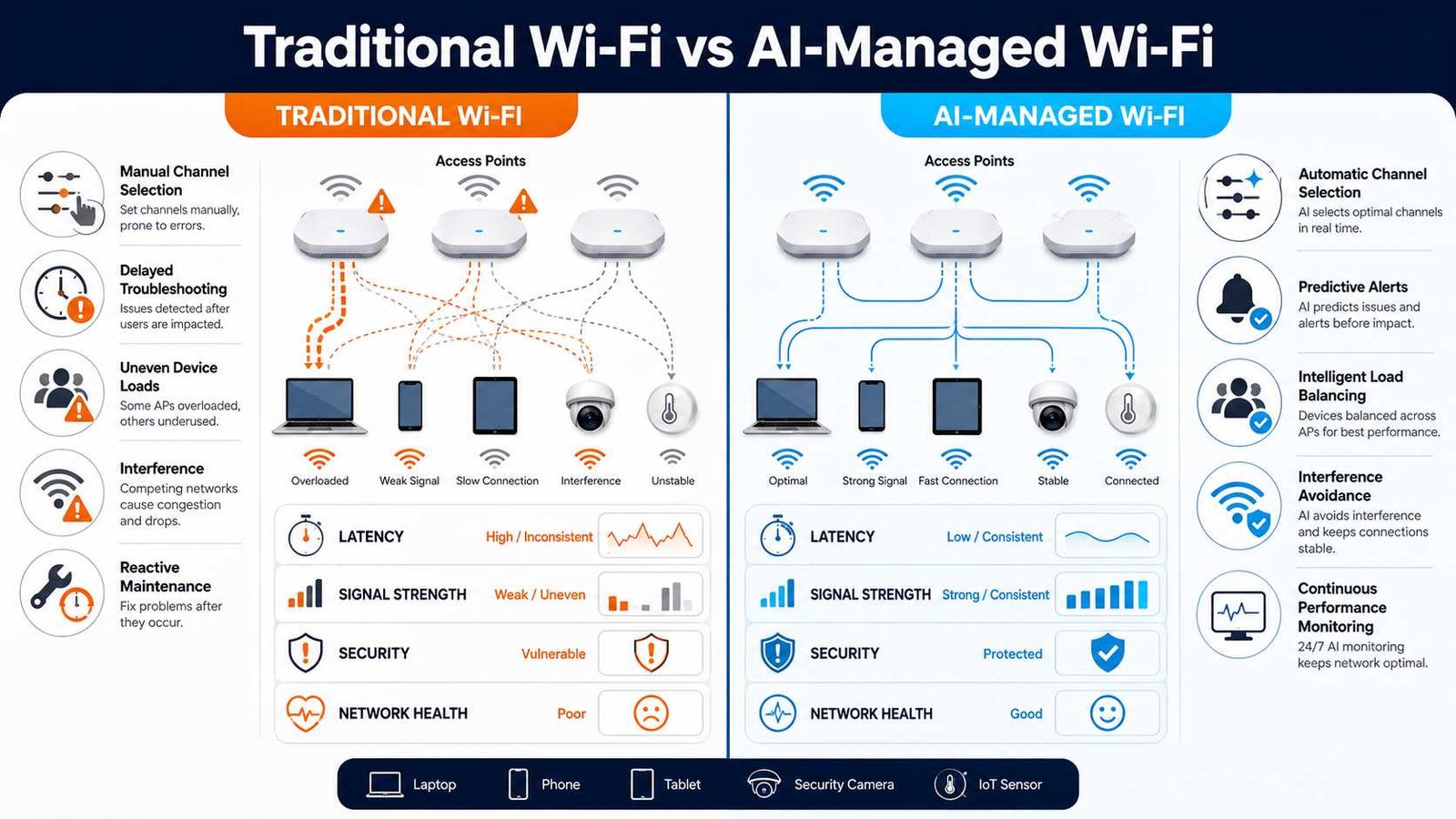
Eight Ways AI Enhances Wireless Network Performance
1. Automatic Channel Selection
Nearby access points can interfere when they use the same or overlapping channels. Manual channel plans may work when first installed but become less effective after neighboring networks, devices, or building usage change.
AI-assisted radio resource management studies interference, client demand, channel history, and access-point relationships. It can select channels that reduce competition while avoiding unnecessary changes.
Cisco reports that its AI-enhanced radio resource management reduced co-channel interference by up to 40 percent, improved downlink signal-to-noise ratio by up to 7 dB, and reduced radio-management changes by up to 75 percent during busy periods. These are Cisco’s measured results from its own deployments, not guaranteed outcomes for every network.
2. Intelligent Transmit-Power Control
More wireless power does not always produce better performance. Excessive transmit power can make access points interfere with one another. It can also cause a device to remain connected to a distant access point instead of moving to a nearer one.
Too little power creates coverage gaps. AI can study client signal levels, retries, access-point overlap, movement patterns, and interference to recommend better power settings.
The aim is not maximum power. It is balanced coverage with enough overlap for reliable roaming and as little unnecessary interference as possible.
3. Congestion Prediction and Load Balancing
Wireless devices share airtime. One access point serving many active clients may become overloaded while another nearby access point remains lightly used.
AI can identify this imbalance and encourage suitable clients to connect through another radio or access point. It may also predict congestion based on historical patterns.
A school network, for example, may see hundreds of students connect when a lecture begins. AI can recognize that repeated pattern and prepare radio resources before the room reaches full capacity.
4. Interference Detection
Wi-Fi competes with neighboring wireless networks and other radio sources. Microwave ovens, wireless video equipment, Bluetooth activity, and some industrial devices can affect parts of the spectrum.
An AI system can compare changes in noise, retries, channel utilization, and client performance. It may distinguish a weak coverage problem from a busy channel or non-Wi-Fi interference.
This distinction matters because each problem needs a different fix. Adding another access point may help a coverage gap but make co-channel interference worse when the real problem is poor channel planning.
5. Predictive Maintenance
Traditional maintenance often begins after equipment fails. Predictive systems look for early warning signs.
An access point may restart more often, run hotter, lose its wired connection briefly, or show growing error rates. AI can compare this behavior with its normal baseline and flag the device before it causes a complete outage.
Predictive maintenance does not remove the need for technicians. It gives them better timing and evidence. They can inspect a cable, power source, switch port, or access point before users experience serious disruption.
6. Faster Root-Cause Analysis
A failed wireless session may involve several systems:
- The client finds an access point.
- The access point accepts the connection.
- An authentication server checks the user.
- DHCP assigns a network address.
- DNS finds the application.
- The internet or private network carries the traffic.
- The application responds.
A problem at any stage may appear to the user as “bad Wi-Fi.” AI can correlate events across these stages and identify the most likely cause.
This reduces the time administrators spend switching between dashboards and testing unrelated fixes. It also lowers the risk of changing radio settings when the real fault lies in a server, switch, cable, endpoint, or cloud service.
7. Application-Aware Traffic Management
Not all traffic has the same urgency. A voice call needs low latency and stable packet delivery. A background software update can tolerate delay. A payment transaction may use little bandwidth but still need high reliability.
AI-assisted quality-of-service systems can classify traffic patterns, observe application experience, and help prioritize critical services during congestion.
A small café could protect payment-terminal and staff traffic while limiting heavy guest downloads. A school could prioritize live lessons over background device updates. Administrators should still define the policy. AI helps apply and refine it.
8. Smarter Roaming and Client Experience
Users expect their devices to move between access points without interruption. In practice, some clients remain connected to a distant access point even when a stronger one is available. These devices are often called sticky clients.
AI can study signal strength, connection history, failed handoffs, data retries, and movement patterns. It can identify areas where roaming regularly fails or where access-point placement creates poor handoff conditions.
HPE Aruba describes AI-assisted technologies that optimize system-wide channels, bandwidth, and transmit power, while its client-management features aim to improve connections as users move around a site.
How to Improve Wireless Network Performance with AI
AI should support a sound network plan, not replace one. The safest approach starts with measurement and introduces automation in stages.
Step 1: Measure the Current Network
Create a baseline before changing anything. Test the network at different locations and times, including busy periods.
Record:
- Upload and download throughput
- Latency and jitter
- Packet loss
- Signal strength and signal-to-noise ratio
- Channel utilization
- Connection and authentication failures
- Access-point client counts
- Application performance
This baseline helps you prove whether an AI recommendation improves the network.
Step 2: Define the Most Important User Experience
Do not optimize every metric without a clear purpose. Choose the services that matter most.
A shop may protect point-of-sale traffic. A school may focus on classroom capacity. A remote worker may prioritize video calls. A warehouse may need reliable roaming for scanners.
The performance goal should describe the user experience, not simply demand “faster Wi-Fi.”
Step 3: Fix Physical Problems First
AI cannot remove a concrete wall, repair a damaged cable, add missing internet capacity, or move an access point trapped inside a cabinet.
Check access-point placement, wired backhaul, switch capacity, power, antennas, firmware, and building coverage. Correct these limits before expecting software to compensate for them.
Step 4: Enable Useful Telemetry
The AI system needs accurate data. Enable the appropriate access-point, switch, client, application, and security telemetry.
Collect only what serves a clear operational purpose. Avoid keeping personal or device-level information longer than necessary.
Step 5: Set Measurable Goals
Define targets such as:
- Maximum acceptable latency
- Minimum coverage level
- Maximum channel utilization
- Acceptable connection time
- Required call quality
- Maximum packet loss
- Minimum application availability
Clear targets help the AI distinguish a meaningful problem from normal variation.
Step 6: Start in Recommendation Mode
Allow the system to suggest changes before granting it permission to apply them.
Review proposed channel changes, power adjustments, firmware actions, client steering, and traffic policies. Confirm that the recommendations match local conditions.
Step 7: Automate Low-Risk Tasks
Begin with actions that have limited impact, such as grouping alerts, scheduling routine channel optimization, identifying capacity risks, or flagging unhealthy clients.
Keep major configuration, access-control, and security actions under human approval until the system proves reliable.
Juniper’s Marvis Actions, for example, supports both a driver-assist mode that recommends action and a self-driving mode that can automatically resolve selected issues.
Step 8: Test and Review
Repeat the same tests after each major change. Compare results by location, application, device type, and time of day.
Do not accept a better dashboard score when users still experience delays. The final measure should remain the quality of the real service.
Real-World Examples of AI-Managed Wireless Networks
Example 1: A High-Density School
A university lecture hall may remain nearly empty during one period and receive 300 devices during the next. Many students carry a phone and laptop, so the number of connections can rise faster than the number of people.
A traditional system may react after channel utilization rises and calls begin to fail. An AI-assisted platform can study class schedules and historical demand, detect overloaded access points, identify connection delays, and recommend capacity changes.
The university still needs good access-point placement and sufficient wired capacity. AI makes those resources easier to observe and manage.
Example 2: A Café or Small Office
Consider a café with guest Wi-Fi, staff tablets, cloud-based ordering, wireless payment terminals, cameras, music streaming, and office laptops.
At lunch, guest devices begin large downloads. The payment system experiences delay even though the internet connection has not failed.
An AI-assisted system can identify the traffic pattern, show that guest usage consumes too much airtime, and recommend a separate guest policy. It may protect business applications, balance users across available radios, and warn the owner when capacity regularly approaches its limit.
The result is not unlimited bandwidth. It is better use of the connection the business already pays for.

Example 3: AI Devices on Mobile Networks
Future wireless demand will not come only from people downloading content. AI assistants, smart glasses, connected cameras, cloud gaming, and autonomous machines may continuously upload video, sensor information, and requests for remote processing.
Ericsson found that uplink traffic grew faster than downlink traffic for 43 of 55 service providers studied in 2025. Its medium-adoption model suggests that additional AI traffic could make uplink traffic three times higher in 2031 than in 2025.
This trend changes network planning. Administrators must consider upload capacity, edge coverage, and two-way application performance rather than focusing mainly on download speed.
Modern AI Tools for Wireless Management
Several enterprise platforms now use machine learning, automation, and natural-language assistance. Their features, licensing, supported hardware, and level of automation differ.
Cisco AI-Enhanced RRM and Network Assurance
Cisco applies AI to radio resource management, wireless assurance, performance analysis, and automated operations. Its systems can analyze radio conditions, client experience, interference, and configuration behavior.
Cisco’s 2026 report also presents a warning. AI can reduce operational work, but AI workloads and AI-generated attacks can increase complexity and security risk at the same time.
Juniper Mist Wi-Fi Assurance and Marvis
Juniper Mist Wi-Fi Assurance uses machine learning to track service-level expectations such as time to connect, coverage, capacity, and throughput.
Marvis can identify likely root causes, highlight affected users or sites, recommend actions, and automate selected corrections. Juniper also describes dynamic packet capture and client-level visibility for troubleshooting.
HPE Aruba Networking Central
HPE Aruba Networking Central combines wired, wireless, WAN, and IoT management. Its AI Insights can identify and categorize issues affecting onboarding, connectivity, and optimization, then provide recommended fixes and supporting context.
Vendor-Neutral Diagnostic Tools
AI dashboards should not replace independent testing. Administrators can verify results with:
- Wi-Fi analyzer applications
- Spectrum analyzers
- Wireless site-survey software
- Local throughput tests
- Internet speed tests
- Packet-capture tools
- Synthetic client sensors
- Switch and cable diagnostics
Independent tools help confirm whether a vendor’s health score matches real performance.
AI, Wireless Security, and Privacy
A compromised device can consume bandwidth, scan other systems, send unusual traffic, or create repeated authentication events. Security problems can therefore reduce both safety and network performance.
AI-based anomaly detection creates a baseline of normal behavior and looks for meaningful changes. It may identify an unknown device, a rogue access point, repeated login attempts, unusual data transfers, or a camera contacting an unexpected destination.
Cisco’s 2026 survey found that 58 percent of respondents had experienced financial losses from wireless security incidents. Among those reporting losses, 40 percent said the annual amount exceeded $1 million. Cisco also found that compromised IoT or operational technology devices were involved in more than one-third of affected organizations.
These findings come from an enterprise survey, so they should not be read as a prediction for every home or small business. They do show why intelligent wireless management must include security.
Privacy Needs Equal Attention
Wireless telemetry may reveal device identifiers, connection times, locations, application categories, and patterns of activity.
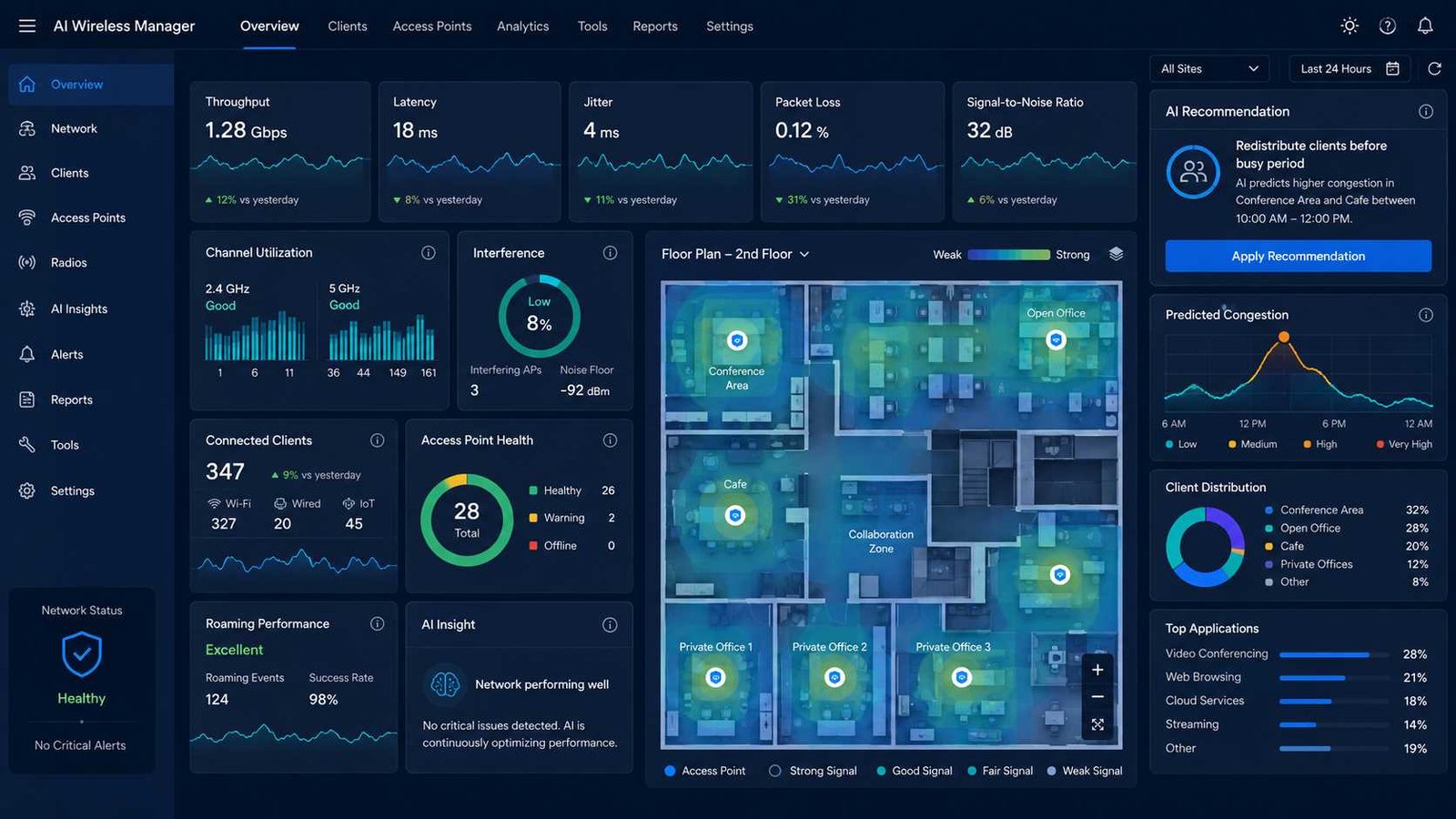
Organizations should limit collection to useful information, encrypt stored data, apply role-based access, set retention limits, and record automated decisions. Staff should also know when a cloud platform sends telemetry outside the local network.
Automatic security actions need guardrails. Isolating a clearly compromised device may prevent harm, but a false positive could disconnect a payment terminal, medical device, or production system.

Limitations of AI in Wireless Networking
AI can improve decisions, but it has clear limits.
First, poor data leads to poor recommendations. Missing telemetry, incorrect device classification, or a short observation period can create a misleading baseline.
Second, AI cannot fix physical limitations. It cannot create extra spectrum, replace an old client radio, remove a thick wall, repair bad wiring, or increase an internet subscription.
Third, automated platforms can increase cost and dependency. Some features require compatible access points, cloud subscriptions, long data-retention plans, or a complete vendor ecosystem.
Fourth, an automated error can spread quickly. A poor manual setting may affect one access point. A poor global policy could affect every site.
Finally, administrators may not understand why a complex model recommends a change. High-impact decisions should include a clear explanation, approval process, rollback plan, and record of the result.
Advanced Optimization for Larger Networks
Larger organizations should manage AI through defined service objectives and controlled automation.
Start by creating targets for voice calls, video, roaming, device onboarding, cloud access, and critical applications. Connect wireless data with DHCP, DNS, authentication, switching, WAN, and application monitoring. This allows the system to determine whether a poor experience began in the radio network or somewhere else.
Use closed-loop automation carefully:
Detect → explain → recommend → approve → apply → verify → roll back
Networks should also account for local patterns. A model trained on offices may not understand a warehouse full of moving scanners and metal shelving. A school, hospital, stadium, and factory each has different density, movement, interference, and safety requirements.
Human oversight remains essential. Ericsson describes autonomous network operations as a combination of AI-driven observability, intent, automation, conflict resolution, and human control.
“The transition to autonomous network operations is key to building trusted, self-X capabilities.”
— Erik Ekudden, Ericsson CTO
The Future of AI-Native Wi-Fi, 5G, and 6G
Today, most systems add AI to an existing management platform. Future networks may treat AI as a native part of their design.
An administrator may eventually state an intent such as: “Keep payment and voice services available during the event while limiting guest congestion.” Network agents could translate that goal into radio, traffic, security, and capacity actions.
Wi-Fi 7 already provides tools such as wider channels, multi-link operation, and improved use of available spectrum. AI can help decide when and where to use these capabilities, but compatible clients, regional spectrum rules, access-point design, and wired capacity will still affect results.
Telecom networks are also moving toward AI agents that observe conditions, reason about goals, and act across different operational areas. Ericsson expects AI to become a native component of 6G-oriented network architecture, with intent-driven management and increasingly autonomous control.
The direction is clear, but fully autonomous wireless networks are not yet universal. Trust, security, data quality, technical standards, cost, and human accountability will determine how quickly organizations allow AI to make independent decisions.
Frequently Asked Questions
What Is the Importance of AI in Wireless Network Performance?
AI helps a wireless network analyze more data, detect hidden patterns, predict congestion, balance users, reduce interference, and identify faults faster. It also reduces repetitive troubleshooting work.
Its greatest benefit is not simply higher peak speed. It is more consistent service across users, devices, locations, and applications.
How Can You Improve Wireless Network Performance?
Start with the physical network. Place the router or access points correctly, reduce interference, use modern equipment, update firmware, check wired connections, and test coverage.
Next, measure throughput, latency, jitter, packet loss, signal quality, and channel utilization. AI can then use this data to identify patterns and recommend improvements.
How Fast Is a Wireless Network?
A wireless network can range from a few megabits per second to several gigabits per second. Actual speed depends on the Wi-Fi generation, client hardware, access point, channel width, frequency band, interference, distance, walls, network load, and internet service.
The advertised router speed rarely equals the speed received by one device.
What Is a Good WLAN Speed?
A good WLAN speed supports the intended applications throughout the required coverage area.
For many homes and small offices, reliable speeds above 100 Mbps at active locations can support normal cloud work, streaming, calls, and browsing. Larger groups, local file transfers, or high-density environments may need much more capacity.
Latency, packet loss, and stability remain just as important as Mbps.
Can AI Increase Internet Speed?
AI cannot increase the speed purchased from an internet provider. It can reduce wireless congestion, interference, retransmissions, poor client distribution, and incorrect configuration.
That improvement may allow users to receive more of the capacity already available.
Does AI Replace a Network Administrator?
No. AI can handle monitoring, pattern detection, recommendations, and selected routine actions.
People still need to design the network, install hardware, set security policy, approve high-risk changes, investigate physical faults, manage budgets, and confirm that automation produces the intended result.
Printable AI Wireless Performance Checklist
Use this checklist before allowing AI to optimize a wireless network:
- Record current throughput, latency, jitter, and packet loss
- Test Wi-Fi in every important location
- Check signal strength and signal-to-noise ratio
- Identify congested channels and busy periods
- Review access-point placement
- Confirm wired backhaul and switch capacity
- Check authentication and DHCP performance
- List business-critical applications
- Define measurable performance targets
- Enable sufficient network telemetry
- Protect collected device and user data
- Start AI in recommendation mode
- Automate only low-risk actions first
- Keep approval controls for security changes
- Create a rollback process
- Compare performance before and after changes
- Review automated decisions regularly
- Reassess the network after layout or usage changes
Final Thoughts Before You Automate Your Network
The role of AI in enhancing wireless network performance is practical, not magical. AI can study thousands of events, recognize patterns that people may miss, and respond faster than a technician reviewing separate dashboards.
It can reduce interference, predict congestion, improve client distribution, detect abnormal behavior, and shorten troubleshooting. These improvements become more valuable as wireless networks support more devices and more important applications.
But AI works best on top of a properly designed network. Good access-point placement, sufficient capacity, secure configuration, updated hardware, independent testing, and skilled human oversight still matter.
The strongest approach combines both sides. Let AI handle repetitive analysis and low-risk optimization. Let people define goals, protect users, approve major changes, and judge whether the network truly delivers a better experience.

Digital innovation analyst with a focus on AI, IoT, and connectivity. Maria’s articles combine data-driven research, industry statistics, and tested solutions, helping global readers stay informed, confident, and future-ready in technology.