
Software licences look simple when a business has ten employees and a handful of applications. The problem changes quickly when that same company adds Microsoft 365, Adobe, Salesforce, project management software, security tools, AI subscriptions, cloud services, and specialist desktop applications. IT may know what employees install, finance may know what the company pays, and procurement may hold the contracts. Yet nobody has a complete picture.
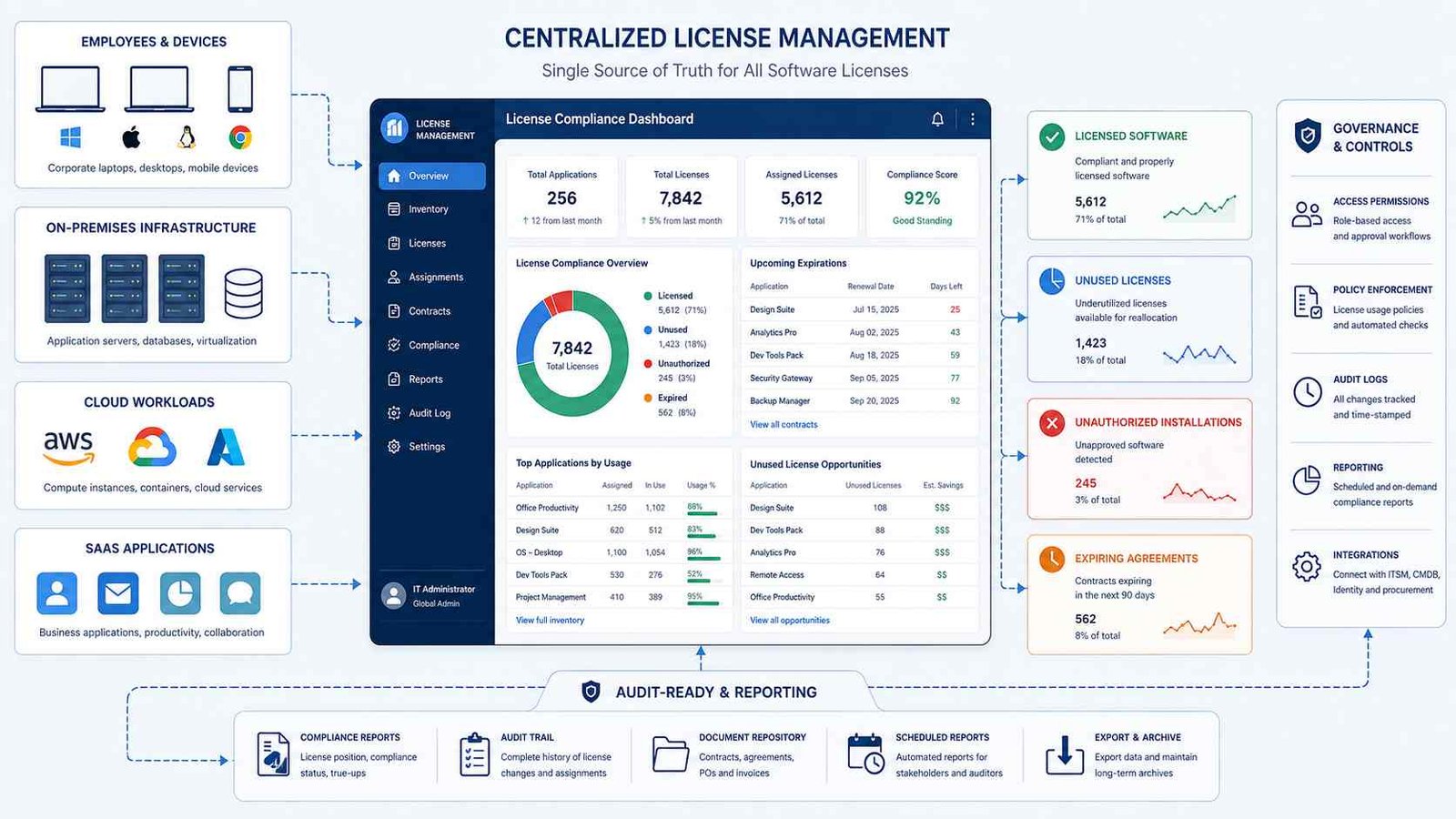
A software licence management tool connects those pieces. It helps an organization understand what software it owns, what employees actually use, what contracts allow, which subscriptions renew soon, and where licensing risks or unused spending exist.
That visibility matters more in 2026. Flexera’s 2026 State of ITAM survey of 512 professionals found that 48% of surveyed organizations had faced a software vendor audit during the previous year. Only 36% reported complete visibility across their IT assets and business impact. Flexera also found growing ITAM responsibility for SaaS, public cloud software, and AI tools.
SaaS creates another problem. Zylo’s 2026 SaaS Management Index data says the average organization in its dataset uses only 54% of provisioned SaaS licences. That figure comes from Zylo’s own research, so it should not be treated as a universal industry average, but it illustrates why companies increasingly measure actual utilization rather than simply counting purchased seats.
Here’s what matters: the best licence management tool depends on what you need to manage. A multinational company dealing with Oracle and IBM agreements has different requirements from a 100-person SaaS-heavy business or an engineering company sharing expensive CAD licences.
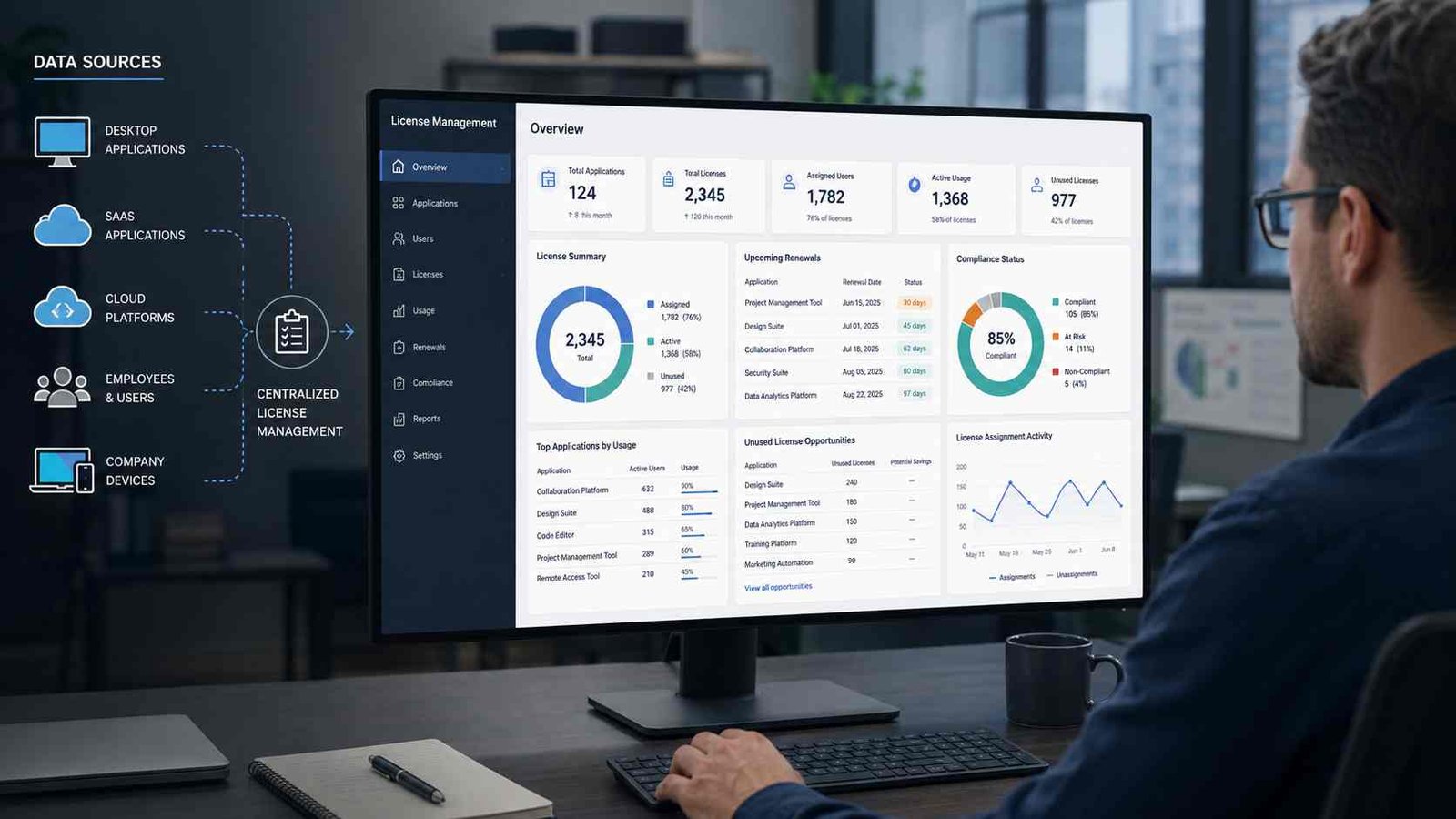
What Is Software License Management?
Software license management, also called software licence management or SLM, is the process of tracking software entitlements and comparing them with actual software deployment and usage.
A licence entitlement represents the organization’s right to use software under a contract or licence agreement. That right may cover one person, one computer, hundreds of employees, a fixed number of simultaneous users, processor cores, cloud consumption, or another licensing metric.
A proper SLM process therefore asks several questions at the same time: What software did we buy? How many rights did we receive? Where is the software installed? Who uses it? How often do they use it? When does the agreement renew? Are we using more than the contract allows? Are we paying for licences nobody needs?
Gartner describes modern Software Asset Management tools as systems that support discovery, normalization, reconciliation, optimization, and reporting. They can also identify under-consumed licences, reharvest unused licences, track renewals, and centralize software information.
A typical licence-management workflow looks like this:
Discover software → Normalize records → Import entitlements → Measure consumption → Reconcile licences → Fix gaps → Optimize renewals
The reconciliation stage is particularly important. Flexera defines an Effective License Position, or ELP, as the comparison between software entitlements and actual consumption. A negative position may indicate that consumption exceeds licensing rights. A positive position can reveal compliance or an opportunity to reduce excess licences.
Software Licence Management vs SAM vs ITAM
These terms overlap, but they do not mean exactly the same thing.
Software Licence Management focuses mainly on licences, entitlements, consumption, compliance, renewals, and allocation.
Software Asset Management, or SAM, covers the broader software lifecycle. It can include procurement, contracts, deployment, inventory, usage, optimization, security, retirement, and vendor management.
IT Asset Management, or ITAM, goes wider still. It manages hardware, software, cloud resources, contracts, financial information, and other technology assets.
ISO/IEC 19770-1 provides a formal framework for IT asset management. The current 2017 edition, confirmed by ISO in 2024, applies to organizations of any size and emphasizes a managed lifecycle rather than treating asset records as a one-time inventory exercise.
Think of ITAM as the whole technology warehouse, SAM as the software section, and licence management as the process that checks whether the software on the shelves matches what the company is legally allowed to use.
Why Software Licence Management Matters in 2026
The old licence-management problem was relatively straightforward: count software installations and compare them with purchased licences. Modern environments are harder.
Employees can subscribe to SaaS applications with corporate cards. AI tools can charge by seat, token, credit, or consumption. Cloud services can combine infrastructure and software costs. A company can also have perpetual desktop licences, monthly subscriptions, concurrent engineering licences, and enterprise agreements at the same time.
Gartner’s June 2026 Magic Quadrant describes SaaS management platforms as tools designed to address problems including SaaS and generative AI overspend, risk, poor visibility, and contract sprawl. Gartner separately maintains a 2026 Market Guide for Software Asset Management tools, which shows why buyers should not treat every licence-management product as the same type of system.
The most common problems look like this:
| Problem | Typical Cause | Business Impact |
|---|---|---|
| Unused licences | Employees leave or stop using an application | Wasted software spend |
| Under-licensing | Deployment exceeds contractual rights | Audit and true-up risk |
| Missed renewals | Contracts live in different departments | Unplanned spending |
| Duplicate software | Teams buy similar applications independently | Higher costs and complexity |
| Shadow SaaS | Employees purchase tools outside IT | Security and compliance gaps |
| Poor software inventory | Manual records become outdated | Bad licensing decisions |
| Wrong licence tier | Premium plans assigned to light users | Avoidable subscription cost |
| Floating licence shortages | Concurrent licences are poorly allocated | Employees cannot access critical tools |
A good software licence management tool does not simply create a prettier inventory. It connects software, contracts, users, devices, usage, and financial data so the organization can act on the information.
Best Software Licence Management Tools for 2026
No product wins every category. The following comparison focuses on the licensing problem each platform is designed to solve.
| Tool | Best For | Main Strength |
|---|---|---|
| Flexera One ITAM | Large enterprises | Complex entitlement reconciliation |
| ServiceNow SAM | ServiceNow environments | Integrated lifecycle workflows |
| USU SAM | Enterprise licence optimization | Complex publisher management |
| ManageEngine AssetExplorer | ITAM-focused teams | Software plus hardware management |
| InvGate Asset Management | Unified IT asset visibility | Discovery, metering, contracts |
| Zylo | SaaS-heavy organizations | SaaS usage and optimization |
| OpenLM | Engineering environments | Floating and specialist licences |
| USU SaaS Management | SaaS lifecycle automation | Reharvesting and user lifecycle |
1. Flexera One ITAM: Best for Complex Enterprise Licensing
Flexera One ITAM suits large organizations managing complicated software estates across on-premises systems, SaaS, cloud environments, and containers.
Its current product documentation highlights automated discovery, entitlement reconciliation, usage metering, optimization recommendations, and more than 200 third-party integrations. Flexera also says its Technopedia data covers more than five million products and more than 2.1 million software use rights. Those capabilities become important when a company must interpret licensing rules across major vendors such as Microsoft, IBM, Oracle, SAP, and Salesforce.
Best fit: Enterprises that need detailed compliance positions, publisher-specific licensing intelligence, audit preparation, and renewal optimization.
Watch for: Enterprise SAM platforms require good source data and mature processes. Buying the platform does not automatically fix incorrect entitlement records.
2. ServiceNow Software Asset Management: Best for ServiceNow Users
ServiceNow Software Asset Management makes the most sense when an organization already uses the ServiceNow platform for IT service management, CMDB, procurement, workflows, or other enterprise processes.
ServiceNow says its SAM application tracks and manages licences, compliance, entitlements, and optimization. Its current platform also uses AI agents for tasks such as software requests, compliance summaries, and identifying licences that may be reclaimed. The SaaS component can connect to identity services including Okta and Microsoft Entra ID and can act on stale subscriptions.
Best fit: Large organizations that want software asset processes connected directly with existing ServiceNow workflows.
3. USU Software Asset Management: Best for Enterprise SAM Depth
USU provides dedicated licence-management capabilities for complex enterprise environments. Its current platform covers major publishers including Microsoft, Oracle, SAP, IBM, and Adobe and supports on-premises, cloud, and hybrid environments.
USU says its licence-management platform includes more than 50 built-in connectors and uses discovery, normalization, contract data, and licensing rules to help organizations calculate usage and compliance. Its software can also recognize documents such as EULAs, contracts, and invoices and apply machine-learning features to parts of the asset-management process.
Best fit: Enterprises with complicated datacenter and publisher agreements that need strong SAM governance.
4. ManageEngine AssetExplorer: Best for ITAM-Focused Teams
ManageEngine AssetExplorer combines software licence management with broader IT asset management. That makes it useful when the same team tracks computers, installed applications, purchase records, contracts, and licences.
ManageEngine documents support for OEM, concurrent, enterprise, free, named-user, node-locked, trial, CAL, volume, and individual licence types. It compares purchased licences against installed software and categorizes software as under-licensed, over-licensed, or compliant. It can also track software usage patterns and alert teams about licence agreement expiry.
Best fit: Small and midsize IT departments that want licence management within a practical ITAM platform.
5. InvGate Asset Management: Best for Unified IT Asset Visibility
InvGate combines discovery, software normalization, software metering, contracts, financial information, and licence optimization.
Its software metering feature shows whether installed applications actually get used, while the licence-management workflow compares purchased rights with installations and usage. InvGate also links software records with contracts and renewal information.
This makes InvGate particularly useful when an organization wants one ITAM platform rather than a dedicated enterprise SAM system plus a separate inventory tool.
Best fit: IT teams that want approachable asset management with practical software usage and contract visibility.
6. Zylo: Best for SaaS Licence Optimization
Zylo solves a different problem. Its focus is SaaS rather than traditional desktop or datacenter licence reconciliation.
A SaaS-heavy organization needs to know who owns an application, which employees have accounts, whether those employees actually use the service, how much the business pays, and when the agreement renews. It also needs to find applications purchased outside normal procurement.
Zylo’s current materials emphasize SaaS discovery, utilization tracking, licence optimization, renewals, application rationalization, and automated deprovisioning. Its 2026 research reports 54% average licence utilization across its dataset.
Best fit: Organizations whose biggest problem is SaaS sprawl and unused subscriptions rather than traditional enterprise software audits.
7. OpenLM: Best for Engineering and Floating Licences
Engineering companies often face licensing problems that standard SaaS dashboards cannot solve. CAD, CAE, GIS, EDA, simulation, and scientific applications commonly rely on expensive concurrent or floating licences served from licence managers.
OpenLM specializes in this environment. Its August 2026 documentation says the platform supports more than 100 licence managers, including FlexNet, DSLS, Sentinel RMS, Reprise, and LM-X. It can collect licence-server usage, workstation activity, directory information, denials, and access-control data.
For example, an engineering company might own 40 floating licences for a simulation package used by 100 engineers. The important question is not simply whether 100 employees have the software installed. The company needs to know peak concurrent usage, denial rates, idle sessions, and whether another licence purchase is actually necessary.
Best fit: Engineering, manufacturing, architecture, energy, research, and technical organizations.
8. USU SaaS Management: Best for SaaS Lifecycle Automation
USU also offers a SaaS-focused platform separate from its broader enterprise SAM capabilities.
USU SaaS Management connects SaaS spending, usage, allocations, contracts, and renewals. The company currently documents integrations with more than 400 SaaS providers and supports automated onboarding, offboarding, and licence reharvesting.
Best fit: Organizations that want automated SaaS user lifecycle management together with procurement and cost visibility, especially when USU already forms part of their ITAM strategy.
Which Software Licence Management Tool Should You Choose?
Start with the licensing problem rather than the vendor name.
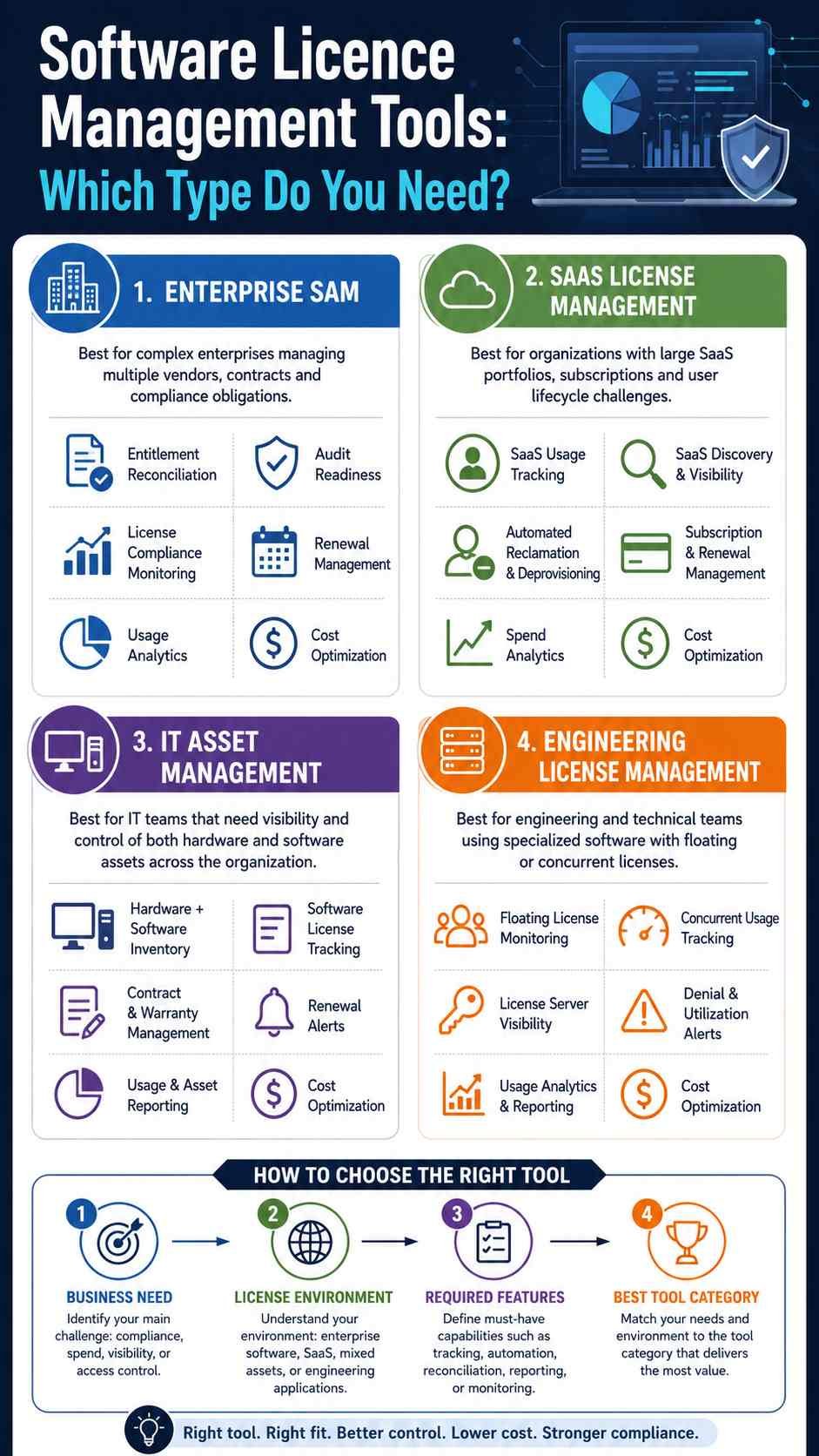
A global enterprise managing Microsoft, Oracle, SAP, and IBM agreements should evaluate deep SAM platforms such as Flexera, ServiceNow, or USU.
A small IT team that wants software and hardware tracking in one place may get more practical value from ManageEngine AssetExplorer or InvGate.
A SaaS-heavy company should prioritize discovery, subscription utilization, onboarding, offboarding, and renewal management. Zylo or a SaaS-focused platform such as USU SaaS Management fits that requirement better.
An engineering company sharing expensive floating licences should investigate OpenLM or another specialist engineering licence-management system.
Features to Look for in a Software Licence Management Tool
The right feature set depends on your environment, but several capabilities matter across most organizations.
Automated discovery should find applications across workstations, servers, virtual machines, cloud environments, or SaaS accounts.
Normalization should convert inconsistent product names and versions into reliable software records. Without normalization, the same application may appear under several names and distort compliance reports.
Entitlement management should record what the organization purchased and the conditions attached to those rights.
Usage metering should distinguish software that is installed or assigned from software people actually use.
Reconciliation should compare entitlement with consumption. This process produces the licence position that supports audit and procurement decisions.
Contract and renewal management should provide ownership, dates, costs, and advance alerts rather than relying on calendar reminders scattered across departments.
Licence reclamation should identify inactive assignments that can be removed or reassigned.
Integrations matter because licence data often lives in identity systems, HR platforms, procurement tools, financial systems, endpoint-management platforms, ITSM systems, and SaaS APIs.
Gartner’s current description of SaaS management platforms includes automated onboarding and offboarding, SaaS discovery, expense optimization, application ownership, and direct management through integrations among the expected capabilities.
What Are the Different Types of Software Licenses?
Understanding licence types helps you choose the right management tool because one calculation does not work for every licensing model.
| Licence Type | How It Works | Common Management Concern |
|---|---|---|
| Perpetual | Right to use software under an ongoing licence | Maintenance and version rights |
| Subscription | Access continues while subscription remains active | Renewal and unused seats |
| Named user | Licence belongs to a specific person | User assignment and offboarding |
| Device or node-locked | Licence attaches to a computer or device | Hardware changes |
| Concurrent or floating | Limited number of simultaneous users | Peak usage and denials |
| Volume | Agreement allows multiple installations | Installation count |
| OEM | Licence comes with particular hardware | Transfer restrictions |
| CAL | Client access rights apply to users or devices | Access counts |
| Usage-based | Cost depends on consumption | Variable spending |
| Trial | Temporary right to use software | Expiration |
| Freemium/free | Software is provided without normal licence cost | Commercial-use restrictions |
ManageEngine’s documentation provides a useful example of why tools must support multiple licence models: AssetExplorer handles OEM, concurrent, enterprise, named-user, node-locked, CAL, volume, individual, trial, and free licences.
Usage-based and AI pricing make the situation even more complex. A business may now pay according to API requests, processing credits, compute consumption, storage, or AI tokens rather than a simple number of users.
How to Implement Software Licence Management Step by Step
A reliable process does not start with buying software. It starts with getting trustworthy information.
Step 1: Discover Your Software
Build an inventory of desktop applications, server software, SaaS services, cloud software, and specialist licence servers.
Step 2: Collect Contracts and Entitlements
Gather purchase records, agreements, invoices, subscription information, renewal terms, and product-use rights.
Step 3: Normalize the Data
Standardize product names, publishers, editions, and versions. This prevents duplicate and misleading inventory records.
Step 4: Connect Entitlements to Consumption
Match purchased rights with installations, users, devices, concurrent usage, or another metric defined by the licence agreement.
Step 5: Measure Actual Usage
Find software that employees rarely or never use. For SaaS, check both assigned accounts and meaningful application activity.
Step 6: Resolve Compliance Gaps
If consumption exceeds entitlement, investigate why. You may need to remove unauthorized installations, reassign licences, change configurations, or purchase additional rights.
Step 7: Reclaim Unused Licences
Recover licences from inactive users and former employees before purchasing more.
Step 8: Review Before Renewal
Do not automatically renew last year’s licence count. Compare the agreement against current employee numbers, utilization, product overlap, business demand, and future plans.
This continuous approach aligns with ISO/IEC 19770-1’s broader lifecycle view of IT asset management and with Gartner’s emphasis on discovery, reconciliation, optimization, and reporting.
Can You Manage Software Licenses With Excel?
Yes, but only up to a point.
A 15-person company with ten applications, clear ownership, and simple annual subscriptions may manage licences successfully with a spreadsheet. It can record product name, vendor, licence count, assigned employee, cost, purchase date, and renewal date.
The spreadsheet starts to fail when software changes faster than employees update the file.
Imagine a 2,000-person organization with hundreds of SaaS applications, multiple countries, virtual servers, employees joining and leaving every week, cloud workloads, and different publisher agreements. A spreadsheet cannot automatically discover new software, measure usage, identify shadow SaaS, calculate complex product-use rights, or revoke an account when an employee leaves.
The point at which you need a dedicated software licence management tool is therefore not defined by employee count alone. Complexity matters more.
Why SaaS Licence Management Is Different
Traditional licence management often starts with installed software. SaaS may never appear in a normal endpoint inventory.
Employees can create SaaS accounts through a browser, pay with departmental cards, or authenticate through identities that IT does not fully monitor. That creates shadow SaaS, duplicate subscriptions, unused seats, and accounts that survive employee departures.
Gartner defines SaaS management platforms around centralized discovery, management, optimization, and automation of the SaaS application lifecycle. Its 2026 research also highlights generative AI as part of the visibility and governance challenge.
This is why SaaS tools increasingly connect to SSO, identity providers, expense systems, financial systems, browser data, HR platforms, and direct application APIs.
A licence-management program should therefore ask two separate questions:
Do we own enough licences?
Are the licences we own actually creating value?
The second question is where usage analytics, reclamation, tier optimization, and renewal planning become important.
Advanced Software Licence Management in 2026
Licence management is expanding beyond simple compliance.
AI-assisted contract processing can help teams extract product names, quantities, dates, and entitlement information from documents that previously required manual entry. USU describes machine-learning features for recognizing software contracts, invoices, and EULAs, while Flexera has introduced AI-supported contract ingestion.
ServiceNow has also added AI agents to parts of its software lifecycle workflow, including compliance summaries, software requests, and reclamation candidates.
The more important trend, however, is convergence. ITAM teams increasingly work with finance, procurement, FinOps, security, and identity teams because the same software can create licensing, spending, access, and cybersecurity questions at once.
Flexera’s 2026 research illustrates that shift: 75% of surveyed ITAM teams manage cloud licences, 64% manage SaaS, and only 31% of respondents reported visibility into AI software.
Future licence-management systems will therefore need to understand not only what a company owns, but also how people and automated systems consume it.
Frequently Asked Questions
What is software license management?
Software license management is the process of tracking software entitlements, installations, subscriptions, assignments, usage, contracts, and renewals. Its goal is to keep software use aligned with contractual rights while reducing unnecessary spending and maintaining accurate information for audits and purchasing decisions.
What are the best tools for managing software licenses?
The best option depends on the environment. Flexera One, ServiceNow SAM, and USU suit complex enterprise SAM. ManageEngine AssetExplorer and InvGate work well for broader ITAM needs. Zylo targets SaaS optimization, while OpenLM specializes in engineering and floating licences.
What is license manager software?
The term has two meanings. An organization may use a licence manager to track software it purchases from many vendors. A software producer may also use licence-management technology to activate products, issue licence keys, control features, or enforce usage rights. These are related but different use cases.
Is software licence management the same as Software Asset Management?
No. Licence management concentrates on entitlements, consumption, compliance, allocation, and renewals. Software Asset Management covers a wider lifecycle that can include procurement, deployment, usage, financial management, security, retirement, and vendor governance.
Can software licence management reduce costs?
It can identify spending opportunities by finding unused licences, duplicate applications, over-provisioned subscriptions, inappropriate licence tiers, and unnecessary renewals. The amount saved depends on the organization’s existing software estate and how efficiently it already manages licences.
Does licence management improve cybersecurity?
It can support security by identifying unauthorized applications, shadow SaaS, stale accounts, outdated software, and access that should have been removed. Licence management should still work alongside dedicated identity, endpoint, vulnerability, and security tools rather than replace them.
Practical Software Licence Management Checklist
- Maintain an accurate software inventory.
- Record purchases, agreements, and entitlements.
- Assign an owner to every important application.
- Track subscription and contract renewal dates.
- Compare purchased rights with actual consumption.
- Monitor usage before purchasing additional licences.
- Reclaim licences from inactive users.
- Remove access when employees leave.
- Identify duplicate applications across departments.
- Review under-licensed and over-licensed software.
- Check licence terms before infrastructure changes.
- Integrate identity, HR, ITSM, and procurement data where useful.
- Review SaaS and AI tools bought outside normal procurement.
- Prepare licence records before vendor audits.
- Recalculate requirements before every major renewal.
Further Reading and Useful Resources
For deeper technical research, start with official documentation rather than relying only on software comparison websites. Useful resources include Flexera One ITAM documentation, ServiceNow Software Asset Management documentation, USU Software Asset Management resources, ManageEngine AssetExplorer licence-management documentation, InvGate Asset Management guides, OpenLM documentation, Gartner’s Software Asset Management and SaaS Management research, and the ISO/IEC 19770 IT asset management standards.
Final Thoughts Before Choosing Your Tool
A software licence management tool should solve the licensing problem you actually have, not simply provide the longest feature list.
Choose an enterprise SAM platform when complex product-use rights and vendor audits drive the risk. Choose an ITAM platform when your team needs hardware, software, contracts, and licence information in one system. Choose a SaaS management platform when subscriptions, shadow applications, renewals, and user access create the biggest problem. Choose an engineering-focused licence manager when concurrent and floating licences control access to expensive technical software.
Most importantly, do not confuse software ownership with software usage.
A company can own enough licences and still waste money. It can also use every purchased licence and still violate contractual terms if the underlying licensing metric is misunderstood.
The strongest licence-management process connects trustworthy inventory, accurate entitlements, real usage, contractual rules, and renewal decisions. Once those pieces work together, software licensing becomes much easier to control, explain, and optimize.

IT consultant and educator specializing in wireless networks and cloud systems. With a strong academic background and real-world projects, Priya brings practical expertise and trustworthy advice for students, professionals, and everyday tech users.